Don't miss your chance to take the Fabric Data Engineer (DP-600) exam for FREE! Find out how by attending the DP-600 session on April 23rd (pacific time), live or on-demand.
Learn moreNext up in the FabCon + SQLCon recap series: The roadmap for Microsoft SQL and Maximizing Developer experiences in Fabric. All sessions are available on-demand after the live show. Register now
OK... I'm hoping this doesn't sound too stupid. I just can't figure out this one.
I have the following....
(1). Power BI Report created on my local machine which has been created using the latest version of PBI Desktop.
(2). A sharepoint list - on my company online (cloud) SharePoint site - this simple list feeds the PBI Report (as created in step 1 above).
(3). A Power BI chart embedded in the SharePoint site (same site as the list). This chart has been created using the Modern SharePoint page and simply using the Power BI component added to it with the URL pasted in - copied from the Embed in SharePoint Online option in the Power BI Service.
The problem I have is:
I can update the list in SharePoint... no problem. This will update then update the Report in Power BI Desktop.
What I can't seem to do is have this update the Power BI embedded Report in SharePoint.
So, my question is how do I do this?
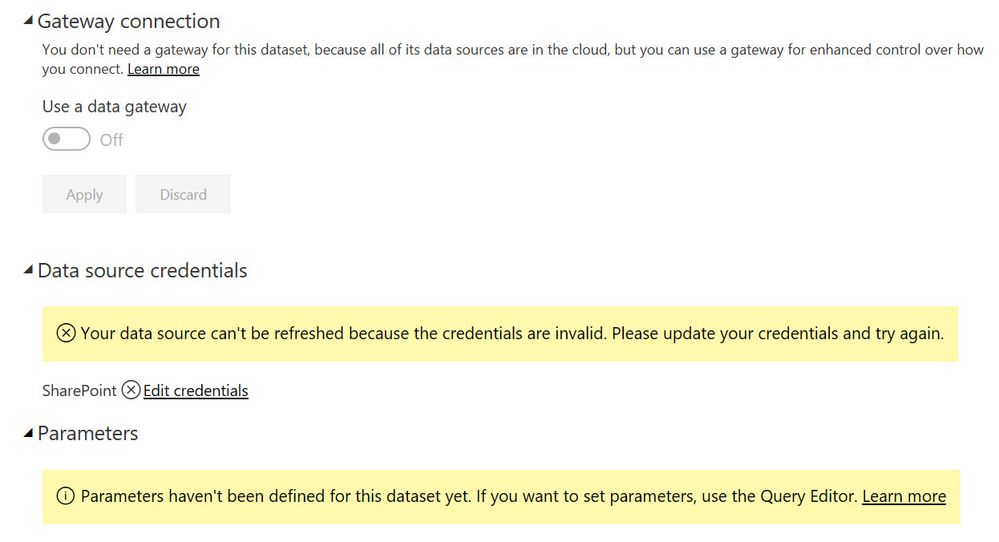
I've received an error saying I can't refresh the dataset as my credentials are incorrect.... not sure how this can be the case as I've logged into everything ok. Similarly, it also mentions I need to sort out parameters... again, not sure why as the chart only uses 2 fields (date and a value) as it's a simple test version before I do anything more difficult !
If I view the Report in the Power BI Service it also won't refresh at all... despite the SharePoint List being updated correctly. The appropriate Datasets Settings are shown:
Your help would be very much appreciated.
Solved! Go to Solution.
Hi @SimonCRSS ,
By my tests, if the report in power bi service has been refreshed, the report page in SharePoint page will be updated either.
Please check if your client update the report, the report in Power BI Service will be updated either?
Best Regards,
Cherry
Hi @SimonCRSS ,
If I understand your scenario correctly that you cannot get the update report which embeded in SharePoint Online when you refresh in Power BI Service?
By my tests, I could get the update report in SharePoint Online after refresh in Power BI Service.
Please check if you have the same step as mine.
1. Create a report which data source is SharePoint Online list in Power BI Desktop and publish it to Power BI Service.
2. Go to Settings and edit the credential (use the same crentential when you get data in Power BI Desktop). You must keep you credential is correct then you could refresh.
3. Do some changes for the list in SharePoint online list and refresh it in Power BI Desktop.
4.Then refresh the dataset of the SharePoint online list in Power BI Service and go to the Refresh history to check if it is refreshed.
5. If the refresh is complete, refresh the report and then refresh the Site Page in SharePoint.
In addition, if you didn't set the parameter in Power BI Desktop, you don't need to focus on the Parameter option.
Best Regards,
Cherry
Cherry,
Hi.... I don't think I explained this correctly...sorry. What I need to do is have a SharePoint list update and then automatically update a Power BI Report in the same SharePoint site. In other words, when my client updates a list (by either adding an entry or using a PowerApps Apps) the Power BI Report on another Page will automatically update.
So, I guess my question is what would be the steps to do this?
I should mention that I design the reports in the Power BI Desktop then publish to the service where I take the URL and paste into the SharePoint page in the appropriate container.
Where am I going wrong?
Kind regards,
Simon
Hi @SimonCRSS ,
By my tests, if the report in power bi service has been refreshed, the report page in SharePoint page will be updated either.
Please check if your client update the report, the report in Power BI Service will be updated either?
Best Regards,
Cherry
If you have recently started exploring Fabric, we'd love to hear how it's going. Your feedback can help with product improvements.
A new Power BI DataViz World Championship is coming this June! Don't miss out on submitting your entry.
Share feedback directly with Fabric product managers, participate in targeted research studies and influence the Fabric roadmap.
| User | Count |
|---|---|
| 5 | |
| 3 | |
| 3 | |
| 3 | |
| 2 |