Join us at FabCon Atlanta from March 16 - 20, 2026, for the ultimate Fabric, Power BI, AI and SQL community-led event. Save $200 with code FABCOMM.
Register now!The Power BI Data Visualization World Championships is back! Get ahead of the game and start preparing now! Learn more
Hi,
I think I have a relatively simple query.
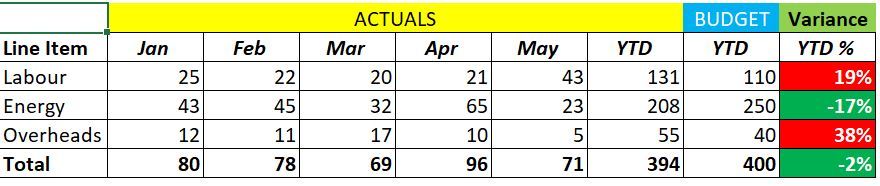
I want to show the attached table from excel in Power BI whereby the actual costs from Jan-May are shown as well as the YTD total. This YTD actual number is then compared to the YTD Budget number.
I can show the actuals easily enough but don't know how to just add the YTD budget. When I try to a
Anyone know a quick fix to this?
Thanks,
Cathal
Solved! Go to Solution.
Matrix doesn't support mix with tables.
You can try other visuals, or create a table beside the matrix.
Best Regards
Maggie
Matrix doesn't support mix with tables.
You can try other visuals, or create a table beside the matrix.
Best Regards
Maggie
Thanks Maggie.
Just to clarify, it sounds like there is not one visual that will show what I require and I'll need 2 visuals to do this?
1. To show each month.
2. To show YTD Actuals vs. YTD Plan
Is that correct? A little surprised Power BI does have this flexibility but if so we'll work with it.
The Power BI Data Visualization World Championships is back! Get ahead of the game and start preparing now!
Check out the November 2025 Power BI update to learn about new features.
| User | Count |
|---|---|
| 10 | |
| 6 | |
| 5 | |
| 4 | |
| 2 |