
cancel
Showing results for 
Search instead for 
Did you mean: 

The Power BI Data Visualization World Championships is back! It's time to submit your entry. Live now!

Reply
DaniBran1
Regular Visitor

Creating a relationship between date table and data table

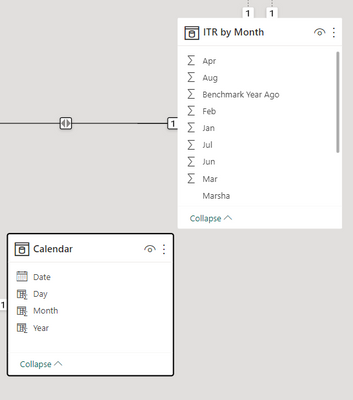
Is there a way I can create a relationship between these 2 tables: 

DaniBran1_0-1696010514712.png

Currently the data has the header as months but the data underneath are scores: 

DaniBran1_0-1696016946613.png


I am trying to create a visualization that will show scores by month for each property.


Thank you for your assistance!


1 ACCEPTED SOLUTION
AlexisOlson
Super User
Super User

I'd strongly recommend unpivoting your data table.

https://learn.microsoft.com/en-us/power-query/unpivot-column


Then convert the month names into dates (e.g. "Apr" --> 4/1/2023) for the appropriate year so that you can create a relationship to Calendar.

View solution in original post

1 REPLY 1
AlexisOlson
Super User
Super User

I'd strongly recommend unpivoting your data table.

https://learn.microsoft.com/en-us/power-query/unpivot-column


Then convert the month names into dates (e.g. "Apr" --> 4/1/2023) for the appropriate year so that you can create a relationship to Calendar.

Helpful resources

Announcements
FabCon Atlanta 2026 carousel

FabCon Atlanta 2026

Join us at FabCon Atlanta, March 16-20, for the ultimate Fabric, Power BI, AI and SQL community-led event. Save $200 with code FABCOMM.