This is best Fabric, Power BI, SQL and AI community event. How do we know? The last event sold out! Save €200 with code FABCMTY200.
Register nowA new Data Days event is coming soon! This time we’re going bigger than ever. Fabric, Power BI, SQL, AI and more. Don't miss out.
I have the below Query Table
Table1
Car_ID | Shift | ServiceType | Timestamp |
| 101 | 1 | Water Wash; Bubble wash | 9/1/2021 12:00:00 PM |
| 102 | 1 | Air Wash | 9/1/2021 02:10:00 PM |
| 103 | 1 | Bubble Wash | 9/1/2021 02:40:00 PM |
| 101 | 2 | Interior Clean | 9/1/2021 04:05:00 PM |
I want to create a new Table in Power Query for Service type and car and respective timestamp, Like below
Table2
| Service Type | Car No | shift | Timestamp |
| Water Wash | 101 | 1 | 9/1/2021 12:00:00 PM |
| Bubble wash | 101 | 1 | 9/1/2021 12:00:00 PM |
| Air wash | 102 | 1 | 9/1/2021 02:10:00 PM |
| Bubble wash | 103 | 1 | 9/1/2021 02:40:00 PM |
| Interior Clean | 101 | 2 | 9/1/2021 04:05:00 PM |
Steps I followed:
Created new Query with Servicetype
Changed it to table
Used delimeter as semicolon to split columns. (this created two columns)
Added a custom column , = #"Table1"
Expanded to get the CarNo, Shift, Timestamp.
-This is causing the data in second column to disappear.
Is there a better way to get the CarNo, Shift, Timestamp. to table 1?
I tried unpivoting and add the columns and didn't work to
So thought to bring the columns first and then unpivot and that didn't work to.
Could anyone help in creating table2?
Thanks!
Solved! Go to Solution.
Does this work?
let
Source = Table.FromRows(Json.Document(Binary.Decompress(Binary.FromText("i45WMjQwVNJRAuHwxJLUIoXwxOIMawWn0qSknFSFciAHKGOpb6hvZGBkqGBoZGVgAEQKAb5KsTogzUZQzY6ZEK3Iqg2MrAxRVRtDVUONx6LBBFUDSDHICs88oNsy84sUnHNSE/NQ9JhYGZjC9MQCAA==", BinaryEncoding.Base64), Compression.Deflate)), let _t = ((type nullable text) meta [Serialized.Text = true]) in type table [#"Car ID" = _t, Service = _t, Type = _t, Timestamp = _t]),
#"Split Column by Delimiter" = Table.SplitColumn(Source, "Type", Splitter.SplitTextByDelimiter(";", QuoteStyle.Csv), {"Type.1", "Type.2"}),
#"Unpivoted Columns" = Table.UnpivotOtherColumns(#"Split Column by Delimiter", {"Car ID", "Service", "Timestamp"}, "Attribute", "Value"),
#"Removed Other Columns" = Table.SelectColumns(#"Unpivoted Columns",{"Service", "Car ID", "Value", "Timestamp"})
in
#"Removed Other Columns"
This:
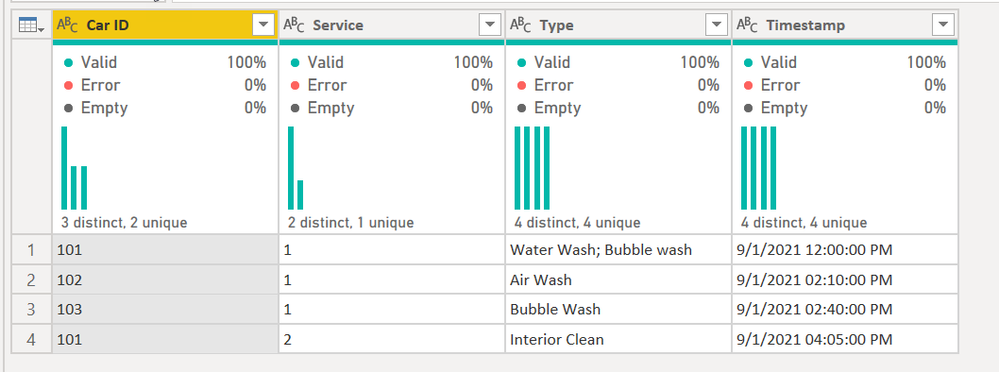
becomes this:
You may need to rename the Values column. But it took the multiple possible values in the Type field and made them into their own row by splitting it then unpivoting it.
How to use M code provided in a blank query:
1) In Power Query, select New Source, then Blank Query
2) On the Home ribbon, select "Advanced Editor" button
3) Remove everything you see, then paste the M code I've given you in that box.
4) Press Done
5) See this article if you need help using this M code in your model.
DAX is for Analysis. Power Query is for Data Modeling
Proud to be a Super User!
MCSA: BI ReportingDoes this work?
let
Source = Table.FromRows(Json.Document(Binary.Decompress(Binary.FromText("i45WMjQwVNJRAuHwxJLUIoXwxOIMawWn0qSknFSFciAHKGOpb6hvZGBkqGBoZGVgAEQKAb5KsTogzUZQzY6ZEK3Iqg2MrAxRVRtDVUONx6LBBFUDSDHICs88oNsy84sUnHNSE/NQ9JhYGZjC9MQCAA==", BinaryEncoding.Base64), Compression.Deflate)), let _t = ((type nullable text) meta [Serialized.Text = true]) in type table [#"Car ID" = _t, Service = _t, Type = _t, Timestamp = _t]),
#"Split Column by Delimiter" = Table.SplitColumn(Source, "Type", Splitter.SplitTextByDelimiter(";", QuoteStyle.Csv), {"Type.1", "Type.2"}),
#"Unpivoted Columns" = Table.UnpivotOtherColumns(#"Split Column by Delimiter", {"Car ID", "Service", "Timestamp"}, "Attribute", "Value"),
#"Removed Other Columns" = Table.SelectColumns(#"Unpivoted Columns",{"Service", "Car ID", "Value", "Timestamp"})
in
#"Removed Other Columns"
This:
becomes this:
You may need to rename the Values column. But it took the multiple possible values in the Type field and made them into their own row by splitting it then unpivoting it.
How to use M code provided in a blank query:
1) In Power Query, select New Source, then Blank Query
2) On the Home ribbon, select "Advanced Editor" button
3) Remove everything you see, then paste the M code I've given you in that box.
4) Press Done
5) See this article if you need help using this M code in your model.
DAX is for Analysis. Power Query is for Data Modeling
Proud to be a Super User!
MCSA: BI ReportingCheck out the May 2026 Power BI update to learn about new features.
Sign up to receive a private message when registration opens and key events begin.
If you have recently started exploring Fabric, we'd love to hear how it's going. Your feedback can help with product improvements.
| User | Count |
|---|---|
| 4 | |
| 2 | |
| 2 | |
| 1 | |
| 1 |
| User | Count |
|---|---|
| 7 | |
| 6 | |
| 6 | |
| 6 | |
| 4 |