Join us at FabCon Atlanta from March 16 - 20, 2026, for the ultimate Fabric, Power BI, AI and SQL community-led event. Save $200 with code FABCOMM.
Register now!The Power BI Data Visualization World Championships is back! Get ahead of the game and start preparing now! Learn more
Hello PBI Experts,
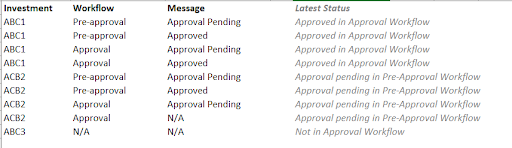
I have a question for you ! 🙂 I have multiple lines for the same investment (or projects) depending on its progress in a workflow ( Pre-Approval / Approval / N/A) and I have same kinds of message (approved / pending) per workflow progress.
I would like to add an extra column ("Latest Status" ) in Power Query inside PBI which displays for each line the latest status per investment in the following way:
Your help is much appreciated.
@Anonymous - do you have a date or timestamp column in the data? You kind of need a column to order by if you want the "latest".
| Have I solved your problem? Please click Accept as Solution so I don't keep coming back to this post, oh yeah, others may find it useful also ;). |
One approach to this:
Hi @Anonymous ,
According to the screenshot, I'm not clear about the logic of the “Latest Status”.
For ABC1, the latest row is Approval & Approved , it's right. But for ACB2, the latest row is Approval & N/A , why the final result is Approval & Pre-Approval ?
The rule I can find is that there may be an order for status ,like
Workflow: From N/A --> Pre-Approval --> Approval
Message: From N/A --> Approval Pending --> Approved
Let's take an example:
For ABC1 , firstly Message has two values: Approval Pending and Approved. So the latest message is Approved, then according to this, find two Workflows as well: Pre-Approval and Approval. so the lastest workflow is Approval
Could you please explain more to help us clarify your scenario?
Best Regards,
Eyelyn Qin
The Power BI Data Visualization World Championships is back! Get ahead of the game and start preparing now!
| User | Count |
|---|---|
| 19 | |
| 9 | |
| 8 | |
| 7 | |
| 6 |