This is best Fabric, Power BI, SQL and AI community event. How do we know? The last event sold out! Save €200 with code FABCMTY200.
Register nowA new Data Days event is coming soon! This time we’re going bigger than ever. Fabric, Power BI, SQL, AI and more. Don't miss out.
Hello community!
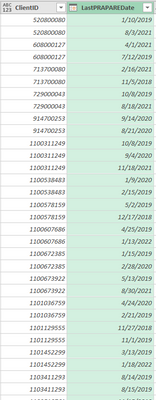
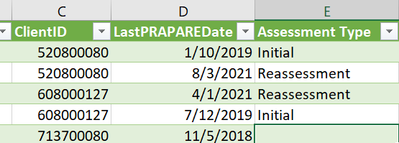
So I am looking to create a new column that is based on Individual Client IDS and the first known date of the assessment. I am hoping to take these two variables and then the end goal be "Initial" or "reassessment" as the new column labels based on each Client. However, I'm finding it hard to figure out exactly how to create this code for this.
So what I have now is this:
The end goal would look like this:
Any help would be greatly appreciated! Thank you!
Solved! Go to Solution.
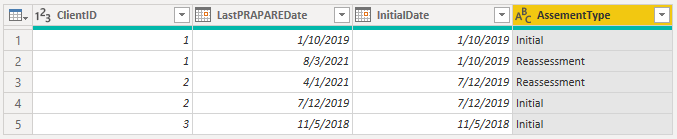
You can group by ClientID and take the min over the date column to find the Initial dates. Then merge that back with the original query and add a custom column that returns different results if the date equals the initial date.
Here's a full sample query you can paste into the Advanced Editor of a new blank query:
let
Source = Table.FromRows(Json.Document(Binary.Decompress(Binary.FromText("VczLCQAgEAPRXnIWYlZFrUW2/zb8HcTrg5kxIASIirSoDg9XGtMC0wFbkKkfKmWvSfsili0N7hM=", BinaryEncoding.Base64), Compression.Deflate)), let _t = ((type nullable text) meta [Serialized.Text = true]) in type table [ClientID = _t, LastPRAPAREDate = _t]),
#"Changed Type" = Table.TransformColumnTypes(Source,{{"ClientID", Int64.Type}, {"LastPRAPAREDate", type date}}),
#"Grouped Rows" = Table.Group(#"Changed Type", {"ClientID"}, {{"InitialDate", each List.Min([LastPRAPAREDate]), type nullable date}}),
#"Merged Queries" = Table.NestedJoin(#"Changed Type", {"ClientID"}, #"Grouped Rows", {"ClientID"}, "Grouped Rows", JoinKind.LeftOuter),
#"Expanded Grouped Rows" = Table.ExpandTableColumn(#"Merged Queries", "Grouped Rows", {"InitialDate"}, {"InitialDate"}),
#"Added Custom" = Table.AddColumn(#"Expanded Grouped Rows", "AssementType", each if [LastPRAPAREDate] = [InitialDate] then "Initial" else "Reassessment", type text)
in
#"Added Custom"
You can group by ClientID and take the min over the date column to find the Initial dates. Then merge that back with the original query and add a custom column that returns different results if the date equals the initial date.
Here's a full sample query you can paste into the Advanced Editor of a new blank query:
let
Source = Table.FromRows(Json.Document(Binary.Decompress(Binary.FromText("VczLCQAgEAPRXnIWYlZFrUW2/zb8HcTrg5kxIASIirSoDg9XGtMC0wFbkKkfKmWvSfsili0N7hM=", BinaryEncoding.Base64), Compression.Deflate)), let _t = ((type nullable text) meta [Serialized.Text = true]) in type table [ClientID = _t, LastPRAPAREDate = _t]),
#"Changed Type" = Table.TransformColumnTypes(Source,{{"ClientID", Int64.Type}, {"LastPRAPAREDate", type date}}),
#"Grouped Rows" = Table.Group(#"Changed Type", {"ClientID"}, {{"InitialDate", each List.Min([LastPRAPAREDate]), type nullable date}}),
#"Merged Queries" = Table.NestedJoin(#"Changed Type", {"ClientID"}, #"Grouped Rows", {"ClientID"}, "Grouped Rows", JoinKind.LeftOuter),
#"Expanded Grouped Rows" = Table.ExpandTableColumn(#"Merged Queries", "Grouped Rows", {"InitialDate"}, {"InitialDate"}),
#"Added Custom" = Table.AddColumn(#"Expanded Grouped Rows", "AssementType", each if [LastPRAPAREDate] = [InitialDate] then "Initial" else "Reassessment", type text)
in
#"Added Custom"
That worked like a charm!!! Thanks so much!!!
Check out the May 2026 Power BI update to learn about new features.
Sign up to receive a private message when registration opens and key events begin.
If you have recently started exploring Fabric, we'd love to hear how it's going. Your feedback can help with product improvements.