cancel
Showing results for 
Search instead for 
Did you mean: 

The Power BI Data Visualization World Championships is back! Get ahead of the game and start preparing now! Learn more

Reply
Anonymous
Not applicable

Create table for each value (error message) from column

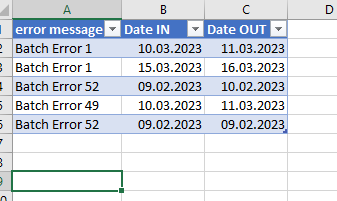
I have a table in Power BI. There are error messages in a column.
Now I want to create tables for each error messages.


I grouped them and then made a new query out of them. That works too.

BUT, if later a new error message appears for which no query was created, no table will created for this error message.


I want a table showing all errors of an error type, for example "Batch error 1"

Is there a way that a new table is always created for each type of error in a column (error message)?


I only created the example of the data in excel for illustration purposes.


I would be glad, if somebody can support me. 

Best wishes 


Error.PNG

3 REPLIES 3
BA_Pete
Super User
Super User

Hi @Anonymous ,


When you say "a new table is created", I assume you mean a new query is created in Power Query?

Power Query cannot spawn new queries itself.

I'd need to understand a lot more about what you're trying to achieve in order to advise if there's an alternative solution/workaround.


Pete


Now accepting Kudos! If my post helped you, why not give it a thumbs-up?

Proud to be a Datanaut!


Anonymous
Not applicable

Yeah query / table... i mean the same. 

I have a column. With Error 1, error 2, error 3. Can I create a table/query, which is generated for each error a new table/query from this column? Well I find already a solution, but its not so smart. 


Or do you not understand what I mean?


I think I understand what you want, I really need to understand the WHY part of it.

Splitting up tables like this in Power Query for use in Power BI is neither a standard process nor a recommended one. Power BI is designed to have all similar data in a single table coming from Power Query, then DAX is used to partition the data for analysis/display.

If you can let me know WHY you believe you need to physically split up the tables in Power Query, when they contain similar data, then I can advise on whether this is actually the fastest/best route to your desired end goal or not, and probably avoid an XY Problem in the process.


Pete


Now accepting Kudos! If my post helped you, why not give it a thumbs-up?

Proud to be a Datanaut!


Helpful resources

Announcements
Power BI DataViz World Championships

Power BI Dataviz World Championships

The Power BI Data Visualization World Championships is back! Get ahead of the game and start preparing now!

December 2025 Power BI Update Carousel

Power BI Monthly Update - December 2025

Check out the December 2025 Power BI Holiday Recap!

FabCon Atlanta 2026 carousel

FabCon Atlanta 2026

Join us at FabCon Atlanta, March 16-20, for the ultimate Fabric, Power BI, AI and SQL community-led event. Save $200 with code FABCOMM.

Top Solution Authors