This is best Fabric, Power BI, SQL and AI community event. How do we know? The last event sold out! Save €200 with code FABCMTY200.
Register nowA new Data Days event is coming soon! This time we’re going bigger than ever. Fabric, Power BI, SQL, AI and more. Don't miss out.
Hello,
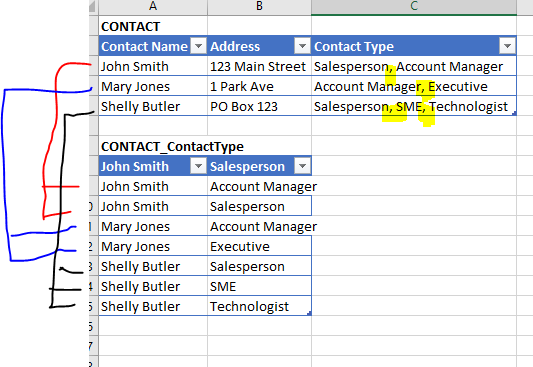
We are connecting to Dynamics 365 and - in several tables - we have multiselect pick lists. i.e. When we enter a contact we can select multiple values of the 'contact type' for a given contact - example in table below. John Smith is both a Salesperson and an Account Manager.
This contact field is displayed as a comma separated value in PBI table. How can we break this out to display as a separate table? We'd also want to have the contact name so can join back to main Contact table. (In reality would use key/ID fields instead of name - thisis just for the example).
Appreciate any help you can provide.
Thanks,
Dan
Solved! Go to Solution.
Split the 'Contact Type' column on ','
Select the 'Contact Name' and Address columns.
Go to the Transform Menu.
Select 'Unpivot-> Unpivot other columns'
Tidy up the data
Split the 'Contact Type' column on ','
Select the 'Contact Name' and Address columns.
Go to the Transform Menu.
Select 'Unpivot-> Unpivot other columns'
Tidy up the data
Thanks! That worked exactly as needed!
Greatly appreciate your assistance.
Check out the May 2026 Power BI update to learn about new features.
Sign up to receive a private message when registration opens and key events begin.
If you have recently started exploring Fabric, we'd love to hear how it's going. Your feedback can help with product improvements.