This time we’re going bigger than ever. Fabric, Power BI, SQL, AI and more. We're covering it all. You won't want to miss it.
Learn moreDid you hear? There's a new SQL AI Developer certification (DP-800). Start preparing now and be one of the first to get certified. Register now
Hi all
Cheeky question:
Here's the table with the current information:
| PROJECT ID | ACCEPTED DATE | DEADLINE | PROJECT PRICE |
| 12345 | 25/11/2021 | 28/11/2021 | £8,000 |
| 23456 | 12/03/2015 | 11/03/2023 | £1,540,780 |
Here's the table i'm wishing we could create!
| PROJECT ID | DATE | PRICE PER DAY (as in, [PROJECT PRICE]/([DEADLINE]-[ACCEPTED DATE]) |
| 12345 | 25/11/2021 | (8,000/(28/11/2021-25/11/2021)=8,000/4=) £2,000 |
| 12345 | 26/11/2021 | £2,000 |
| 12345 | 27/11/2021 | £2,000 |
| 12345 | 28/11/2021 | £2,000 |
| 23456 | 12/03/2015 | (1,540,780/(11/03/2023-12/03/2015)=1,540,780/2,921=) £527.48 |
| 23456 | 13/03/2015 | £527.48 |
| .... |
Just to point out that i have no real desire on creating such a table on power query or something. If that can be done in DAX, no problem at all, i'd welcome that. Plus, it would probably make sense for the DATE granularity to be on months rather than individual days but that would create the pro rata unneeded headache for projects that might just start on the last day of a month.
The main purpose of this exercise is to allow managers to review the potential revenue generated from projects long into the future by assuming a linear distribution of overall project price.
What do we think?
Many thanks in advance
Solved! Go to Solution.
Hi @kalspiros ,
In Power Query, go to New Source>Blank Query then in Advanced Editor paste my code over the default code. You can then follow the steps I took to complete this:
let
Source = Table.FromRows(Json.Document(Binary.Decompress(Binary.FromText("TcuxDcBACEPRXaiRwHAk7IJuumySyQJXpfzWcxXBfAUxWQggpoaJ/MX7JKsqbS4afPUGE/UGmGvTE+ZHg2Mp39mP/QE=", BinaryEncoding.Base64), Compression.Deflate)), let _t = ((type nullable text) meta [Serialized.Text = true]) in type table [#"PROJECT ID" = _t, #"ACCEPTED DATE" = _t, DEADLINE = _t, #"PROJECT PRICE" = _t]),
chgTypes = Table.TransformColumnTypes(Source,{{"PROJECT ID", Int64.Type}, {"ACCEPTED DATE", type date}, {"DEADLINE", type date}, {"PROJECT PRICE", Currency.Type}}),
addDaysBetween = Table.AddColumn(chgTypes, "daysBetween", each Duration.Days([DEADLINE] - [ACCEPTED DATE]) + 1),
addDailyPrice = Table.AddColumn(addDaysBetween, "dailyPrice", each [PROJECT PRICE] / [daysBetween]),
addDateList = Table.AddColumn(addDailyPrice, "dateList", each List.Transform({Number.From([ACCEPTED DATE])..Number.From([DEADLINE])}, each Date.From(_))),
expandDateList = Table.ExpandListColumn(addDateList, "dateList")
in
expandDateList
SUMMARY:
1) Get days between dates
2) Divide [PROJECTPRICE] by days to get daily value
3) Create list of dates between accpted/deadline dates
4) Expand list
This give me the following output:
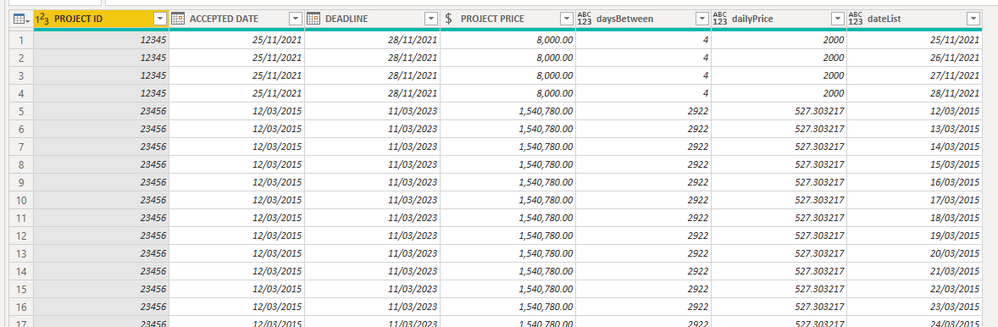
Pete
Proud to be a Datanaut!
Hi @kalspiros ,
In Power Query, go to New Source>Blank Query then in Advanced Editor paste my code over the default code. You can then follow the steps I took to complete this:
let
Source = Table.FromRows(Json.Document(Binary.Decompress(Binary.FromText("TcuxDcBACEPRXaiRwHAk7IJuumySyQJXpfzWcxXBfAUxWQggpoaJ/MX7JKsqbS4afPUGE/UGmGvTE+ZHg2Mp39mP/QE=", BinaryEncoding.Base64), Compression.Deflate)), let _t = ((type nullable text) meta [Serialized.Text = true]) in type table [#"PROJECT ID" = _t, #"ACCEPTED DATE" = _t, DEADLINE = _t, #"PROJECT PRICE" = _t]),
chgTypes = Table.TransformColumnTypes(Source,{{"PROJECT ID", Int64.Type}, {"ACCEPTED DATE", type date}, {"DEADLINE", type date}, {"PROJECT PRICE", Currency.Type}}),
addDaysBetween = Table.AddColumn(chgTypes, "daysBetween", each Duration.Days([DEADLINE] - [ACCEPTED DATE]) + 1),
addDailyPrice = Table.AddColumn(addDaysBetween, "dailyPrice", each [PROJECT PRICE] / [daysBetween]),
addDateList = Table.AddColumn(addDailyPrice, "dateList", each List.Transform({Number.From([ACCEPTED DATE])..Number.From([DEADLINE])}, each Date.From(_))),
expandDateList = Table.ExpandListColumn(addDateList, "dateList")
in
expandDateList
SUMMARY:
1) Get days between dates
2) Divide [PROJECTPRICE] by days to get daily value
3) Create list of dates between accpted/deadline dates
4) Expand list
This give me the following output:
Pete
Proud to be a Datanaut!
Power platform.
The moment you're suspecting that you came up with a problem that will challenge this site's gurus, the answer is being landed within 10 minutes 😄
Thank you so much @BA_Pete , that works magic, no need for taking it through SQL then!
Kind Regards
Check out the April 2026 Power BI update to learn about new features.
Sign up to receive a private message when registration opens and key events begin.
If you have recently started exploring Fabric, we'd love to hear how it's going. Your feedback can help with product improvements.