This is best Fabric, Power BI, SQL and AI community event. How do we know? The last event sold out! Save €200 with code FABCMTY200.
Register nowA new Data Days event is coming soon! This time we’re going bigger than ever. Fabric, Power BI, SQL, AI and more. Don't miss out.
Hi guys!
I'm attempting to create an array that has one single input to one single output coming from a table. I currently have a table with multiple columns and I want to map two columns together.
A sample table is supplied below:
let
Source = Table.FromRows(Json.Document(Binary.Decompress(Binary.FromText("LYu3DcAwDMB+0ezBXfaYXl4w/P8bYQANBMiBY0gQJwsE72W6IRFfIVonfINknfEdsnXBDyjWFT+hWit+gVo3/IZm3fEHunXwxPsPqjLnBw==", BinaryEncoding.Base64), Compression.Deflate)), let _t = ((type nullable text) meta [Serialized.Text = true]) in type table [Column1 = _t, Column2 = _t, Column3 = _t])
in
Source
The sample input looks like this:
Considering I may have 1000+ records, I want to be able to create an array with the expected output where I select and map Column2 to Column3.
EDIT: Considering all items from Column2 and Column3 will be unique
let
Source = Table.FromRows(Json.Document(Binary.Decompress(Binary.FromText("LYu3DcAwDMB+0ezBXfaYXl4w/P8bYQANBMiBY0gQJwsE72W6IRFfIVonfINknfEdsnXBDyjWFT+hWit+gVo3/IZm3fEHunXwxPsPqjLnBw==", BinaryEncoding.Base64), Compression.Deflate)), let _t = ((type nullable text) meta [Serialized.Text = true]) in type table [Column1 = _t, Column2 = _t, Column3 = _t]),
ExpectedResult =
[
A = 100,
B = 200,
C = 300,
D = 400,
E = 500,
F = 600,
G = 700,
H = 800,
I = 900,
J = 777
]
in
ExpectedResult
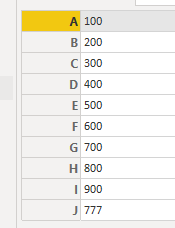
How would this be possible? I think I've done it before but I'm currently having a brain fart.
Solved! Go to Solution.
Here is a modified version of your query that does this.
let
Source = Table.FromRows(Json.Document(Binary.Decompress(Binary.FromText("LYu3DcAwDMB+0ezBXfaYXl4w/P8bYQANBMiBY0gQJwsE72W6IRFfIVonfINknfEdsnXBDyjWFT+hWit+gVo3/IZm3fEHunXwxPsPqjLnBw==", BinaryEncoding.Base64), Compression.Deflate)), let _t = ((type nullable text) meta [Serialized.Text = true]) in type table [Column1 = _t, Column2 = _t, Column3 = _t]),
ToRecords = Table.ToRecords(Source),
Custom1 = List.Accumulate(ToRecords, [], (current, next) => Record.AddField(current, next[Column2], next[Column3]))
in
Custom1
Here is a modified version of your query that does this.
let
Source = Table.FromRows(Json.Document(Binary.Decompress(Binary.FromText("LYu3DcAwDMB+0ezBXfaYXl4w/P8bYQANBMiBY0gQJwsE72W6IRFfIVonfINknfEdsnXBDyjWFT+hWit+gVo3/IZm3fEHunXwxPsPqjLnBw==", BinaryEncoding.Base64), Compression.Deflate)), let _t = ((type nullable text) meta [Serialized.Text = true]) in type table [Column1 = _t, Column2 = _t, Column3 = _t]),
ToRecords = Table.ToRecords(Source),
Custom1 = List.Accumulate(ToRecords, [], (current, next) => Record.AddField(current, next[Column2], next[Column3]))
in
Custom1
@artemus Thank you! I attempted to use List.Accumulate but failed lol. This is working perfectly! Cheers!
Check out the May 2026 Power BI update to learn about new features.
Sign up to receive a private message when registration opens and key events begin.
If you have recently started exploring Fabric, we'd love to hear how it's going. Your feedback can help with product improvements.