cancel
Showing results for 
Search instead for 
Did you mean: 

The Power BI Data Visualization World Championships is back! Get ahead of the game and start preparing now! Learn more

Reply
Anonymous
Not applicable

Create a Column that increments when another column changes

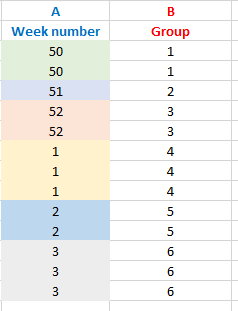
How do I create a colum (B) that starts at "1" and increments when column A changes? 🙂


HTK421_0-1613844511757.png


1 ACCEPTED SOLUTION
ImkeF
Community Champion
Community Champion

Hi @Anonymous ,

if you group on ColumnA/Week Number with GroupKind.Local and select "All Rows" in the aggregation, you'll get a table where you simply add an index column to. Then expand the grouped columns again:

let
    Source = Table.FromRows(Json.Document(Binary.Decompress(Binary.FromText("i45WMjVUitVBUEZgyhCDNIKRsQA=", BinaryEncoding.Base64), Compression.Deflate)), let _t = ((type nullable text) meta [Serialized.Text = true]) in type table [#"Week number1" = _t]),
    #"Changed Type" = Table.TransformColumnTypes(Source,{{"Week number1", Int64.Type}}),
    #"Grouped Rows" = Table.Group(#"Changed Type", {"Week number1"}, {{"All", each _, type table [Week number1=nullable number]}}, GroupKind.Local),
    #"Added Index" = Table.AddIndexColumn(#"Grouped Rows", "Group", 1, 1, Int64.Type),
    #"Removed Columns" = Table.RemoveColumns(#"Added Index",{"Week number1"}),
    #"Expanded All" = Table.ExpandTableColumn(#"Removed Columns", "All", {"Week number1"}, {"Week number"})
in
    #"Expanded All"



Imke Feldmann (The BIccountant)

If you liked my solution, please give it a thumbs up. And if I did answer your question, please mark this post as a solution. Thanks!

How to integrate M-code into your solution -- How to get your questions answered quickly -- How to provide sample data -- Check out more PBI- learning resources here -- Performance Tipps for M-queries

View solution in original post

4 REPLIES 4
Anonymous
Not applicable

here  you can find some solutions(some of which are very similar to the one proposed here ) to identical problem

Anonymous
Not applicable

Thank you I appreciate the links.


ImkeF
Community Champion
Community Champion

Hi @Anonymous ,

if you group on ColumnA/Week Number with GroupKind.Local and select "All Rows" in the aggregation, you'll get a table where you simply add an index column to. Then expand the grouped columns again:

let
    Source = Table.FromRows(Json.Document(Binary.Decompress(Binary.FromText("i45WMjVUitVBUEZgyhCDNIKRsQA=", BinaryEncoding.Base64), Compression.Deflate)), let _t = ((type nullable text) meta [Serialized.Text = true]) in type table [#"Week number1" = _t]),
    #"Changed Type" = Table.TransformColumnTypes(Source,{{"Week number1", Int64.Type}}),
    #"Grouped Rows" = Table.Group(#"Changed Type", {"Week number1"}, {{"All", each _, type table [Week number1=nullable number]}}, GroupKind.Local),
    #"Added Index" = Table.AddIndexColumn(#"Grouped Rows", "Group", 1, 1, Int64.Type),
    #"Removed Columns" = Table.RemoveColumns(#"Added Index",{"Week number1"}),
    #"Expanded All" = Table.ExpandTableColumn(#"Removed Columns", "All", {"Week number1"}, {"Week number"})
in
    #"Expanded All"


Imke Feldmann (The BIccountant)

If you liked my solution, please give it a thumbs up. And if I did answer your question, please mark this post as a solution. Thanks!

How to integrate M-code into your solution -- How to get your questions answered quickly -- How to provide sample data -- Check out more PBI- learning resources here -- Performance Tipps for M-queries

Anonymous
Not applicable

Thank you @ImkeF  I appreciate it

Helpful resources

Announcements
Power BI DataViz World Championships

Power BI Dataviz World Championships

The Power BI Data Visualization World Championships is back! Get ahead of the game and start preparing now!

December 2025 Power BI Update Carousel

Power BI Monthly Update - December 2025

Check out the December 2025 Power BI Holiday Recap!

FabCon Atlanta 2026 carousel

FabCon Atlanta 2026

Join us at FabCon Atlanta, March 16-20, for the ultimate Fabric, Power BI, AI and SQL community-led event. Save $200 with code FABCOMM.

Top Solution Authors