cancel
Showing results for 
Search instead for 
Did you mean: 

The Power BI Data Visualization World Championships is back! Get ahead of the game and start preparing now! Learn more

Reply
Anonymous
Not applicable

Create Custom Time Range Field (power Query)

I want to create a custom field from a time field that generates time between intervals. For example, anytime between 12am - 3am will be "0 AM - 3 AM", 3am - 6am will be "3 AM - 6 AM" and so on like i have in the snapshot below. Thanks in advance


snapshot


 Capture.PNG


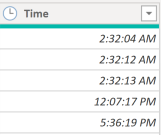
my data looks like this


Capture.PNG


1 ACCEPTED SOLUTION

This was just pseudo code. The actual code looks more like this


    #"Added Custom" = Table.AddColumn(#"Changed Type", "snapshot", each if [Time] < #time(3, 0, 0) then "0 AM - 3 AM" else if [Time] < #time(6, 0, 0) then "3 AM - 6 AM" else if [Time] < #time(9, 0, 0) then "6 AM - 9 AM" else if [Time] < #time(12, 0, 0) then "9 AM - 12 PM" else if [Time] < #time(15, 0, 0) then "12 PM - 3 PM" else if [Time] < #time(18, 0, 0) then "3 PM - 6 PM" else if [Time] < #time(21, 0, 0) then "6 PM - 9 PM" else "9 PM - 12 AM")

View solution in original post

4 REPLIES 4
lbendlin
Super User
Super User

Let's ignore for a second that you have overlapping intervals.


Create a custom column with a simple if chain (pseudo code below)


snapshot = each if time < 3 then "0 - 3" else if time < 6 then "3 - 6"  ... else if time < 21 then "18 - 21" else "21 - 24" 

Anonymous
Not applicable

@lbendlin 


Thanks for responding, i created the code using your format but i got an error that it's not seeing the "Time" field but it's actually there. Could you please view my code and let me know what my be wrong. Thanks


= Table.AddColumn(#"Inserted Time", "Time Range", each if "Time" < 3 then "0 AM - 3 AM" else if Time < 6 then "3 AM - 6 AM" else if Time < 9 then "6 AM - 9 AM" else if Time < 12 then "9 AM - 12 PM" else if Time < 15 then "12 PM - 3 PM" else if Time < 18 then "3 PM - 6 PM" else if Time < 21 then "6 PM - 9 PM" else "21 - 24")


Capture.PNG

This was just pseudo code. The actual code looks more like this


    #"Added Custom" = Table.AddColumn(#"Changed Type", "snapshot", each if [Time] < #time(3, 0, 0) then "0 AM - 3 AM" else if [Time] < #time(6, 0, 0) then "3 AM - 6 AM" else if [Time] < #time(9, 0, 0) then "6 AM - 9 AM" else if [Time] < #time(12, 0, 0) then "9 AM - 12 PM" else if [Time] < #time(15, 0, 0) then "12 PM - 3 PM" else if [Time] < #time(18, 0, 0) then "3 PM - 6 PM" else if [Time] < #time(21, 0, 0) then "6 PM - 9 PM" else "9 PM - 12 AM")
Anonymous
Not applicable

@lbendlin Thanks so much, it worked. 

Helpful resources

Announcements
Power BI DataViz World Championships

Power BI Dataviz World Championships

The Power BI Data Visualization World Championships is back! Get ahead of the game and start preparing now!

December 2025 Power BI Update Carousel

Power BI Monthly Update - December 2025

Check out the December 2025 Power BI Holiday Recap!

FabCon Atlanta 2026 carousel

FabCon Atlanta 2026

Join us at FabCon Atlanta, March 16-20, for the ultimate Fabric, Power BI, AI and SQL community-led event. Save $200 with code FABCOMM.