Don't miss your chance to take the Fabric Data Engineer (DP-600) exam for FREE! Find out how by watching the DP-600 session on-demand now through April 28th.
Learn moreJoin the FabCon + SQLCon recap series. Up next: Power BI, Real-Time Intelligence, IQ and AI, and Data Factory take center stage. All sessions are available on-demand after the live show. Register now
I need to create a custom column, in power query (M language), using a formula developed in DAX language, as follows:
'ReD'[Valor] - is a column of present table (ReD table)
Ipca[Valor] , Ipca[Data] and [IpcaSoma] - from other table (Ipca table)
Can someone help me please?
Solved! Go to Solution.
What is the [IpcaSoma] in your DAX? Is it a measure or something else? I don't see this data in your screenshots of two tables. If possible, you can use some natural language and the sample data to explain what you want to calculate in the custom column. This could help us understand the expected result better.
Assume you already have a [IpcaSoma] column in ReD table, you can add two steps to get the custom column.
Step #1: Add a custom step to get the latest value from Ipca table
Step #2: Create the required custom step
let
Source = Table.FromRows(Json.Document(Binary.Decompress(Binary.FromText("i45WMrS0tNA31Dc2VNJRcgFiXRNDUz1DYyDL0MDAQClWB1VJEBCbmxrApWMB", BinaryEncoding.Base64), Compression.Deflate)), let _t = ((type nullable text) meta [Serialized.Text = true]) in type table [Data = _t, CodNat = _t, Valor = _t, IpcaSoma = _t]),
#"Changed Type" = Table.TransformColumnTypes(Source,{{"Data", type date}, {"CodNat", type text}, {"Valor", type number}, {"IpcaSoma", Int64.Type}}),
// Add a custom step to get the latest value from Ipca table
ultimoipca = Table.First(Table.Sort(Ipca, {"Data", Order.Descending}))[Valor],
// Add a custom column
#"Added Custom" = Table.AddColumn(#"Changed Type", "ValorAtual", each Number.Round([Valor] * ultimoipca / [IpcaSoma], 2), type number)
in
#"Added Custom"
Best Regards,
Community Support Team _ Jing
If this post helps, please Accept it as Solution to help other members find it.
Hi,
it's much easier if you provide some sample data
Hi, serpiva64.
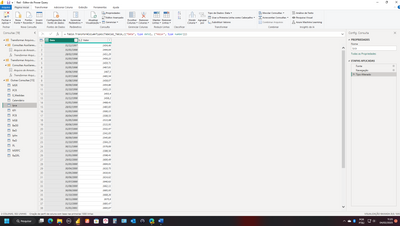
In the table below (ReD) I want to create the custom column:
The table below (Ipca) contains the information I will use to update data from the ReD table:
The formula for the update is as follows (in DAX language):
What is the [IpcaSoma] in your DAX? Is it a measure or something else? I don't see this data in your screenshots of two tables. If possible, you can use some natural language and the sample data to explain what you want to calculate in the custom column. This could help us understand the expected result better.
Assume you already have a [IpcaSoma] column in ReD table, you can add two steps to get the custom column.
Step #1: Add a custom step to get the latest value from Ipca table
Step #2: Create the required custom step
let
Source = Table.FromRows(Json.Document(Binary.Decompress(Binary.FromText("i45WMrS0tNA31Dc2VNJRcgFiXRNDUz1DYyDL0MDAQClWB1VJEBCbmxrApWMB", BinaryEncoding.Base64), Compression.Deflate)), let _t = ((type nullable text) meta [Serialized.Text = true]) in type table [Data = _t, CodNat = _t, Valor = _t, IpcaSoma = _t]),
#"Changed Type" = Table.TransformColumnTypes(Source,{{"Data", type date}, {"CodNat", type text}, {"Valor", type number}, {"IpcaSoma", Int64.Type}}),
// Add a custom step to get the latest value from Ipca table
ultimoipca = Table.First(Table.Sort(Ipca, {"Data", Order.Descending}))[Valor],
// Add a custom column
#"Added Custom" = Table.AddColumn(#"Changed Type", "ValorAtual", each Number.Round([Valor] * ultimoipca / [IpcaSoma], 2), type number)
in
#"Added Custom"
Best Regards,
Community Support Team _ Jing
If this post helps, please Accept it as Solution to help other members find it.
Check out the April 2026 Power BI update to learn about new features.
If you have recently started exploring Fabric, we'd love to hear how it's going. Your feedback can help with product improvements.
A new Power BI DataViz World Championship is coming this June! Don't miss out on submitting your entry.
| User | Count |
|---|---|
| 5 | |
| 3 | |
| 3 | |
| 3 | |
| 3 |
| User | Count |
|---|---|
| 8 | |
| 6 | |
| 5 | |
| 5 | |
| 4 |