Don't miss your chance to take the Fabric Data Engineer (DP-700) exam on us!
Learn moreWe've captured the moments from FabCon & SQLCon that everyone is talking about, and we are bringing them to the community, live and on-demand. Starts on April 14th. Register now
Hi, I m new to PowerBi. Currently, I encountered an issue about getting data from one table to another table, below is my trouble:
| Table 1 | |||
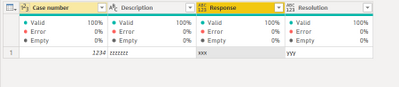
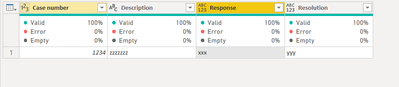
| Case number | Description | Response | Resolution |
| 1234 | zzzzzzz | xxx | yyy |
| Table 2 | |||
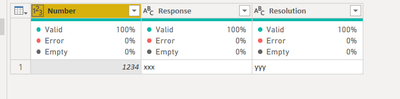
| Number | Target | Wanted value | |
| 1234 | Response | xxx | |
| 1234 | Resolution | yyy |
Table 1 initially gets two column fields only, I want to add two columns "response" & "resolution" into it in which their value should be referred from table 2. Table 1 [Case number] & Table 2 [Number] formed the relationship.
Please help to advise how to proceed. Thanks !!
Solved! Go to Solution.
Hi @Royoam
Merge table1 and table2, then get the column value
let
Source = Table.FromRows(Json.Document(Binary.Decompress(Binary.FromText("i45WMjQyNlHSUaqCAKXYWAA=", BinaryEncoding.Base64), Compression.Deflate)), let _t = ((type nullable text) meta [Serialized.Text = true]) in type table [#"Case number" = _t, Description = _t]),
#"Changed Type" = Table.TransformColumnTypes(Source,{{"Case number", Int64.Type}, {"Description", type text}}),
#"Merged Queries" = Table.NestedJoin(#"Changed Type", {"Case number"}, Table2, {"Number"}, "Table2", JoinKind.LeftOuter),
#"Added Custom" = Table.AddColumn(#"Merged Queries", "Response", each Table.SelectRows([Table2], each [Target]="Response")[Wanted value]{0}?),
#"Added Custom1" = Table.AddColumn(#"Added Custom", "Resolution", each Table.SelectRows([Table2], each [Target]="Resolution")[Wanted value]{0}?),
#"Removed Columns" = Table.RemoveColumns(#"Added Custom1",{"Table2"})
in
#"Removed Columns"
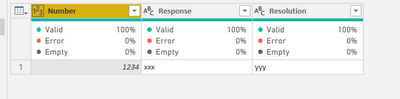
Or you can pivot table2 first, then merge two tables, no need to add columns, this is table2
let
Source = Table.FromRows(Json.Document(Binary.Decompress(Binary.FromText("i45WMjQyNlHSUQpKLS7IzytOBTIrKiqUYnWQZfJzSksy8/OAnMrKSqXYWAA=", BinaryEncoding.Base64), Compression.Deflate)), let _t = ((type nullable text) meta [Serialized.Text = true]) in type table [Number = _t, Target = _t, #"Wanted value" = _t]),
#"Changed Type" = Table.TransformColumnTypes(Source,{{"Number", Int64.Type}, {"Target", type text}, {"Wanted value", type text}}),
#"Pivoted Column" = Table.Pivot(#"Changed Type", List.Distinct(#"Changed Type"[Target]), "Target", "Wanted value")
in
#"Pivoted Column"
Hi @Royoam
Merge table1 and table2, then get the column value
let
Source = Table.FromRows(Json.Document(Binary.Decompress(Binary.FromText("i45WMjQyNlHSUaqCAKXYWAA=", BinaryEncoding.Base64), Compression.Deflate)), let _t = ((type nullable text) meta [Serialized.Text = true]) in type table [#"Case number" = _t, Description = _t]),
#"Changed Type" = Table.TransformColumnTypes(Source,{{"Case number", Int64.Type}, {"Description", type text}}),
#"Merged Queries" = Table.NestedJoin(#"Changed Type", {"Case number"}, Table2, {"Number"}, "Table2", JoinKind.LeftOuter),
#"Added Custom" = Table.AddColumn(#"Merged Queries", "Response", each Table.SelectRows([Table2], each [Target]="Response")[Wanted value]{0}?),
#"Added Custom1" = Table.AddColumn(#"Added Custom", "Resolution", each Table.SelectRows([Table2], each [Target]="Resolution")[Wanted value]{0}?),
#"Removed Columns" = Table.RemoveColumns(#"Added Custom1",{"Table2"})
in
#"Removed Columns"
Or you can pivot table2 first, then merge two tables, no need to add columns, this is table2
let
Source = Table.FromRows(Json.Document(Binary.Decompress(Binary.FromText("i45WMjQyNlHSUQpKLS7IzytOBTIrKiqUYnWQZfJzSksy8/OAnMrKSqXYWAA=", BinaryEncoding.Base64), Compression.Deflate)), let _t = ((type nullable text) meta [Serialized.Text = true]) in type table [Number = _t, Target = _t, #"Wanted value" = _t]),
#"Changed Type" = Table.TransformColumnTypes(Source,{{"Number", Int64.Type}, {"Target", type text}, {"Wanted value", type text}}),
#"Pivoted Column" = Table.Pivot(#"Changed Type", List.Distinct(#"Changed Type"[Target]), "Target", "Wanted value")
in
#"Pivoted Column"
Hi @Royoam
Merge table1 and table2, then get the column value
let
Source = Table.FromRows(Json.Document(Binary.Decompress(Binary.FromText("i45WMjQyNlHSUaqCAKXYWAA=", BinaryEncoding.Base64), Compression.Deflate)), let _t = ((type nullable text) meta [Serialized.Text = true]) in type table [#"Case number" = _t, Description = _t]),
#"Changed Type" = Table.TransformColumnTypes(Source,{{"Case number", Int64.Type}, {"Description", type text}}),
#"Merged Queries" = Table.NestedJoin(#"Changed Type", {"Case number"}, Table2, {"Number"}, "Table2", JoinKind.LeftOuter),
#"Added Custom" = Table.AddColumn(#"Merged Queries", "Response", each Table.SelectRows([Table2], each [Target]="Response")[Wanted value]{0}?),
#"Added Custom1" = Table.AddColumn(#"Added Custom", "Resolution", each Table.SelectRows([Table2], each [Target]="Resolution")[Wanted value]{0}?),
#"Removed Columns" = Table.RemoveColumns(#"Added Custom1",{"Table2"})
in
#"Removed Columns"
Or you can pivot table2 first, then merge two tables, no need to add columns, this is table2
let
Source = Table.FromRows(Json.Document(Binary.Decompress(Binary.FromText("i45WMjQyNlHSUQpKLS7IzytOBTIrKiqUYnWQZfJzSksy8/OAnMrKSqXYWAA=", BinaryEncoding.Base64), Compression.Deflate)), let _t = ((type nullable text) meta [Serialized.Text = true]) in type table [Number = _t, Target = _t, #"Wanted value" = _t]),
#"Changed Type" = Table.TransformColumnTypes(Source,{{"Number", Int64.Type}, {"Target", type text}, {"Wanted value", type text}}),
#"Pivoted Column" = Table.Pivot(#"Changed Type", List.Distinct(#"Changed Type"[Target]), "Target", "Wanted value")
in
#"Pivoted Column"
Thanks a lot...it works..
If you have recently started exploring Fabric, we'd love to hear how it's going. Your feedback can help with product improvements.
A new Power BI DataViz World Championship is coming this June! Don't miss out on submitting your entry.
Share feedback directly with Fabric product managers, participate in targeted research studies and influence the Fabric roadmap.
| User | Count |
|---|---|
| 5 | |
| 3 | |
| 3 | |
| 2 | |
| 2 |
| User | Count |
|---|---|
| 9 | |
| 8 | |
| 7 | |
| 5 | |
| 5 |