cancel
Showing results for 
Search instead for 
Did you mean: 

July 7 - July 17 | Round 2 of the Power BI Dataviz World Championships. Don't miss your chance! Learn more

Reply
Royoam
New Member

Copy data from another table

Hi, I m new to PowerBi. Currently, I encountered an issue about getting data from one table to another table, below is my trouble:

Table 1
Case numberDescriptionResponseResolution
1234zzzzzzzxxxyyy
    
Table 2 
NumberTargetWanted value 
1234Responsexxx 
1234Resolutionyyy 


Table 1 initially gets two column fields only, I want to add two columns "response" & "resolution" into it in which their value should be referred from table 2. Table 1 [Case number] & Table 2 [Number] formed the relationship.


Please help to advise how to proceed. Thanks !!

1 ACCEPTED SOLUTION
Anonymous
Not applicable

Hi @Royoam 


Merge table1 and table2, then get the column value
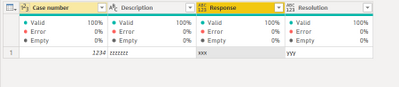
Vera_33_0-1626923276696.png


let
    Source = Table.FromRows(Json.Document(Binary.Decompress(Binary.FromText("i45WMjQyNlHSUaqCAKXYWAA=", BinaryEncoding.Base64), Compression.Deflate)), let _t = ((type nullable text) meta [Serialized.Text = true]) in type table [#"Case number" = _t, Description = _t]),
    #"Changed Type" = Table.TransformColumnTypes(Source,{{"Case number", Int64.Type}, {"Description", type text}}),
    #"Merged Queries" = Table.NestedJoin(#"Changed Type", {"Case number"}, Table2, {"Number"}, "Table2", JoinKind.LeftOuter),
    #"Added Custom" = Table.AddColumn(#"Merged Queries", "Response", each Table.SelectRows([Table2], each [Target]="Response")[Wanted value]{0}?),
    #"Added Custom1" = Table.AddColumn(#"Added Custom", "Resolution", each Table.SelectRows([Table2], each [Target]="Resolution")[Wanted value]{0}?),
    #"Removed Columns" = Table.RemoveColumns(#"Added Custom1",{"Table2"})
in
    #"Removed Columns"


Or you can pivot table2 first, then merge two tables, no need to add columns, this is table2
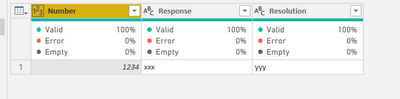
Vera_33_1-1626923437378.png


let
    Source = Table.FromRows(Json.Document(Binary.Decompress(Binary.FromText("i45WMjQyNlHSUQpKLS7IzytOBTIrKiqUYnWQZfJzSksy8/OAnMrKSqXYWAA=", BinaryEncoding.Base64), Compression.Deflate)), let _t = ((type nullable text) meta [Serialized.Text = true]) in type table [Number = _t, Target = _t, #"Wanted value" = _t]),
    #"Changed Type" = Table.TransformColumnTypes(Source,{{"Number", Int64.Type}, {"Target", type text}, {"Wanted value", type text}}),
    #"Pivoted Column" = Table.Pivot(#"Changed Type", List.Distinct(#"Changed Type"[Target]), "Target", "Wanted value")
in
    #"Pivoted Column"


View solution in original post

3 REPLIES 3
Syndicate_Admin
Administrator
Administrator

Hi @Royoam 


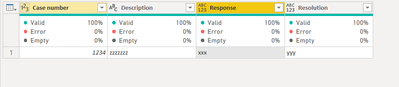
Merge table1 and table2, then get the column value

Vera_33_0-1626923276696.png


let
    Source = Table.FromRows(Json.Document(Binary.Decompress(Binary.FromText("i45WMjQyNlHSUaqCAKXYWAA=", BinaryEncoding.Base64), Compression.Deflate)), let _t = ((type nullable text) meta [Serialized.Text = true]) in type table [#"Case number" = _t, Description = _t]),
    #"Changed Type" = Table.TransformColumnTypes(Source,{{"Case number", Int64.Type}, {"Description", type text}}),
    #"Merged Queries" = Table.NestedJoin(#"Changed Type", {"Case number"}, Table2, {"Number"}, "Table2", JoinKind.LeftOuter),
    #"Added Custom" = Table.AddColumn(#"Merged Queries", "Response", each Table.SelectRows([Table2], each [Target]="Response")[Wanted value]{0}?),
    #"Added Custom1" = Table.AddColumn(#"Added Custom", "Resolution", each Table.SelectRows([Table2], each [Target]="Resolution")[Wanted value]{0}?),
    #"Removed Columns" = Table.RemoveColumns(#"Added Custom1",{"Table2"})
in
    #"Removed Columns"


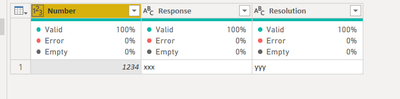
Or you can pivot table2 first, then merge two tables, no need to add columns, this is table2

Vera_33_1-1626923437378.png


let
    Source = Table.FromRows(Json.Document(Binary.Decompress(Binary.FromText("i45WMjQyNlHSUQpKLS7IzytOBTIrKiqUYnWQZfJzSksy8/OAnMrKSqXYWAA=", BinaryEncoding.Base64), Compression.Deflate)), let _t = ((type nullable text) meta [Serialized.Text = true]) in type table [Number = _t, Target = _t, #"Wanted value" = _t]),
    #"Changed Type" = Table.TransformColumnTypes(Source,{{"Number", Int64.Type}, {"Target", type text}, {"Wanted value", type text}}),
    #"Pivoted Column" = Table.Pivot(#"Changed Type", List.Distinct(#"Changed Type"[Target]), "Target", "Wanted value")
in
    #"Pivoted Column"
 

Anonymous
Not applicable

Hi @Royoam 


Merge table1 and table2, then get the column value

Vera_33_0-1626923276696.png


let
    Source = Table.FromRows(Json.Document(Binary.Decompress(Binary.FromText("i45WMjQyNlHSUaqCAKXYWAA=", BinaryEncoding.Base64), Compression.Deflate)), let _t = ((type nullable text) meta [Serialized.Text = true]) in type table [#"Case number" = _t, Description = _t]),
    #"Changed Type" = Table.TransformColumnTypes(Source,{{"Case number", Int64.Type}, {"Description", type text}}),
    #"Merged Queries" = Table.NestedJoin(#"Changed Type", {"Case number"}, Table2, {"Number"}, "Table2", JoinKind.LeftOuter),
    #"Added Custom" = Table.AddColumn(#"Merged Queries", "Response", each Table.SelectRows([Table2], each [Target]="Response")[Wanted value]{0}?),
    #"Added Custom1" = Table.AddColumn(#"Added Custom", "Resolution", each Table.SelectRows([Table2], each [Target]="Resolution")[Wanted value]{0}?),
    #"Removed Columns" = Table.RemoveColumns(#"Added Custom1",{"Table2"})
in
    #"Removed Columns"


Or you can pivot table2 first, then merge two tables, no need to add columns, this is table2

Vera_33_1-1626923437378.png


let
    Source = Table.FromRows(Json.Document(Binary.Decompress(Binary.FromText("i45WMjQyNlHSUQpKLS7IzytOBTIrKiqUYnWQZfJzSksy8/OAnMrKSqXYWAA=", BinaryEncoding.Base64), Compression.Deflate)), let _t = ((type nullable text) meta [Serialized.Text = true]) in type table [Number = _t, Target = _t, #"Wanted value" = _t]),
    #"Changed Type" = Table.TransformColumnTypes(Source,{{"Number", Int64.Type}, {"Target", type text}, {"Wanted value", type text}}),
    #"Pivoted Column" = Table.Pivot(#"Changed Type", List.Distinct(#"Changed Type"[Target]), "Target", "Wanted value")
in
    #"Pivoted Column"
 

Thanks a lot...it works..

Helpful resources

Announcements
FabCon and SQLCon Barcelona 2026

FabCon & SQLCon – Barcelona 2026

Join us in Barcelona for FabCon and SQLCon, the Fabric, Power BI, SQL, and AI community event. Save €200 with code FABCMTY200.

60 days of Data Days Carousel

Data Days 2026

Join Data Days 2026: 60 days of free live/on-demand sessions, challenges, study groups, and certification opportunities.

Power BI DataViz World Championships carousel

Power BI DataViz World Championships - June 2026

A new Power BI DataViz World Championship is coming this June! Don't miss out on submitting your entry.