This is best Fabric, Power BI, SQL and AI community event. How do we know? The last event sold out! Save €200 with code FABCMTY200.
Register nowJuly 28 - August 9 | Final Round of the Power BI Dataviz World Championships. This is your chance. Learn more
Hi,
I am cracking my head trying to convert the data type from text to datetime using the DateTime.FromText function in Power Query.
Basically, I have the following text format:
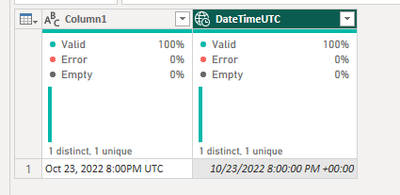
| Oct 23, 2022 8:00PM UTC |
I tried the following function, but it did not work:
DateTime.FromText([ColumnName], [Format="MMM dd, yyyy h:mmtt"])
I know that I also have to define the local culture as a parameter but not sure if there is such for UTC format. I think there is something wrong with how I am providing the format code or maybe there is an easiest solution to do that.
Any good soul can help?
Solved! Go to Solution.
Hello - this will make the conversion:
let
Source = Table.FromRows(Json.Document(Binary.Decompress(Binary.FromText("i45W8k8uUTAy1lEwMjAyUrCwMjAI8FUIDXFWio0FAA==", BinaryEncoding.Base64), Compression.Deflate)), let _t = ((type nullable text) meta [Serialized.Text = true]) in type table [Column1 = _t]),
DateTimeUTC = Table.AddColumn(Source, "DateTimeUTC", each DateTime.AddZone(DateTime.FromText(Text.BeforeDelimiter([Column1], " UTC")),0)),
#"Changed Type" = Table.TransformColumnTypes(DateTimeUTC,{{"DateTimeUTC", type datetimezone}})
in
#"Changed Type"
Proud to be a Microsoft Data Platforms Super User
Hello - this will make the conversion:
let
Source = Table.FromRows(Json.Document(Binary.Decompress(Binary.FromText("i45W8k8uUTAy1lEwMjAyUrCwMjAI8FUIDXFWio0FAA==", BinaryEncoding.Base64), Compression.Deflate)), let _t = ((type nullable text) meta [Serialized.Text = true]) in type table [Column1 = _t]),
DateTimeUTC = Table.AddColumn(Source, "DateTimeUTC", each DateTime.AddZone(DateTime.FromText(Text.BeforeDelimiter([Column1], " UTC")),0)),
#"Changed Type" = Table.TransformColumnTypes(DateTimeUTC,{{"DateTimeUTC", type datetimezone}})
in
#"Changed Type"
Proud to be a Microsoft Data Platforms Super User
Join us in Barcelona for FabCon and SQLCon, the Fabric, Power BI, SQL, and AI community event. Save €200 with code FABCMTY200.
If you love stickers, then you will definitely want to check out our community sticker challenge, Barcelona edition!
Check out the July 2026 Power BI update to learn about new features.