This is best Fabric, Power BI, SQL and AI community event. How do we know? The last event sold out! Save €200 with code FABCMTY200.
Register nowA new Data Days event is coming soon! This time we’re going bigger than ever. Fabric, Power BI, SQL, AI and more. Don't miss out.
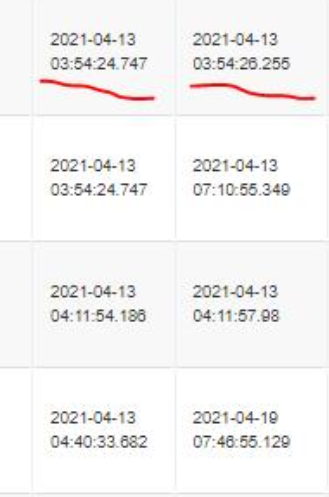
I'm trying to convert the dates pulled out of SAP in M code to make data ready for reporting. Attached image will show the actual date format which is having micro seconds as well.
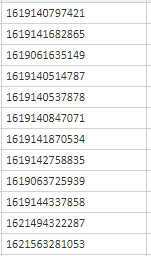
Is there a way I can convert the below values to dates in M code:
One of the solution was to convert the number into date using a formula, please refer below link:
Solved: Converting SAP or Unix time stamp - Microsoft Power BI Community
This is not working for me. Can someone help?
Feel free to let me know if you need further info.
Solved! Go to Solution.
So let's day your SAP/UNIX datetime column is named SAPTime. If your most recent step is "LastStep", then in the formula bar, you would type:
= Table.TransformColumns(LastStep, {{"SAPTime", each #datetime(1970,1,1,0,0,0) + #duration(0,0,0,[SAPTime])}})
This says take the duration of these seconds, and add that to 1/1/1970 for each value in the SAPTime column.
--Nate
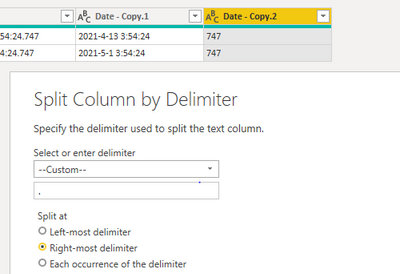
You cannot have seconds in decimals in date time type, You can just split the microseconds to another column, then you are able to change the date column to date type.
Paul Zheng _ Community Support Team
If this post helps, please Accept it as the solution to help the other members find it more quickly.
You cannot have seconds in decimals in date time type, You can just split the microseconds to another column, then you are able to change the date column to date type.
Paul Zheng _ Community Support Team
If this post helps, please Accept it as the solution to help the other members find it more quickly.
So let's day your SAP/UNIX datetime column is named SAPTime. If your most recent step is "LastStep", then in the formula bar, you would type:
= Table.TransformColumns(LastStep, {{"SAPTime", each #datetime(1970,1,1,0,0,0) + #duration(0,0,0,[SAPTime])}})
This says take the duration of these seconds, and add that to 1/1/1970 for each value in the SAPTime column.
--Nate
Thank you so much. It worked!
Check out the May 2026 Power BI update to learn about new features.
Sign up to receive a private message when registration opens and key events begin.
If you have recently started exploring Fabric, we'd love to hear how it's going. Your feedback can help with product improvements.
| User | Count |
|---|---|
| 4 | |
| 3 | |
| 2 | |
| 1 | |
| 1 |
| User | Count |
|---|---|
| 7 | |
| 6 | |
| 6 | |
| 6 | |
| 4 |