cancel
Showing results for 
Search instead for 
Did you mean: 

We've captured the moments from FabCon & SQLCon that everyone is talking about, and we are bringing them to the community, live and on-demand. Starts on April 14th. Register now

Reply
Anonymous
Not applicable

Convert String to Duration

Hi All,


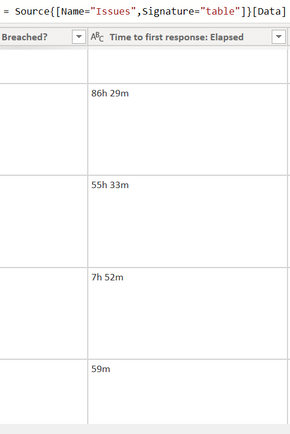
I just wanted to ask for help on how to convert the Time to first response: Elapsed column, with type string, to duration by still containing the __h __m format?

pbiTrainee_0_0-1669213059828.png


The business users prefer to sort this column by still seeing the same format but can't since it is in string type. I tried doing things on my end but it is having errors as it does not display those with greater than 24h.


Would greatly appreciate your help.


Thanks.


1 ACCEPTED SOLUTION
wdx223_Daniel
Community Champion
Community Champion

=Duration.From(Expression.Evaluate(List.Accumulate({{"h","/24+0"},{"m","/1440"}},[#"Time to first response: Elapsed"],(x,y)=>Text.Replace(x,y{0},y{1}))))


View solution in original post

2 REPLIES 2
wdx223_Daniel
Community Champion
Community Champion

=Duration.From(Expression.Evaluate(List.Accumulate({{"h","/24+0"},{"m","/1440"}},[#"Time to first response: Elapsed"],(x,y)=>Text.Replace(x,y{0},y{1}))))


ppm1
Solution Sage
Solution Sage

You can add a custom column in the query editor with this expression (replace ElapsedTime with your actual column name). Once that creates a duration column, it will convert to a decimal # when you load it. Take a look at this article for how to then calculate your measures and format it at the end to show as hours and minutes.

Calculate and Format Durations in DAX – Hoosier BI


=#duration(0, Number.FromText(Text.BeforeDelimiter([ElapsedTime], "h")), Number.FromText(Text.BetweenDelimiters([ElapsedTime], " ", "m")), 0)


Pat

Microsoft Employee

Helpful resources

Announcements
New to Fabric survey Carousel

New to Fabric Survey

If you have recently started exploring Fabric, we'd love to hear how it's going. Your feedback can help with product improvements.

Power BI DataViz World Championships carousel

Power BI DataViz World Championships - June 2026

A new Power BI DataViz World Championship is coming this June! Don't miss out on submitting your entry.

Join our Fabric User Panel

Join our Fabric User Panel

Share feedback directly with Fabric product managers, participate in targeted research studies and influence the Fabric roadmap.

March Power BI Update Carousel

Power BI Community Update - March 2026

Check out the March 2026 Power BI update to learn about new features.