cancel
Showing results for 
Search instead for 
Did you mean: 

Learn from the best! Meet the four finalists headed to the FINALS of the Power BI Dataviz World Championships! Register now

Reply
Anonymous
Not applicable

Convert Date Column from UTC to EST Timezone

Hi, 


I'm pulling CRM dynamics data in UTC format, I see that dates showing in Powerbi is different from CRM dynamics. Now i want to convert that date column to local time zone EST. 


Please share me in Power Query how to convert this Date column from UTC to EST time zone


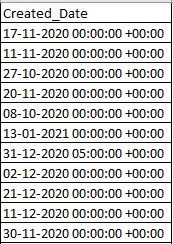
Here is the sample data looks like -

DOC.JPG


Thanks,

Santosh

1 ACCEPTED SOLUTION
v-kelly-msft
Community Support
Community Support

Hi  @Anonymous ,


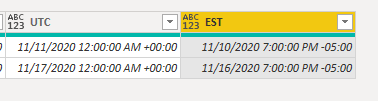
UTC is 5 hrs ahead of EST,so create below M query to convert the timezone column to EST time:

EST = DateTimeZone.SwitchZone([UTC],-5)

And you will see:

v-kelly-msft_0-1613115136057.png

For the sample .pbix file,pls see attached.


Best Regards,
Kelly

Did I answer your question? Mark my post as a solution!

View solution in original post

5 REPLIES 5
Syndicate_Admin
Administrator
Administrator

@Syndicate_Admin , I am looking for the same solution that auto process Day time saving as well.


So far this is semi-manual way I found 

Add a Refresh Time Stamp To Your Power BI Reports — ehansalytics

lmyers
Frequent Visitor

I'm using the powerbi template - CQ and AA analytics combined analytics. The call queue analysis table has time in UTC. How do I add a column, conversion to conver this to EST? When filtering on the measure Calls volumne for a day, the time is in UTC which is not helpful for our staff when they are looking at what time calls are coming in.


I'm very new to powerbi and would like some assistance how I can add a column to this table to convert the Date column to a Date column in EST.


I've tried to follow these suggestions but not sure how to apply this to the template.


v-kelly-msft
Community Support
Community Support

Hi  @Anonymous ,


UTC is 5 hrs ahead of EST,so create below M query to convert the timezone column to EST time:

EST = DateTimeZone.SwitchZone([UTC],-5)

And you will see:

v-kelly-msft_0-1613115136057.png

For the sample .pbix file,pls see attached.


Best Regards,
Kelly

Did I answer your question? Mark my post as a solution!

Hi,


how does the function take care when the day light savings kicks in ? Is there a function that looks at the date and decides whether it should be -5 or -4 (Eastern Daylight Time) ?


Thanks

Jaco

Jimmy801
Community Champion
Community Champion

Hello @Anonymous 


you can use the function DateTimeZone.SwitchZone. Here an example

let
    Source = Table.FromRows(Json.Document(Binary.Decompress(Binary.FromText("i45WMjTXMzTUMzIwMlAwMLACIwVtMKUUqwOUNsQtHQsA", BinaryEncoding.Base64), Compression.Deflate)), let _t = ((type nullable text) meta [Serialized.Text = true]) in type table [Created_Date = _t]),
    #"Changed Type" = Table.TransformColumnTypes(Source,{{"Created_Date", type datetimezone}}),
    #"Added Custom" = Table.AddColumn(#"Changed Type", "EST", each DateTimeZone.SwitchZone([Created_Date], 5), type datetimezone)
in
    #"Added Custom"

Jimmy801_0-1612959207174.png


Copy paste this code to the advanced editor in a new blank query to see how the solution works.

If this post helps or solves your problem, please mark it as solution (to help other users find useful content and to acknowledge the work of users that helped you)
Kudoes are nice too

Have fun

Jimmy


Helpful resources

Announcements
New to Fabric survey Carousel

New to Fabric Survey

If you have recently started exploring Fabric, we'd love to hear how it's going. Your feedback can help with product improvements.

Power BI DataViz World Championships carousel

Power BI DataViz World Championships - June 2026

A new Power BI DataViz World Championship is coming this June! Don't miss out on submitting your entry.

Join our Fabric User Panel

Join our Fabric User Panel

Share feedback directly with Fabric product managers, participate in targeted research studies and influence the Fabric roadmap.

March Power BI Update Carousel

Power BI Community Update - March 2026

Check out the March 2026 Power BI update to learn about new features.