Join us at FabCon Atlanta from March 16 - 20, 2026, for the ultimate Fabric, Power BI, AI and SQL community-led event. Save $200 with code FABCOMM.
Register now!The Power BI Data Visualization World Championships is back! Get ahead of the game and start preparing now! Learn more
Hi ,
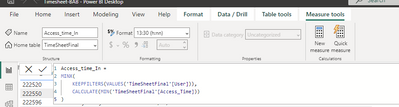
i have added measure in the desktop, it working fine, but I want to get the same output in the power query...
this code is in desktop...
could you help me with how I can write the same code in power query..?pls
Thanks
Solved! Go to Solution.
Hi @RAKESH1986
You may try the Group by feature from Transfrom > Group By. Group by User column and execute Min aggregation on Access_Time column. To have more aggregated columns, switch to Advanced and add more new aggregations. Grouping or summarizing rows - Power Query | Microsoft Learn
If this is not what you want, can you provide some sample data and expected result in table format? This could help me understand your requirement better.
Best Regards,
Community Support Team _ Jing
If this post helps, please Accept it as Solution to help other members find it.
Hi @RAKESH1986
You may try the Group by feature from Transfrom > Group By. Group by User column and execute Min aggregation on Access_Time column. To have more aggregated columns, switch to Advanced and add more new aggregations. Grouping or summarizing rows - Power Query | Microsoft Learn
If this is not what you want, can you provide some sample data and expected result in table format? This could help me understand your requirement better.
Best Regards,
Community Support Team _ Jing
If this post helps, please Accept it as Solution to help other members find it.
The Power BI Data Visualization World Championships is back! Get ahead of the game and start preparing now!