Get certified for free when you join Fabric Data Days 2026 and dive into Fabric, Power BI, SQL, AI, and other essential data skills.
Join nowData Days is here! Join us now for 60+ days of learning, challenges, and connection. Learn more
Our organization stores excel data files within One Drive for business on a shared folder.
I want to add these data files to Power BI online to allow autorefresh.
When I click Get Data --> Files --> One Drive for Business it loads the default One Drive folder that is attached to my username.
However, I cannot navigate to (and it doesn't show) the shared folders from our organization, only my individual folder. What am I missing?
Hi Nick,
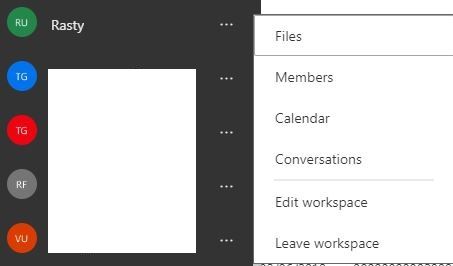
You should upload your files to Workspace OneDrive clicking on below.
Click on "..." and choose files. Then you will be navigated to workspace OneDrive where you can store your Excel and PBIX files.
You can grant access to anyone in company to these files, even without PBI access.
Hi @nickvb
As tested, it seems that connecting to shared one drive folder doesn't support currently.
As a workaround, In the latest version of Power BI Desktop(2019/2), please enter the following URL in SharePoint Folder connector, this way, you can connect to OneDrive for Business folder in Power BI Desktop.
https://mydomain-my.sharepoint.com/personal/user_mydomain_com
Best Regards
Maggie
Don't miss out on Data Days, June 15 through August 7. Learn Fabric, Power BI, SQL, AI and more.
Check out the May 2026 Power BI update to learn about new features.
| User | Count |
|---|---|
| 4 | |
| 4 | |
| 3 | |
| 2 | |
| 1 |
| User | Count |
|---|---|
| 11 | |
| 11 | |
| 4 | |
| 4 | |
| 4 |