Goal
To pull data into PowerBI using Power Query Editor from a 3rd party REST API which authenticates with a key in the request header. I'd like this key to not be directly visible in the code for security reasons.
Background
The API handles authentication through a key which is passed in GET method's header ("Ocp-Apim-subscription-Key" parameter).
The following works (replacing the "abc_example_key_xyz" with a string that is my actual API key). I am propted to click "edit credentials" and when selecting the "Anonymous" connection option I successfully get the desired data back:
response = Web.Contents("https://api.example.com/V1/company/GetAll", [Headers=[#"Ocp-Apim-subscription-Key"="abc_example_key_xyz"]])
Now I'd like to obfuscate / hide / replace the key in the query with a secret (or some other method).
Instead of selecting an Anonymous connection, the Web API option allows me to enter a key. However, unless I include the field ApiKeyName in the request I get the error "A web API key can only be specified when a web API key name is provided":
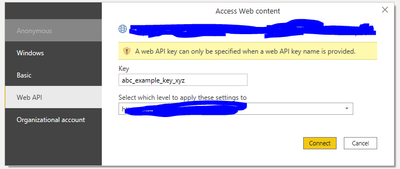
But if I update the request to include the ApiKeyName field the authentication fails (obviously, because it's not what the API wants):
response = Web.Contents("https://api.example.com/V1/company/GetAll", [ApiKeyName = "abc_example_key_xyz"])

I tried some other funny tests like "tricking" it into pulling a secret key from the Web API key interface and using it in the head, e.g.:
response = Web.Contents("https://api.example.com/V1/company/GetAll", [ApiKeyName = "api_key", Headers=[#"Ocp-Apim-subscription-Key"=ApiKeyName]])
... but it didn't work, I interestingly get the error "Expression.Error: The 'Ocp-Apim-subscription-Key' header is only supported when connecting anonymously" - which would have been useful information upfront (I can't believe this is that much of a fringe case?)
Help
So, has anyone successfully used a GET request using a header / ocp-apim-subscription-key authentication which is kept secret?
Can anyone point me in the right direction? (I've been down a terrible Azure Key Vault Secrets rabbit hole and would rather avoid if possible!)
Thank you!


