
Join us at FabCon Atlanta from March 16 - 20, 2026, for the ultimate Fabric, Power BI, AI and SQL community-led event. Save $200 with code FABCOMM.
Register now!The Power BI Data Visualization World Championships is back! Get ahead of the game and start preparing now! Learn more
Hi Guys,
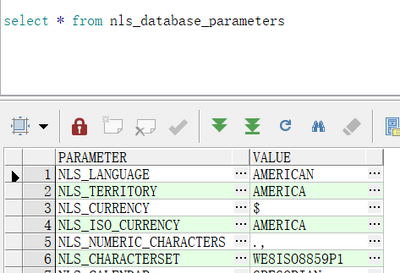
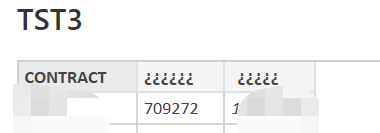
I connect to Oracle to query out the data appears garbled? How do I know what the data encoding is after I import my power BI data source? My database is coded as WE8ISO8859P1.
I also tried the following code, but it didn't work, still garbled.
= Table.AddColumn(source, "Customer colunm", each Text.FromBinary(Text.ToBinary([COMPANY_NAME], TextEncoding.Utf16), TextEncoding.Ascii))
Thanks advance.
BR,
Soldier Rong
Hi @v-yanjiang-msft ,
Hope you are well.
I found the the oracle server code as the below: American_America.WE8ISO8859P1.
So, I changed the key in my PC. However, the field still garbled
Hi @soldier_rong ,
I noticed that you have another same thread and the engineer has gave a solution. Does it work for you? If not, please see if this document can help:
Best Regards,
Community Support Team _ kalyj
If this post helps, then please consider Accept it as the solution to help the other members find it more quickly.
The Power BI Data Visualization World Championships is back! Get ahead of the game and start preparing now!