
cancel
Showing results for 
Search instead for 
Did you mean: 

July 7 - July 17 | Round 2 of the Power BI Dataviz World Championships. Don't miss your chance! Learn more

Reply
soldier_rong
Helper II
Helper II

Connecting to Oracle database with garbled code

Hi Guys,

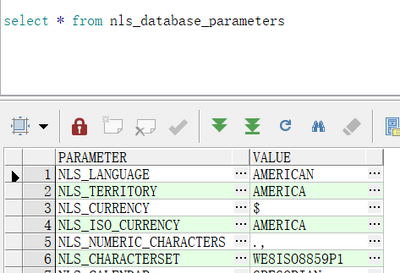
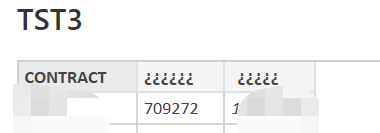
I connect to Oracle to query out the data appears garbled? How do I know what the data encoding is after I import my power BI data source? My database is coded as WE8ISO8859P1.


I also tried the following code, but it didn't work, still garbled.

= Table.AddColumn(source, "Customer colunm", each Text.FromBinary(Text.ToBinary([COMPANY_NAME], TextEncoding.Utf16), TextEncoding.Ascii))


soldier_rong_1-1669799213982.png


soldier_rong_0-1669799106823.png

Thanks advance.


BR,

Soldier Rong

2 REPLIES 2
soldier_rong
Helper II
Helper II

Hi @v-yanjiang-msft ,


Hope you are well.


I found the the oracle server code as the below: American_America.WE8ISO8859P1.

soldier_rong_0-1673415884664.png

So, I changed the key in my PC. However, the field still garbled

soldier_rong_1-1673415919890.png


soldier_rong_2-1673416040795.png


v-yanjiang-msft
Community Support
Community Support

Hi @soldier_rong ,

I noticed that you have another same thread and the engineer has gave a solution. Does it work for you? If not, please see if this document can help: 

Characters are garbled with Oracle database - Enterprise Information Management - Support Wiki (sap....


Best Regards,
Community Support Team _ kalyj

If this post helps, then please consider Accept it as the solution to help the other members find it more quickly.

Helpful resources

Announcements
FabCon and SQLCon Barcelona 2026

FabCon & SQLCon – Barcelona 2026

Join us in Barcelona for FabCon and SQLCon, the Fabric, Power BI, SQL, and AI community event. Save €200 with code FABCMTY200.

Fabric Community Sticker Design Challenge Barcelona Carousel

Fabric Community Sticker Challenge - Barcelona 2026

If you love stickers, then you will definitely want to check out our community sticker challenge, Barcelona edition!

July Power BI Update Carousel

Power BI Monthly Update - July 2026

Check out the July 2026 Power BI update to learn about new features.

Power BI DataViz World Championships carousel

Power BI DataViz World Championships - June 2026

A new Power BI DataViz World Championship is coming this June! Don't miss out on submitting your entry.

Top Solution Authors