
Don't miss your chance to take the Fabric Data Engineer (DP-700) exam on us!
Learn moreWe've captured the moments from FabCon & SQLCon that everyone is talking about, and we are bringing them to the community, live and on-demand. Starts on April 14th. Register now
Hi,
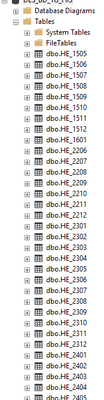
I have an SQL database where every monthly data is inserted into a table, so all tables in database have the same schema. And I would like to know if its possible to create M query to append all of them dinamically (like CSV folder). Below screenshot shows tables names. I'am able to capture table names with simple SQL SELECT from INFORMATION_SCHEMA.COLUMNS, this is giving me a table with all the table names, but don't know how to iterate, connect and append all of them. Thanks in advance for any help or support.
S.
Solved! Go to Solution.
Ok, fair enough, but there must still be someone managing the DB that can create a Stored Procedure or similar to combine all these tables.
Anyway, that aside, to do this in PQ you do the following:
1) Connect to any one of the tables from PQ to generate your Source and Navigation steps.
2) Once imported, delete your Navigation step from the Applied Steps list. This should leave you with a table list, something like this:
3) Filter this list as you would any other table to end up with a list of all the tables you want to append. For your scenario, you would probably apply a filter to the [Name] column something like this:
Text.StartsWith([Name], "HE_")
Leaving the criteria generic like this ensures that the table selection is dynamic as new tables are added.
4) Create a custom step like this:
Table.Combine(previousStepName[Data])
This should result in a combined table, including all tables that featured in your filtered list.
Pete
Proud to be a Datanaut!
Hi @saguado ,
I would very strongly suggest that you speak with your DBA and get them to store all of this information in a single table on your DB. It's pretty bad form to have tables containing similar data to be segmented like this on a DB, especially by date parameters.
I think trying to manage this situation via Power Query would be a coding and performance nightmare.
Pete
Proud to be a Datanaut!
Hi Pete,
Thanks for yur prompt answer and I fully agree with your comments, but, the issue is that this database is created by a commercial software, and we cannot change this, so I need to find a way to merge them dinamically.
S.
Ok, fair enough, but there must still be someone managing the DB that can create a Stored Procedure or similar to combine all these tables.
Anyway, that aside, to do this in PQ you do the following:
1) Connect to any one of the tables from PQ to generate your Source and Navigation steps.
2) Once imported, delete your Navigation step from the Applied Steps list. This should leave you with a table list, something like this:
3) Filter this list as you would any other table to end up with a list of all the tables you want to append. For your scenario, you would probably apply a filter to the [Name] column something like this:
Text.StartsWith([Name], "HE_")
Leaving the criteria generic like this ensures that the table selection is dynamic as new tables are added.
4) Create a custom step like this:
Table.Combine(previousStepName[Data])
This should result in a combined table, including all tables that featured in your filtered list.
Pete
Proud to be a Datanaut!
If you have recently started exploring Fabric, we'd love to hear how it's going. Your feedback can help with product improvements.
A new Power BI DataViz World Championship is coming this June! Don't miss out on submitting your entry.
Share feedback directly with Fabric product managers, participate in targeted research studies and influence the Fabric roadmap.
| User | Count |
|---|---|
| 5 | |
| 4 | |
| 3 | |
| 3 | |
| 2 |
| User | Count |
|---|---|
| 9 | |
| 8 | |
| 7 | |
| 6 | |
| 5 |