cancel
Showing results for 
Search instead for 
Did you mean: 

The Power BI Data Visualization World Championships is back! Get ahead of the game and start preparing now! Learn more

Reply
rishirajdeb
Advocate I
Advocate I

Conditionally transform multiple columns in single step

Hi All,


I need to implement the below requirement for a very large dataset (hence need a solution which would perform well).

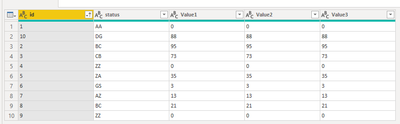
Some mock-up data:

data.png

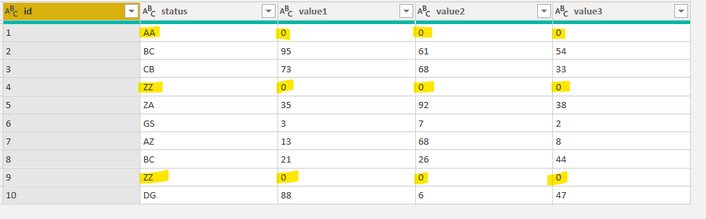
The requirement is when the status is 'AA' or 'ZZ', all the value fields should be 0.

So the result should look like below:

rishirajdeb_0-1646845328525.png

Would like to do it in power query editor (and not on desktop using DAX as the transformations would get applied on a fact table having nearly 100 millions of records. So multiple calculated columns would cause performance issues during refresh). Also don't want to rework on measures/visuals for changing references (this can't be done on datasource side as well).

Tried to do it by creating simple conditional columns like below (thought of renaming & removing the original value fields later):

rishirajdeb_1-1646846133780.png

but don't really want to create multiple addional steps for each numeric field (there's quite a few!). Also could not make it work in a single step with list.accumulate etc. (for example).


Please can someone help on how this can be done in the best possible way? (don't really want to create additional columns if the existing ones can be transformed)


Regards,

Rishi


@BA_Pete @AlexisOlson @Anonymous @mahoneypat @amitchandak @Samarth_18 @TheoC@lbendlin @parry2k @bcdobbs 


1 ACCEPTED SOLUTION
lbendlin
Super User
Super User

let
    Source = Table.FromRows(Json.Document(Binary.Decompress(Binary.FromText("i45WMlTSUXJ0BBKGBkDC0hhImCjF6kQrGQFZTs4gMVMgYQZSZwqRAamJigIpBKmxsABpVoqNBQA=", BinaryEncoding.Base64), Compression.Deflate)), let _t = ((type nullable text) meta [Serialized.Text = true]) in type table [id = _t, status = _t, value1 = _t, value2 = _t, value3 = _t]),
    #"Replaced Value" = Table.ReplaceValue(Source,each List.Contains({"AA","ZZ"},[status]),"0",(o,c,r)=> if c then r else o,{"value1","value2","value3"})
in
    #"Replaced Value"
How to use this code: Create a new Blank Query. Click on "Advanced Editor". Replace the code in the window with the code provided here. Click "Done".

View solution in original post

4 REPLIES 4
Anonymous
Not applicable


= let
    cols = Table.ToColumns(your_tab), /*{"id","v1","v2","v3"}*/
    set=List.Accumulate(lpo,List.Zip({cols{1},cols{2},cols{3}}),(s,c)=> List.ReplaceRange(s,c,1,{{0,0,0}}))
in
   Table.FromColumns({cols{0}}&List.Zip(set), {"id","v1","v2","v3"})

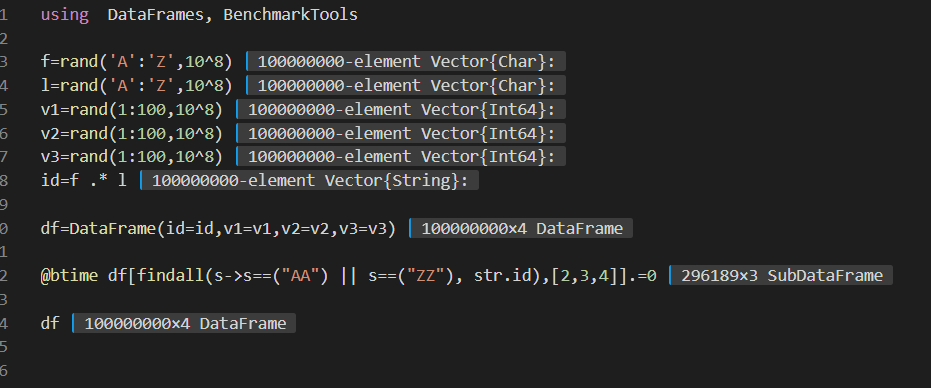
Perhaps for transforming large data frames Power Query is not the most suitable tool.
You should consider using other languages (JULIA's DataFrames.jl package for example solves the whole thing (100 million lines) in less than 10 sec with just one half line instruction)

transform dataframe by JULIA.PNG


Anonymous
Not applicable

Fai un tentativo con questo schema.


Nessuna nuova colonna 😁.


serpiva64
Solution Sage
Solution Sage

Hi,

you can try this:

let
Source = Table.FromRows(Json.Document(Binary.Decompress(Binary.FromText("TY+xDcAgDAR3oaYIJgQogUgMkA7E/mvEH4noC06PT9hmTuOMNaUo3EFYdhrRWJsiBwKM19iqInoCzKlxDMUpBBg8H5jjAwHm0tgf3P+DcsRiaOU8ASbtxcQRYPIen4QA833s7igkwlov", BinaryEncoding.Base64), Compression.Deflate)), let _t = ((type nullable text) meta [Serialized.Text = true]) in type table [id = _t, status = _t, Value1 = _t, Value2 = _t, Value3 = _t]),
#"Filtered Rows1" = Table.SelectRows(Source, each ([status] <> "AA" and [status] <> "ZZ")),
#"Filtered Rows" = Table.SelectRows(Source, each ([status] = "AA" or [status] = "ZZ")),
#"Multiplied Column" = Table.TransformColumns(#"Filtered Rows", {{"Value1", each Text.From( Number.FromText(_) * 0), type text},{"Value2", each Text.From( Number.FromText(_) * 0), type text},{"Value3", each Text.From( Number.FromText(_) * 0), type text}}),
#"Appended Query" = Table.Combine({#"Filtered Rows1", #"Multiplied Column"}),
#"Sorted Rows" = Table.Sort(#"Appended Query",{{"id", Order.Ascending}})
in
#"Sorted Rows"

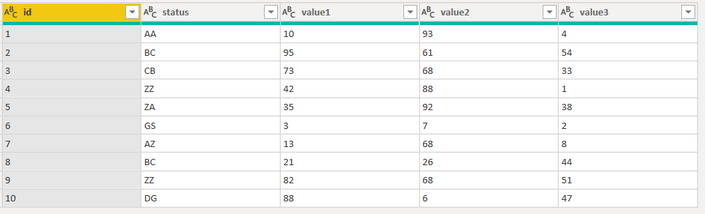
 and from this 
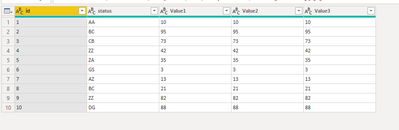
serpiva64_0-1646848625104.png

you get this

serpiva64_0-1646849628446.png


If this post is useful to help you to solve your issue consider giving the post a thumbs up 

 and accepting it as a solution !


lbendlin
Super User
Super User

let
    Source = Table.FromRows(Json.Document(Binary.Decompress(Binary.FromText("i45WMlTSUXJ0BBKGBkDC0hhImCjF6kQrGQFZTs4gMVMgYQZSZwqRAamJigIpBKmxsABpVoqNBQA=", BinaryEncoding.Base64), Compression.Deflate)), let _t = ((type nullable text) meta [Serialized.Text = true]) in type table [id = _t, status = _t, value1 = _t, value2 = _t, value3 = _t]),
    #"Replaced Value" = Table.ReplaceValue(Source,each List.Contains({"AA","ZZ"},[status]),"0",(o,c,r)=> if c then r else o,{"value1","value2","value3"})
in
    #"Replaced Value"
How to use this code: Create a new Blank Query. Click on "Advanced Editor". Replace the code in the window with the code provided here. Click "Done".

Helpful resources

Announcements
Power BI DataViz World Championships

Power BI Dataviz World Championships

The Power BI Data Visualization World Championships is back! Get ahead of the game and start preparing now!

December 2025 Power BI Update Carousel

Power BI Monthly Update - December 2025

Check out the December 2025 Power BI Holiday Recap!

FabCon Atlanta 2026 carousel

FabCon Atlanta 2026

Join us at FabCon Atlanta, March 16-20, for the ultimate Fabric, Power BI, AI and SQL community-led event. Save $200 with code FABCOMM.