Join us at FabCon Atlanta from March 16 - 20, 2026, for the ultimate Fabric, Power BI, AI and SQL community-led event. Save $200 with code FABCOMM.
Register now!The Power BI Data Visualization World Championships is back! Get ahead of the game and start preparing now! Learn more
Hello friends, I'm new in this subject, so hopefully, someone will be able to help me out with my issue.
What I'm looking for is the conditional merge in Power Query Excel.
Here is the situation I'm in - there are 2 data tables:
L_bound | U_bound | %Discount |
1 | 9 | 0 |
10 | 99 | 0.1 |
100 | 199 | 0.2 |
200 | 299 | 0.3 |
2. Table two: shipments table, looks like this:
Shipmnt_ID | prod | Cust_ID | Cust_ttl_SHipmnt | Shipmnst_cost |
1 | monitor | Danny | 50 | 1000 |
2 | Computer | Tomas | 9 | 500 |
2 | ..... | ..... | 10 | 2000 |
4 | ------- | ------ | 150 | 10000 |
I need to add the relevant “%Discount” from table one to every shipment in table two based on “Cust_ttl_SHipmnt” value.
For example, for the first shipment the relevant “%Discount” is 0.1 (Because 10< Cust_ttl_SHipmnt <99)
The result of the merge I need, looks like the following table:
Shipmnt_ID | prod | Cust_ID | Cust_ttl_SHipmnt | Shipmnst_cost | %Discount |
1 | monitor | Danny | 50 | 1000 | 0.1 |
2 | Computer | Tomas | 9 | 500 | 0 |
2 | ..... | ..... | 10 | 2000 | 0.1 |
4 | ------- | ------ | 150 | 10000 | 0.2 |
Solved! Go to Solution.
Hi @Flixg
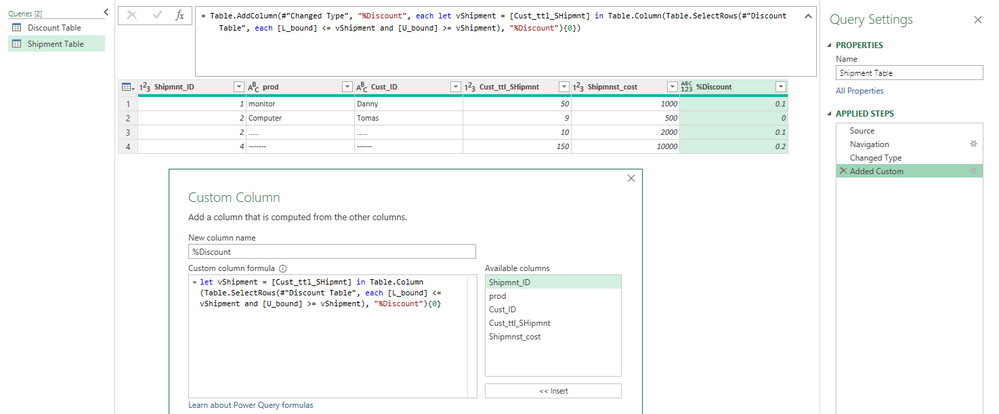
You can add a custom column to shipment table with below code. The sample file has been attached at bottom.
let vShipment = [Cust_ttl_SHipmnt] in Table.Column(Table.SelectRows(#"Discount Table", each [L_bound] <= vShipment and [U_bound] >= vShipment), "%Discount"){0}
Best Regards,
Community Support Team _ Jing
If this post helps, please Accept it as Solution to help other members find it.
Hi @Flixg
You can add a custom column to shipment table with below code. The sample file has been attached at bottom.
let vShipment = [Cust_ttl_SHipmnt] in Table.Column(Table.SelectRows(#"Discount Table", each [L_bound] <= vShipment and [U_bound] >= vShipment), "%Discount"){0}
Best Regards,
Community Support Team _ Jing
If this post helps, please Accept it as Solution to help other members find it.
The Power BI Data Visualization World Championships is back! Get ahead of the game and start preparing now!