
cancel
Showing results for 
Search instead for 
Did you mean: 

We've captured the moments from FabCon & SQLCon that everyone is talking about, and we are bringing them to the community, live and on-demand. Starts on April 14th. Register now

Reply
Anonymous
Not applicable

Conditional formatting with specific value

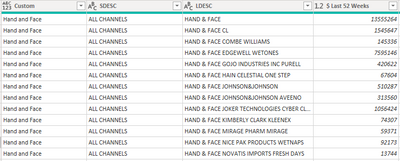
marissaanj_0-1655727210513.png

How to make conditional column so that if category is "hand and face" the new category value is equal to LESC = Hand & Face's Last 52 Week value

(basically 13555264 but that number could change)

So in this case since all the categories are hand & face, the new category value column will all have 13555264 as their value

1 ACCEPTED SOLUTION
jennratten
Super User
Super User

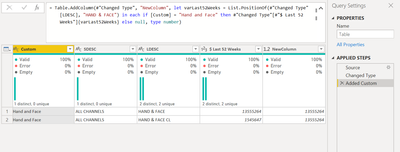
Hello - this works for me.

let
    Source = Table.FromRows(Json.Document(Binary.Decompress(Binary.FromText("i45W8kjMS1EAYbfE5FQlHSVHHx8FZw9HPz9Xn2AgF8hyUYgpNTAwMlNwc3R2BQoZGpuamhqZmSjF6pCsXcHZB2SCqYmpmYm5UmwsAA==", BinaryEncoding.Base64), Compression.Deflate)), let _t = ((type nullable text) meta [Serialized.Text = true]) in type table [Custom = _t, SDESC = _t, LDESC = _t, #"$ Last 52 Weeks" = _t]),
    #"Changed Type" = Table.TransformColumnTypes(Source,{{"Custom", type text}, {"SDESC", type text}, {"LDESC", type text}, {"$ Last 52 Weeks", Int64.Type}}),
    #"Added Custom" = Table.AddColumn(#"Changed Type", "NewColumn", let varLast52Weeks = List.PositionOf(#"Changed Type"[LDESC], "HAND & FACE") in each if [Custom] = "Hand and Face" then #"Changed Type"[#"$ Last 52 Weeks"]{varLast52Weeks} else null, type number)
in
    #"Added Custom"


jennratten_0-1655730857601.png


View solution in original post

4 REPLIES 4
Anonymous
Not applicable

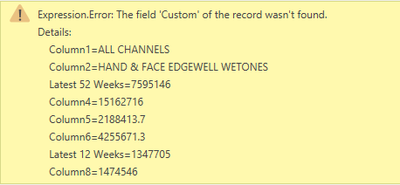
marissaanj_0-1656003358916.png

This is the error I am getting.

marissaanj_1-1656003400203.png

it also pushes some of my column headers down 


Anonymous
Not applicable

how did you make the edits to the source and the changed type? i tried to invoke a custom column and add the 

#"Added Custom" = Table.AddColumn(#"Changed Type", "NewColumn", let varLast52Weeks = List.PositionOf(#"Changed Type"[LDESC], "HAND & FACE") in each if [Custom] = "Hand and Face" then #"Changed Type"[#"$ Last 52 Weeks"]{varLast52Weeks} else null, type number)
in

part shown, but i dont think it works without the rest of the given steps? 

jennratten
Super User
Super User

Hello - this works for me.

let
    Source = Table.FromRows(Json.Document(Binary.Decompress(Binary.FromText("i45W8kjMS1EAYbfE5FQlHSVHHx8FZw9HPz9Xn2AgF8hyUYgpNTAwMlNwc3R2BQoZGpuamhqZmSjF6pCsXcHZB2SCqYmpmYm5UmwsAA==", BinaryEncoding.Base64), Compression.Deflate)), let _t = ((type nullable text) meta [Serialized.Text = true]) in type table [Custom = _t, SDESC = _t, LDESC = _t, #"$ Last 52 Weeks" = _t]),
    #"Changed Type" = Table.TransformColumnTypes(Source,{{"Custom", type text}, {"SDESC", type text}, {"LDESC", type text}, {"$ Last 52 Weeks", Int64.Type}}),
    #"Added Custom" = Table.AddColumn(#"Changed Type", "NewColumn", let varLast52Weeks = List.PositionOf(#"Changed Type"[LDESC], "HAND & FACE") in each if [Custom] = "Hand and Face" then #"Changed Type"[#"$ Last 52 Weeks"]{varLast52Weeks} else null, type number)
in
    #"Added Custom"


jennratten_0-1655730857601.png


Dear @jennratten ,


I may not need your solution now but for sure in the future I will.

Thanks for sharing this short but effective custom column.


Ciao

Helpful resources

Announcements
New to Fabric survey Carousel

New to Fabric Survey

If you have recently started exploring Fabric, we'd love to hear how it's going. Your feedback can help with product improvements.

Power BI DataViz World Championships carousel

Power BI DataViz World Championships - June 2026

A new Power BI DataViz World Championship is coming this June! Don't miss out on submitting your entry.

Join our Fabric User Panel

Join our Fabric User Panel

Share feedback directly with Fabric product managers, participate in targeted research studies and influence the Fabric roadmap.