Don't miss your chance to take the Fabric Data Engineer (DP-600) exam for FREE! Find out how by watching the DP-600 session on-demand now through April 28th.
Learn moreJoin the FabCon + SQLCon recap series. Up next: Power BI, Real-Time Intelligence, IQ and AI, and Data Factory take center stage. All sessions are available on-demand after the live show. Register now
Hello!
I have 3 columns [Job Number]; [Job Name] and [Client].
I need a new column [Job Info] createdbased off one (or two) of the above columns depending on the populated data.
Ideally, the [Job Info] column would:
Concatenate [Job Number] and [Job Name]
but if [Job Number] = null then I just want [Job Name] returned
if both [Job Number] and [Job Name] = null I want [Client] returned
And if none of the above columns are populated, I just want null returned.
Seems basic, but I can't think of how to do this!
TIA
Solved! Go to Solution.
if [Job Number] <> null and [Job Name] <> null
then
Number.ToText([Job Number])&[Job Name]
else if [Job Number] = null and [Job Name] <> null
then
[Job Name]
else
[Client]
@JNelson If this post helps, please consider accept as solution to help other members find it more quickly and Appreciate your Kudos.
This works! Thank you so much
Hello @JNelson ,
you could add a conditional column using power query, check this link for instructions https://learn.microsoft.com/en-us/power-query/add-conditional-column
If I answered your question, please mark my post as solution, Appreciate your Kudos 👍
Proud to be a Super User! | |
Hello,
Thanks for your reply. I have tried using 'add conditional column' however it doesn't allow the 'and' argument. As I am trying to return the Client name if the Job Number AND Job Name are both blank on the row...
Thanks
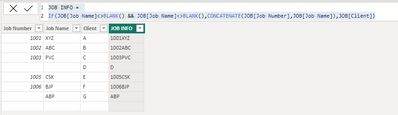
JOB INFO =
IF (
JOB[Job Name] <> BLANK ()
&& JOB[Job Name] <> BLANK (),
CONCATENATE ( JOB[Job Number], JOB[Job Name] ),
JOB[Client]
)
*Can you share sample data and sample output in table format? Or a sample pbix after removing sensitive data.
Thanks for your reply. This looks like DAX not M code...? Don't I need M for Power Query? It's not recognising BLANK or &&.
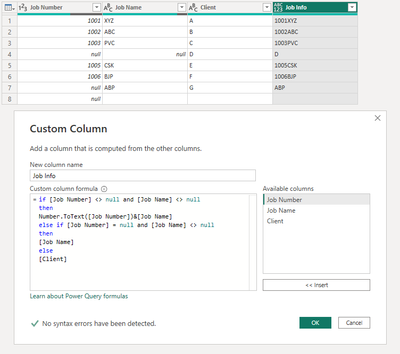
Below is a screenshot of a sample data. The "Job Info" column is the desired outcome.
if [Job Number] <> null and [Job Name] <> null
then
Number.ToText([Job Number])&[Job Name]
else if [Job Number] = null and [Job Name] <> null
then
[Job Name]
else
[Client]
@JNelson If this post helps, please consider accept as solution to help other members find it more quickly and Appreciate your Kudos.
Check out the April 2026 Power BI update to learn about new features.
If you have recently started exploring Fabric, we'd love to hear how it's going. Your feedback can help with product improvements.
A new Power BI DataViz World Championship is coming this June! Don't miss out on submitting your entry.
| User | Count |
|---|---|
| 5 | |
| 4 | |
| 4 | |
| 4 | |
| 4 |