cancel
Showing results for 
Search instead for 
Did you mean: 

The Power BI Data Visualization World Championships is back! Get ahead of the game and start preparing now! Learn more

Reply
Anonymous
Not applicable

Conditional changes to multiple columns at once

Hello there.  I'm doing a bit of data cleansing and am hoping for a pointer on the following scenario.

Two columns containing YYYY data with some punctuation (sample below).  Not all entries have data in the second column because not all items span a date range.  

If the YearFrom contains "--" I want to replace those dashes with two zeros, AND populate the YearTo with the last year of the century.  I can work out the century, and I can replace the dashes, but I don't know who to do an if statement that replaces the dashes and fills in the YearTo column.  Any points would be very much appreciated.


YearFrom   YearTo

1985

1939            1942

19--


I would like to get to:

YearFrom  YearTo

1985

1939        1942

1900         1999


1 ACCEPTED SOLUTION
v-juanli-msft
Community Support
Community Support

Hi @Anonymous 

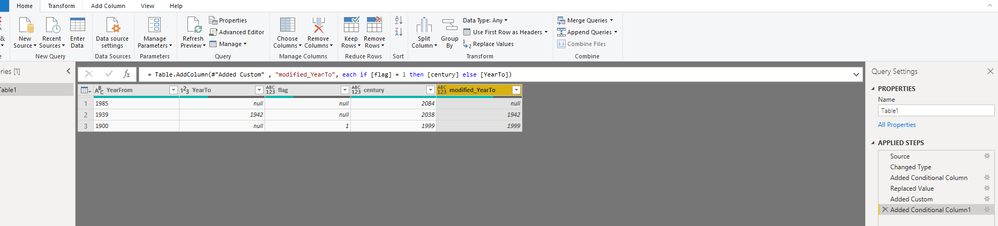
Add column as below
4.png

Write code in Advanced editor

let
    Source = Table.FromRows(Json.Document(Binary.Decompress(Binary.FromText("i45WMrS0MFXSUVKK1QGxjS2BbENLEyMoX1cXLBcLAA==", BinaryEncoding.Base64), Compression.Deflate)), let _t = ((type text) meta [Serialized.Text = true]) in type table [YearFrom = _t, YearTo = _t]),
    #"Changed Type" = Table.TransformColumnTypes(Source,{{"YearFrom", type text}, {"YearTo", Int64.Type}}),
    #"Added Conditional Column" = Table.AddColumn(#"Changed Type", "flag", each if Text.Contains([YearFrom], "--") then 1 else null),
    #"Replaced Value" = Table.ReplaceValue(#"Added Conditional Column","--","00",Replacer.ReplaceText,{"YearFrom"}),
    #"Added Custom" = Table.AddColumn(#"Replaced Value", "century", each Number.FromText([YearFrom])+100-1),
    #"Added Conditional Column1" = Table.AddColumn(#"Added Custom" , "modified_YearTo", each if [flag] = 1 then [century] else [YearTo])
in
    #"Added Conditional Column1"

Then remove [flag],[century],[YearTo] columns.


Best Regards
Maggie


Community Support Team _ Maggie Li
If this post helps, then please consider Accept it as the solution to help the other members find it more quickly.

View solution in original post

1 REPLY 1
v-juanli-msft
Community Support
Community Support

Hi @Anonymous 

Add column as below

4.png

Write code in Advanced editor

let
    Source = Table.FromRows(Json.Document(Binary.Decompress(Binary.FromText("i45WMrS0MFXSUVKK1QGxjS2BbENLEyMoX1cXLBcLAA==", BinaryEncoding.Base64), Compression.Deflate)), let _t = ((type text) meta [Serialized.Text = true]) in type table [YearFrom = _t, YearTo = _t]),
    #"Changed Type" = Table.TransformColumnTypes(Source,{{"YearFrom", type text}, {"YearTo", Int64.Type}}),
    #"Added Conditional Column" = Table.AddColumn(#"Changed Type", "flag", each if Text.Contains([YearFrom], "--") then 1 else null),
    #"Replaced Value" = Table.ReplaceValue(#"Added Conditional Column","--","00",Replacer.ReplaceText,{"YearFrom"}),
    #"Added Custom" = Table.AddColumn(#"Replaced Value", "century", each Number.FromText([YearFrom])+100-1),
    #"Added Conditional Column1" = Table.AddColumn(#"Added Custom" , "modified_YearTo", each if [flag] = 1 then [century] else [YearTo])
in
    #"Added Conditional Column1"

Then remove [flag],[century],[YearTo] columns.


Best Regards
Maggie


Community Support Team _ Maggie Li
If this post helps, then please consider Accept it as the solution to help the other members find it more quickly.

Helpful resources

Announcements
Power BI DataViz World Championships

Power BI Dataviz World Championships

The Power BI Data Visualization World Championships is back! Get ahead of the game and start preparing now!

December 2025 Power BI Update Carousel

Power BI Monthly Update - December 2025

Check out the December 2025 Power BI Holiday Recap!

FabCon Atlanta 2026 carousel

FabCon Atlanta 2026

Join us at FabCon Atlanta, March 16-20, for the ultimate Fabric, Power BI, AI and SQL community-led event. Save $200 with code FABCOMM.