This time we’re going bigger than ever. Fabric, Power BI, SQL, AI and more. We're covering it all. You won't want to miss it.
Learn moreDid you hear? There's a new SQL AI Developer certification (DP-800). Start preparing now and be one of the first to get certified. Register now
Hello there. I'm doing a bit of data cleansing and am hoping for a pointer on the following scenario.
Two columns containing YYYY data with some punctuation (sample below). Not all entries have data in the second column because not all items span a date range.
If the YearFrom contains "--" I want to replace those dashes with two zeros, AND populate the YearTo with the last year of the century. I can work out the century, and I can replace the dashes, but I don't know who to do an if statement that replaces the dashes and fills in the YearTo column. Any points would be very much appreciated.
YearFrom YearTo
1985
1939 1942
19--
I would like to get to:
YearFrom YearTo
1985
1939 1942
1900 1999
Solved! Go to Solution.
Hi @Anonymous
Add column as below
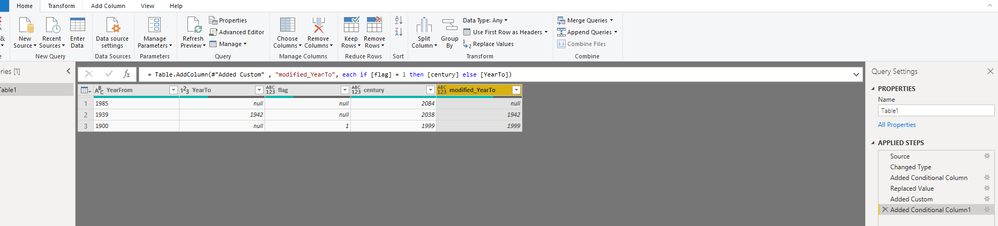
Write code in Advanced editor
let
Source = Table.FromRows(Json.Document(Binary.Decompress(Binary.FromText("i45WMrS0MFXSUVKK1QGxjS2BbENLEyMoX1cXLBcLAA==", BinaryEncoding.Base64), Compression.Deflate)), let _t = ((type text) meta [Serialized.Text = true]) in type table [YearFrom = _t, YearTo = _t]),
#"Changed Type" = Table.TransformColumnTypes(Source,{{"YearFrom", type text}, {"YearTo", Int64.Type}}),
#"Added Conditional Column" = Table.AddColumn(#"Changed Type", "flag", each if Text.Contains([YearFrom], "--") then 1 else null),
#"Replaced Value" = Table.ReplaceValue(#"Added Conditional Column","--","00",Replacer.ReplaceText,{"YearFrom"}),
#"Added Custom" = Table.AddColumn(#"Replaced Value", "century", each Number.FromText([YearFrom])+100-1),
#"Added Conditional Column1" = Table.AddColumn(#"Added Custom" , "modified_YearTo", each if [flag] = 1 then [century] else [YearTo])
in
#"Added Conditional Column1"
Then remove [flag],[century],[YearTo] columns.
Best Regards
Maggie
Community Support Team _ Maggie Li
If this post helps, then please consider Accept it as the solution to help the other members find it more quickly.
Hi @Anonymous
Add column as below
Write code in Advanced editor
let
Source = Table.FromRows(Json.Document(Binary.Decompress(Binary.FromText("i45WMrS0MFXSUVKK1QGxjS2BbENLEyMoX1cXLBcLAA==", BinaryEncoding.Base64), Compression.Deflate)), let _t = ((type text) meta [Serialized.Text = true]) in type table [YearFrom = _t, YearTo = _t]),
#"Changed Type" = Table.TransformColumnTypes(Source,{{"YearFrom", type text}, {"YearTo", Int64.Type}}),
#"Added Conditional Column" = Table.AddColumn(#"Changed Type", "flag", each if Text.Contains([YearFrom], "--") then 1 else null),
#"Replaced Value" = Table.ReplaceValue(#"Added Conditional Column","--","00",Replacer.ReplaceText,{"YearFrom"}),
#"Added Custom" = Table.AddColumn(#"Replaced Value", "century", each Number.FromText([YearFrom])+100-1),
#"Added Conditional Column1" = Table.AddColumn(#"Added Custom" , "modified_YearTo", each if [flag] = 1 then [century] else [YearTo])
in
#"Added Conditional Column1"
Then remove [flag],[century],[YearTo] columns.
Best Regards
Maggie
Community Support Team _ Maggie Li
If this post helps, then please consider Accept it as the solution to help the other members find it more quickly.
Check out the April 2026 Power BI update to learn about new features.
Sign up to receive a private message when registration opens and key events begin.
If you have recently started exploring Fabric, we'd love to hear how it's going. Your feedback can help with product improvements.
| User | Count |
|---|---|
| 7 | |
| 5 | |
| 4 | |
| 4 | |
| 3 |