cancel
Showing results for 
Search instead for 
Did you mean: 

The Power BI Data Visualization World Championships is back! Get ahead of the game and start preparing now! Learn more

Reply
kag
New Member

Conditional Calculation for Date Difference

Hi All,


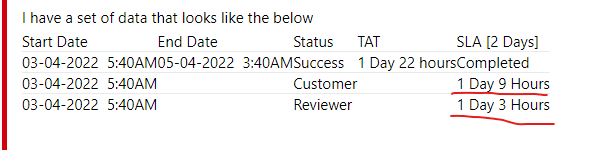
I have a set of data that looks like the below

Start DateEnd DateStatusTATSLA [2 Days]
03-04-2022  5:40AM05-04-2022  3:40AMSuccess1 Day 22 hoursCompleted
03-04-2022  5:40AM Customer 1 Day 9 Hours
03-04-2022  5:40AM Reviewer 1 Day 3 Hours


I am trying to calculate SLA and TAT here.

TAT is the Duration of days between End date and Start date excluding weekends.

The request should be completed within 2 days of Start Date excluding weekends and the SLA calculation should pause whenever the status says "Customer" and resume when the Status becomes "Reviewer".


Can someone help me with this please? I am very new to Power BI, thanks in advance!

1 REPLY 1
Anonymous
Not applicable

Hi @kag ,


For the TAT column, you could refer to this post:

Solved: Re: Difference of dates in days by excluding weeke... - Microsoft Power BI Community


For the SLA [2 Days] column, I still wonder how this number of days and hours is calculated, "completed" is because the Status column is "Success", right?

vstephenmsft_1-1649299761671.png


Best Regards,

Stephen Tao


If this post helps, then please consider Accept it as the solution to help the other members find it more quickly.


Helpful resources

Announcements
Power BI DataViz World Championships

Power BI Dataviz World Championships

The Power BI Data Visualization World Championships is back! Get ahead of the game and start preparing now!

December 2025 Power BI Update Carousel

Power BI Monthly Update - December 2025

Check out the December 2025 Power BI Holiday Recap!

FabCon Atlanta 2026 carousel

FabCon Atlanta 2026

Join us at FabCon Atlanta, March 16-20, for the ultimate Fabric, Power BI, AI and SQL community-led event. Save $200 with code FABCOMM.