Don't miss your chance to take the Fabric Data Engineer (DP-600) exam for FREE! Find out how by attending the DP-600 session on April 23rd (pacific time), live or on-demand.
Learn moreNext up in the FabCon + SQLCon recap series: The roadmap for Microsoft SQL and Maximizing Developer experiences in Fabric. All sessions are available on-demand after the live show. Register now
Hi All,
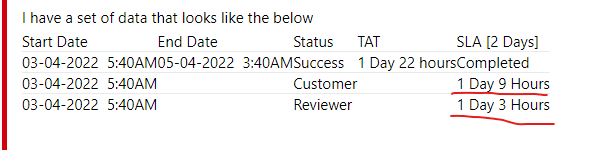
I have a set of data that looks like the below
| Start Date | End Date | Status | TAT | SLA [2 Days] |
| 03-04-2022 5:40AM | 05-04-2022 3:40AM | Success | 1 Day 22 hours | Completed |
| 03-04-2022 5:40AM | Customer | 1 Day 9 Hours | ||
| 03-04-2022 5:40AM | Reviewer | 1 Day 3 Hours |
I am trying to calculate SLA and TAT here.
TAT is the Duration of days between End date and Start date excluding weekends.
The request should be completed within 2 days of Start Date excluding weekends and the SLA calculation should pause whenever the status says "Customer" and resume when the Status becomes "Reviewer".
Can someone help me with this please? I am very new to Power BI, thanks in advance!
Hi @kag ,
For the TAT column, you could refer to this post:
Solved: Re: Difference of dates in days by excluding weeke... - Microsoft Power BI Community
For the SLA [2 Days] column, I still wonder how this number of days and hours is calculated, "completed" is because the Status column is "Success", right?
Best Regards,
Stephen Tao
If this post helps, then please consider Accept it as the solution to help the other members find it more quickly.
If you have recently started exploring Fabric, we'd love to hear how it's going. Your feedback can help with product improvements.
A new Power BI DataViz World Championship is coming this June! Don't miss out on submitting your entry.
Share feedback directly with Fabric product managers, participate in targeted research studies and influence the Fabric roadmap.
| User | Count |
|---|---|
| 6 | |
| 3 | |
| 3 | |
| 3 | |
| 2 |