Get Fabric or SQL Certified for Free.
Get certified for free when you join Fabric Data Days 2026 and dive into Fabric, Power BI, SQL, AI, and other essential data skills.
Join now- Power BI forums
- Get Help with Power BI
- Desktop
- Service
- Report Server
- Power Query
- Mobile Apps
- Developer
- DAX Commands and Tips
- Custom Visuals Development Discussion
- Health and Life Sciences
- Power BI Spanish forums
- Translated Spanish Desktop
- Training and Consulting
- Instructor Led Training
- Dashboard in a Day for Women, by Women
- Galleries
- Data Stories Gallery
- Themes Gallery
- Contests Gallery
- QuickViz Gallery
- Quick Measures Gallery
- Visual Calculations Gallery
- Notebook Gallery
- Translytical Task Flow Gallery
- TMDL Gallery
- R Script Showcase
- Webinars and Video Gallery
- Ideas
- Custom Visuals Ideas (read-only)
- Issues
- Issues
- Events
- Upcoming Events
Try your skills in the Power BI Dataviz World Championship! Round one ends June 26. Join now
- Power BI forums
- Forums
- Get Help with Power BI
- Power Query
- Re: Concatenate two consecutive rows
- Subscribe to RSS Feed
- Mark Topic as New
- Mark Topic as Read
- Float this Topic for Current User
- Bookmark
- Subscribe
- Printer Friendly Page


- Mark as New
- Bookmark
- Subscribe
- Mute
- Subscribe to RSS Feed
- Permalink
- Report Inappropriate Content
Concatenate two consecutive rows
I extract a txt report from the company's accounts, but the report comes out with two lines. By power query I can transform this report into a table, but I wanted to contact the information below in the Observation column.
Example TxT extracted from system:
SICOOB CRE - DINHEIRO - RECEITA FEDERAL 200721 20/07/21 273,45-
OBSERVAÇÃO - *P /INSS CONTAGEM JUN/21 200721 20/07/21
SICOOB CRE - DINHEIRO - RECEITA FEDERAL 200721 20/07/21 1.052,90-
OBSERVAÇÃO - *N /INSS BELO HORIZONTE JUN/21 200721 20/07/21
SICOOB CRE - DINHEIRO - RECEITA FEDERAL 200721 20/07/21 1.338,95-
OBSERVAÇÃO - *G /INSS BELO HORIZONTE JUN/21 200721 20/07/21
after treatment in the power query the table looks like this:
| ACCOUNT | SPECIES | DESCRIPTION | CODE DOCUMENT | DATE | VALUE |
| SICOOB CRE | DINHEIRO | RECEITA FEDERAL | 200721 | 20/07/21 | 273,45- |
| OBSERVAÇÃO | *P /INSS CONTAGEM JUN/21 | 200721 | 20/07/21 | ||
| SICOOB CRE | DINHEIRO | RECEITA FEDERAL | 200721 | 20/07/21 | 1.052,90- |
| OBSERVAÇÃO | *N /INSS BELO HORIZONTE JUN/21 | 200721 | 20/07/21 | ||
| SICOOB CRE | DINHEIRO | RECEITA FEDERAL | 200721 | 20/07/21 | 1.338,95- |
| OBSERVAÇÃO | *G /INSS BELO HORIZONTE | 200721 | 20/07/21 |
But my target is this:
| ACCOUNT | SPECIES | DESCRIPTION | CODE DOCUMENT | DATE | VALUE |
| SICOOB CRE | DINHEIRO | RECEITA FEDERAL + *P /INSS CONTAGEM JUN/21 | 200721 | 20/07/21 | 273,45- |
| SICOOB CRE | DINHEIRO | RECEITA FEDERAL + *N /INSS BELO HORIZONTE JUN/21 | 200721 | 20/07/21 | 1.052,90- |
| SICOOB CRE | DINHEIRO | RECEITA FEDERAL + *G /INSS BELO HORIZONTE | 200721 | 20/07/21 | 1.338,95- |
My idea is to concatenate only the description column information and ignore the other information. Remembering that the word "OBSERVAÇÃO" is in all instances of an account having two lines.
Solved! Go to Solution.


- Mark as New
- Bookmark
- Subscribe
- Mute
- Subscribe to RSS Feed
- Permalink
- Report Inappropriate Content
You can try this quick pattern @renatopnovaes
let
    Source = Table.FromRows(Json.Document(Binary.Decompress(Binary.FromText("pdBBDoIwEAXQq0y6NFVKkSDLUkaowY5p0YWE07jwYFzMiiw0QRN192eS+XmZrmPeaKICtEPGWWlsjcZRiA41mlbBFkt0qgkbKUQm4zFEIoseMUv4Ol2ynncMwkyFR3dSw3W43EsWB4iM9R402VZVuIfd0U6XM20w9vwnilcilTwX7012MhXYENTkzDng8GsZ/EBLkg3PP7yrmqU918Erqr8B", BinaryEncoding.Base64), Compression.Deflate)), let _t = ((type nullable text) meta [Serialized.Text = true]) in type table [ACCOUNT = _t, SPECIES = _t, DESCRIPTION = _t, #"CODE DOCUMENT" = _t, DATE = _t, VALUE = _t]),
    #"Added Custom" = Table.AddColumn(Source, "Description 2", each if [ACCOUNT] = " " then [DESCRIPTION] else null),
    #"Filled Up" = Table.FillUp(#"Added Custom",{"Description 2"}),
    #"Merged Columns" = Table.CombineColumns(#"Filled Up",{"DESCRIPTION", "Description 2"},Combiner.CombineTextByDelimiter(",", QuoteStyle.None),"Description"),
    #"Filtered Rows" = Table.SelectRows(#"Merged Columns", each ([ACCOUNT] = "SICOOB CRE")),
    #"Reordered Columns" = Table.ReorderColumns(#"Filtered Rows",{"ACCOUNT", "SPECIES", "CODE DOCUMENT", "Description", "DATE", "VALUE"})
in
    #"Reordered Columns"
It returns this.
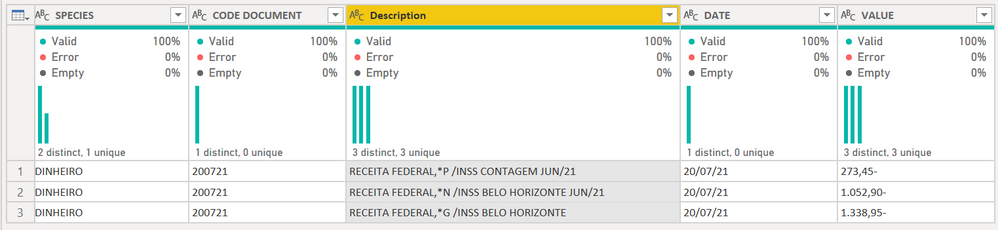
Here is what it does:
- Adds a new column. If [Account] = " " (a space) then pull the Description 2 coluimn, otherwise return null. You may need to change the space to a blank "" or null depending on your real data. Pasting into the forum can mess up blanks and nulls.
- In the new column, right-click and Fill Up.
- Filter the Account column to remove the blank/null/whatever.
- Merge the two Description columns by clicking on both, right-click then Merge. Pick a delimiter fi you want.
- Get rid of whatever else you want.
How to use M code provided in a blank query:
1) In Power Query, select New Source, then Blank Query
2) On the Home ribbon, select "Advanced Editor" button
3) Remove everything you see, then paste the M code I've given you in that box.
4) Press Done
5) See this article if you need help using this M code in your model.
Did I answer your question? Mark my post as a solution!
Did my answers help arrive at a solution? Give it a kudos by clicking the Thumbs Up!
DAX is for Analysis. Power Query is for Data Modeling
Proud to be a Super User!
MCSA: BI Reporting
- Mark as New
- Bookmark
- Subscribe
- Mute
- Subscribe to RSS Feed
- Permalink
- Report Inappropriate Content
@renatopnovaes How about:
let
    Source = Table.FromRows(Json.Document(Binary.Decompress(Binary.FromText("pdBBDoIwEAXQq0y6NFVKkSDLUkaowY5p0YWE07jwYFzMiiw0QRN192eS+XmZrmPeaKICtEPGWWlsjcZRiA41mlbBFkt0qgkbKUQm4zFEIoseMUv4Ol2ynncMwkyFR3dSw3W43EsWB4iM9R402VZVuIfd0U6XM20w9vwnilcilTwX7012MhXYENTkzDng8GsZ/EBLkg3PP7yrmqU918Erqr8B", BinaryEncoding.Base64), Compression.Deflate)), let _t = ((type nullable text) meta [Serialized.Text = true]) in type table [ACCOUNT = _t, SPECIES = _t, DESCRIPTION = _t, #"CODE DOCUMENT" = _t, DATE = _t, VALUE = _t]),
    #"Changed Type" = Table.TransformColumnTypes(Source,{{"ACCOUNT", type text}, {"SPECIES", type text}, {"DESCRIPTION", type text}, {"CODE DOCUMENT", Int64.Type}, {"DATE", type text}, {"VALUE", type text}}),
    #"Added Index" = Table.AddIndexColumn(#"Changed Type", "Index", 1, 1, Int64.Type),
    #"Added Custom" = Table.AddColumn(#"Added Index", "Custom", each Number.RoundUp([Index]/2)),
    Odds = Table.SelectRows(#"Added Custom", each Number.IsOdd([Index])),
    Evens = Table.SelectRows(#"Added Custom", each Number.IsEven([Index])),
    Merged = Table.NestedJoin(Odds,{"Custom"},Evens,{"Custom"},"NewColumn",JoinKind.LeftOuter),
    #"Expanded NewColumn" = Table.ExpandTableColumn(Merged, "NewColumn", {"DESCRIPTION"}, {"NewColumn.DESCRIPTION"}),
    #"Merged Columns" = Table.CombineColumns(#"Expanded NewColumn",{"DESCRIPTION", "NewColumn.DESCRIPTION"},Combiner.CombineTextByDelimiter("", QuoteStyle.None),"Merged"),
    #"Removed Columns" = Table.RemoveColumns(#"Merged Columns",{"Index", "Custom"}),
    #"Renamed Columns" = Table.RenameColumns(#"Removed Columns",{{"Merged", "DESCRIPTION"}})
in
    #"Renamed Columns"
Follow on LinkedIn
@ me in replies or I'll lose your thread!!!
Instead of a Kudo, please vote for this idea
Become an expert!: Enterprise DNA
External Tools: MSHGQM
YouTube Channel!: Microsoft Hates Greg
Latest book!: DAX For Humans
DAX is easy, CALCULATE makes DAX hard...
- Mark as New
- Bookmark
- Subscribe
- Mute
- Subscribe to RSS Feed
- Permalink
- Report Inappropriate Content
@renatopnovaes How about:
let
    Source = Table.FromRows(Json.Document(Binary.Decompress(Binary.FromText("pdBBDoIwEAXQq0y6NFVKkSDLUkaowY5p0YWE07jwYFzMiiw0QRN192eS+XmZrmPeaKICtEPGWWlsjcZRiA41mlbBFkt0qgkbKUQm4zFEIoseMUv4Ol2ynncMwkyFR3dSw3W43EsWB4iM9R402VZVuIfd0U6XM20w9vwnilcilTwX7012MhXYENTkzDng8GsZ/EBLkg3PP7yrmqU918Erqr8B", BinaryEncoding.Base64), Compression.Deflate)), let _t = ((type nullable text) meta [Serialized.Text = true]) in type table [ACCOUNT = _t, SPECIES = _t, DESCRIPTION = _t, #"CODE DOCUMENT" = _t, DATE = _t, VALUE = _t]),
    #"Changed Type" = Table.TransformColumnTypes(Source,{{"ACCOUNT", type text}, {"SPECIES", type text}, {"DESCRIPTION", type text}, {"CODE DOCUMENT", Int64.Type}, {"DATE", type text}, {"VALUE", type text}}),
    #"Added Index" = Table.AddIndexColumn(#"Changed Type", "Index", 1, 1, Int64.Type),
    #"Added Custom" = Table.AddColumn(#"Added Index", "Custom", each Number.RoundUp([Index]/2)),
    Odds = Table.SelectRows(#"Added Custom", each Number.IsOdd([Index])),
    Evens = Table.SelectRows(#"Added Custom", each Number.IsEven([Index])),
    Merged = Table.NestedJoin(Odds,{"Custom"},Evens,{"Custom"},"NewColumn",JoinKind.LeftOuter),
    #"Expanded NewColumn" = Table.ExpandTableColumn(Merged, "NewColumn", {"DESCRIPTION"}, {"NewColumn.DESCRIPTION"}),
    #"Merged Columns" = Table.CombineColumns(#"Expanded NewColumn",{"DESCRIPTION", "NewColumn.DESCRIPTION"},Combiner.CombineTextByDelimiter("", QuoteStyle.None),"Merged"),
    #"Removed Columns" = Table.RemoveColumns(#"Merged Columns",{"Index", "Custom"}),
    #"Renamed Columns" = Table.RenameColumns(#"Removed Columns",{{"Merged", "DESCRIPTION"}})
in
    #"Renamed Columns"
Follow on LinkedIn
@ me in replies or I'll lose your thread!!!
Instead of a Kudo, please vote for this idea
Become an expert!: Enterprise DNA
External Tools: MSHGQM
YouTube Channel!: Microsoft Hates Greg
Latest book!: DAX For Humans
DAX is easy, CALCULATE makes DAX hard...
- Mark as New
- Bookmark
- Subscribe
- Mute
- Subscribe to RSS Feed
- Permalink
- Report Inappropriate Content
You can try this quick pattern @renatopnovaes
let
    Source = Table.FromRows(Json.Document(Binary.Decompress(Binary.FromText("pdBBDoIwEAXQq0y6NFVKkSDLUkaowY5p0YWE07jwYFzMiiw0QRN192eS+XmZrmPeaKICtEPGWWlsjcZRiA41mlbBFkt0qgkbKUQm4zFEIoseMUv4Ol2ynncMwkyFR3dSw3W43EsWB4iM9R402VZVuIfd0U6XM20w9vwnilcilTwX7012MhXYENTkzDng8GsZ/EBLkg3PP7yrmqU918Erqr8B", BinaryEncoding.Base64), Compression.Deflate)), let _t = ((type nullable text) meta [Serialized.Text = true]) in type table [ACCOUNT = _t, SPECIES = _t, DESCRIPTION = _t, #"CODE DOCUMENT" = _t, DATE = _t, VALUE = _t]),
    #"Added Custom" = Table.AddColumn(Source, "Description 2", each if [ACCOUNT] = " " then [DESCRIPTION] else null),
    #"Filled Up" = Table.FillUp(#"Added Custom",{"Description 2"}),
    #"Merged Columns" = Table.CombineColumns(#"Filled Up",{"DESCRIPTION", "Description 2"},Combiner.CombineTextByDelimiter(",", QuoteStyle.None),"Description"),
    #"Filtered Rows" = Table.SelectRows(#"Merged Columns", each ([ACCOUNT] = "SICOOB CRE")),
    #"Reordered Columns" = Table.ReorderColumns(#"Filtered Rows",{"ACCOUNT", "SPECIES", "CODE DOCUMENT", "Description", "DATE", "VALUE"})
in
    #"Reordered Columns"
It returns this.
Here is what it does:
- Adds a new column. If [Account] = " " (a space) then pull the Description 2 coluimn, otherwise return null. You may need to change the space to a blank "" or null depending on your real data. Pasting into the forum can mess up blanks and nulls.
- In the new column, right-click and Fill Up.
- Filter the Account column to remove the blank/null/whatever.
- Merge the two Description columns by clicking on both, right-click then Merge. Pick a delimiter fi you want.
- Get rid of whatever else you want.
How to use M code provided in a blank query:
1) In Power Query, select New Source, then Blank Query
2) On the Home ribbon, select "Advanced Editor" button
3) Remove everything you see, then paste the M code I've given you in that box.
4) Press Done
5) See this article if you need help using this M code in your model.
Did I answer your question? Mark my post as a solution!
Did my answers help arrive at a solution? Give it a kudos by clicking the Thumbs Up!
DAX is for Analysis. Power Query is for Data Modeling
Proud to be a Super User!
MCSA: BI Reporting- Mark as New
- Bookmark
- Subscribe
- Mute
- Subscribe to RSS Feed
- Permalink
- Report Inappropriate Content
@edhans quicker
Follow on LinkedIn
@ me in replies or I'll lose your thread!!!
Instead of a Kudo, please vote for this idea
Become an expert!: Enterprise DNA
External Tools: MSHGQM
YouTube Channel!: Microsoft Hates Greg
Latest book!: DAX For Humans
DAX is easy, CALCULATE makes DAX hard...
- Mark as New
- Bookmark
- Subscribe
- Mute
- Subscribe to RSS Feed
- Permalink
- Report Inappropriate Content
Depends on the dataset size. Merging a table against itself @Greg_Deckler can be super slow with thousands of records. There is a better but more complex way to do that if necessary with a List added offset by 1 as a new column. But for this, thie Fill Up seemed to work well give it was just one field that was needed, and I don't know of any performance issues on Fill Up over thousands of records.
Did I answer your question? Mark my post as a solution!
Did my answers help arrive at a solution? Give it a kudos by clicking the Thumbs Up!
DAX is for Analysis. Power Query is for Data Modeling
Proud to be a Super User!
MCSA: BI Reporting- Mark as New
- Bookmark
- Subscribe
- Mute
- Subscribe to RSS Feed
- Permalink
- Report Inappropriate Content
@edhans Oh, I was just saying that you were quicker than me to get your answer in!! 🙂 But, yes, you are correct in your reply as well!
Follow on LinkedIn
@ me in replies or I'll lose your thread!!!
Instead of a Kudo, please vote for this idea
Become an expert!: Enterprise DNA
External Tools: MSHGQM
YouTube Channel!: Microsoft Hates Greg
Latest book!: DAX For Humans
DAX is easy, CALCULATE makes DAX hard...
- Mark as New
- Bookmark
- Subscribe
- Mute
- Subscribe to RSS Feed
- Permalink
- Report Inappropriate Content
🤣🤣🤣
Ahh... my misunderstanding.
Did I answer your question? Mark my post as a solution!
Did my answers help arrive at a solution? Give it a kudos by clicking the Thumbs Up!
DAX is for Analysis. Power Query is for Data Modeling
Proud to be a Super User!
MCSA: BI Reporting
Helpful resources

Data Days 2026
Don't miss out on Data Days, June 15 through August 7. Learn Fabric, Power BI, SQL, AI and more.

Power BI Monthly Update - May 2026
Check out the May 2026 Power BI update to learn about new features.

Power BI DataViz World Championships - June 2026
A new Power BI DataViz World Championship is coming this June! Don't miss out on submitting your entry.

| User | Count |
|---|---|
| 4 | |
| 3 | |
| 3 | |
| 2 | |
| 2 |


| User | Count |
|---|---|
| 11 | |
| 9 | |
| 5 | |
| 5 | |
| 4 |


