

cancel
Showing results for 
Search instead for 
Did you mean: 

The Power BI Data Visualization World Championships is back! Get ahead of the game and start preparing now! Learn more

Reply
Anonymous
Not applicable

Comparing two Excel tables

Hi All,


I was looking for a way to have powerbi to compare two spreadsheets, hihlight the changed filed and be able to output only the changed fields from the cells data to a table visual.


Thanks


1 ACCEPTED SOLUTION
v-yanjiang-msft
Community Support
Community Support

Hi @Anonymous ,

If you want to show the changed fields in a visual, here's my solution.

Sample:

Table1

vkalyjmsft_0-1665733263358.png

Table2

vkalyjmsft_1-1665733282929.png

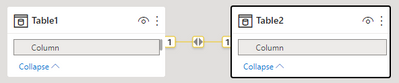
The two tables are related with the compared column.

vkalyjmsft_2-1665733424946.png

Create a measure.

Check =
IF ( MAX ( 'Table2'[Column] ) <> MAX ( 'Table1'[Column] ), 1, 0 )

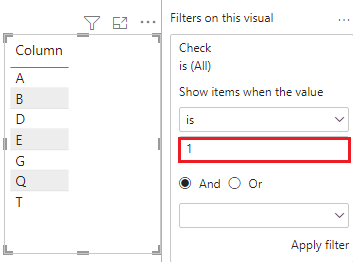
Put table2 in a visual, and put the measure in the visual filter, then set its value to 1.

vkalyjmsft_3-1665733601556.png

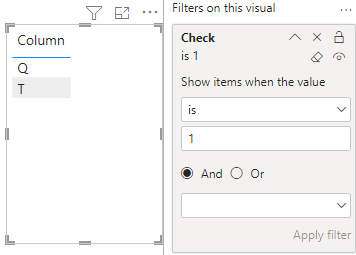
After click Apply filter, get the correct result.

vkalyjmsft_4-1665733673063.png

I attach my sample below for your reference.


Best Regards,
Community Support Team _ kalyj

If this post helps, then please consider Accept it as the solution to help the other members find it more quickly.


View solution in original post

2 REPLIES 2
v-yanjiang-msft
Community Support
Community Support

Hi @Anonymous ,

If you want to show the changed fields in a visual, here's my solution.

Sample:

Table1

vkalyjmsft_0-1665733263358.png

Table2

vkalyjmsft_1-1665733282929.png

The two tables are related with the compared column.

vkalyjmsft_2-1665733424946.png

Create a measure.

Check =
IF ( MAX ( 'Table2'[Column] ) <> MAX ( 'Table1'[Column] ), 1, 0 )

Put table2 in a visual, and put the measure in the visual filter, then set its value to 1.

vkalyjmsft_3-1665733601556.png

After click Apply filter, get the correct result.

vkalyjmsft_4-1665733673063.png

I attach my sample below for your reference.


Best Regards,
Community Support Team _ kalyj

If this post helps, then please consider Accept it as the solution to help the other members find it more quickly.


ImkeF
Community Champion
Community Champion

Hi @Anonymous ,
yes, that's called a full anti join: (4) Performing a full Anti Join in Power Query - Compare Two Tables - YouTube

Imke Feldmann (The BIccountant)

If you liked my solution, please give it a thumbs up. And if I did answer your question, please mark this post as a solution. Thanks!

How to integrate M-code into your solution -- How to get your questions answered quickly -- How to provide sample data -- Check out more PBI- learning resources here -- Performance Tipps for M-queries

Helpful resources

Announcements
Power BI DataViz World Championships

Power BI Dataviz World Championships

The Power BI Data Visualization World Championships is back! Get ahead of the game and start preparing now!

December 2025 Power BI Update Carousel

Power BI Monthly Update - December 2025

Check out the December 2025 Power BI Holiday Recap!

FabCon Atlanta 2026 carousel

FabCon Atlanta 2026

Join us at FabCon Atlanta, March 16-20, for the ultimate Fabric, Power BI, AI and SQL community-led event. Save $200 with code FABCOMM.