Don't miss your chance to take the Fabric Data Engineer (DP-600) exam for FREE! Find out how by watching the DP-600 session on-demand now through April 28th.
Learn moreJoin the FabCon + SQLCon recap series. Up next: Power BI, Real-Time Intelligence, IQ and AI, and Data Factory take center stage. All sessions are available on-demand after the live show. Register now
Hello Power Query experts,
I have hit a wall and have been struggling to get a solution.
So my requirement is to compare the list in a column with that of previous row and find out differences.
I tried creating an index column starting from 0 and one column from 1 but couldn't find a way out.
Can you help me achieve it?
If possible, can you help me with the comparios of structured table as well.
Attaching the file here for reference.
Hi @PC2790 ,
I see your idea is to group the dates, if you can, try grouping the IDs and then go and compare the changes in the dates. I'm sorry I've only done part of it, I'll spend more time researching the rest.
let
Source = Table.FromRows(Json.Document(Binary.Decompress(Binary.FromText("i45WMtQ31DcyMDJU0lEyVIrVQREwggoYoaswwqnCGCpgjK7FGElFLAA=", BinaryEncoding.Base64), Compression.Deflate)), let _t = ((type nullable text) meta [Serialized.Text = true]) in type table [#"Month " = _t, ID = _t]),
#"Changed Type" = Table.TransformColumnTypes(Source,{{"Month ", type date}, {"ID", Int64.Type}}),
#"Grouped Rows" = Table.Group(#"Changed Type", {"ID"}, {{"Count", each _, type table [#"Month "=nullable date, ID=nullable number]}}),
#"Added Custom" = Table.AddColumn(#"Grouped Rows", "Custom", each Table.AddIndexColumn([Count],"Index",1,1)),
#"Expanded Custom" = Table.ExpandTableColumn(#"Added Custom", "Custom", {"Month ", "Index"}, {"Month ", "Index"}),
#"Removed Columns" = Table.RemoveColumns(#"Expanded Custom",{"Count"}),
#"Added Custom1" = Table.AddColumn(#"Removed Columns", "Custom", each if [Index]=1 then Text.From([ID])&" added in this month" else null),
#"Sorted Rows" = Table.Sort(#"Added Custom1",{{"ID", Order.Ascending}, {"Month ", Order.Ascending}}),
#"Changed Type1" = Table.TransformColumnTypes(#"Sorted Rows",{{"Month ", type date}}),
#"Sorted Rows1" = Table.Sort(#"Changed Type1",{{"Month ", Order.Ascending}})
in
#"Sorted Rows1"
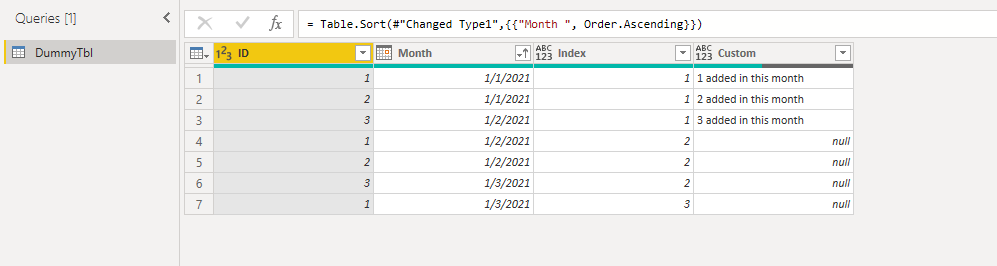
Best Regards,
Stephen Tao
If this post helps, then please consider Accept it as the solution to help the other members find it more quickly.
Thanks @Anonymous for attempting.
I appreciate the effort. However we are not quite there.
Yes the idea is to group and find out the difference.
I was able to figure out the added ones using the approach of grouping them and checking if the count is equal to 1. something like below:
each Table.RowCount(_), Int64.Type}}),each [Count]=1))
Still not able to figure out how to get the newly added ones.
I really thought there would be a way of comparing structured lists and structured tables using some inbuilt function or even custom function.
That would have been very helpful. I could not find it anywhere.
If you can let us know the final result, we can rework the approach. I think approach needs a change here.
Looaking for a solution like this:
| Month | Id | |
| 1/1/2021 | 1 | |
| 1/1/2021 | 2 | |
| 1/2/2021 | 1 | 3 added in this month |
| 1/2/2021 | 2 | 3 added in this month |
| 1/2/2021 | 3 | 3 added in this month |
| 1/3/2021 | 1 | 2 missing from this month |
| 1/3/2021 | 3 | 2 missing from this month |
My apologies to come back on this. Can you please post the final result which you want? I went through your expanation but I am unable to conceptualize the final table which you need. If you can post the final result table, that would be great.
Check out the April 2026 Power BI update to learn about new features.
If you have recently started exploring Fabric, we'd love to hear how it's going. Your feedback can help with product improvements.
A new Power BI DataViz World Championship is coming this June! Don't miss out on submitting your entry.
| User | Count |
|---|---|
| 3 | |
| 3 | |
| 2 | |
| 2 | |
| 2 |
| User | Count |
|---|---|
| 5 | |
| 4 | |
| 4 | |
| 4 | |
| 4 |