cancel
Showing results for 
Search instead for 
Did you mean: 

Next up in the FabCon + SQLCon recap series: The roadmap for Microsoft SQL and Maximizing Developer experiences in Fabric. All sessions are available on-demand after the live show. Register now

Reply
aabi
Helper I
Helper I

Compare a number with a range of numbers(from to) that exist in another table with no relation

Hi everyone!


I have stumpled upon a problem and I cannot think of any good solution!


My plan was to compare IP address of datacenters (range) with an IP that I have. If the IP that I have is within that range then to return me the datacenter name. 


Comparing IP is not possible so I converted all IP into a decimal number! The table I now have is as follows :
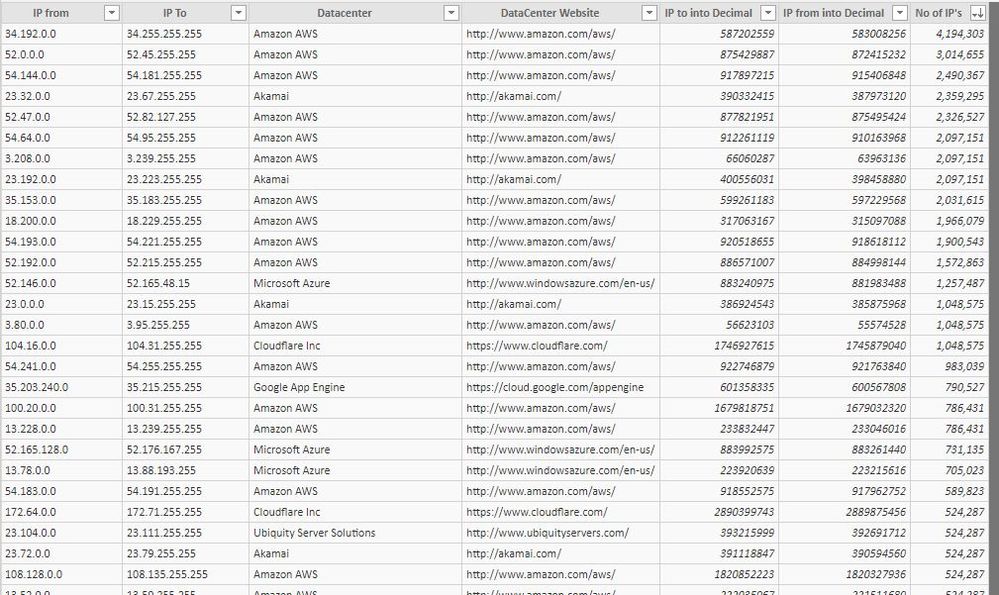
My list to compare withMy list to compare with

And I also have my IP's tables (this is a test table with random IP's) as follows :

Ip ListIp List


I converted the IP to decimal like I did in my datacenter list, now ideally I would like another column "Hosted By" which will be populated based on the datacenters list if the IP is within the range of the "IP From" and "IP to".

If its not within range just return "not a datacenter"


Is this even possible? As you see there are no relations in this table...

Any other ideas to make this work?


At the end of the day I want to see all the IP's that I have if they are on datacenters or unkown.... and I have ALOT of IP's to much...


I thought of creating a list with all the datacenter individual IP's (not as a range)... but the total is 95m different IP's, so the list will be huge and probably too cumbersome to use...


Looking forward to a smart solution to what I thought would be an easy problem....


1 ACCEPTED SOLUTION

Hi


Thanks for your idea but I to tell you the truth I did not even try it... My table (IP) is 500K... I believe that would have it would have been quite slow...


I have solved this using the below DAX formula and it also quite fast! It take less than a minute to populate around 500K IP's that I have to check.


Hosted by =
CALCULATE (
ALLSELECTED(datacenters[Datacenter]),
FILTER ( 'datacenters', 'datacenters'[IP from into Decimal] <= 'Ip''s'[IP into Decimal] && datacenters[IP to into Decimal] >= 'Ip''s'[IP into Decimal] ))

View solution in original post

3 REPLIES 3
Stachu
Community Champion
Community Champion

not sure about the performance on this one, but it should give the correct result

the idea is to filter the original table for each row and then return the first entry

you can do it with custom function (create blank query in M and paste the code below in the Advanced Editor), name it fnFilterIPs

(prmTable as table, prmDecimalIP as number) => let
        Source = prmTable,
        #"Filtered Rows" = Table.SelectRows(Source, each [IP from into decimal] <= prmDecimalIP and [IP to into decimal]>= prmDecimalIP),
        Datacenter = try #"Filtered Rows"{0}[Datacenter] otherwise "Unknown"
    in
        Datacenter

then you need to add new column to your Table2

fnFilterIPs(Table1, [IP to into decimal])

where Table1 is your first table


Did I answer your question? Mark my post as a solution!

Proud to be a Datanaut!


Did I answer your question? Mark my post as a solution!
Thank you for the kudos 🙂

Stachu,

Thanks for you reply. I tried your method of doing it with power quert but noticed it was extremely slow and table1 (the lookup table) would be loaded numerous times. Do you know how to avoid this?

Hi


Thanks for your idea but I to tell you the truth I did not even try it... My table (IP) is 500K... I believe that would have it would have been quite slow...


I have solved this using the below DAX formula and it also quite fast! It take less than a minute to populate around 500K IP's that I have to check.


Hosted by =
CALCULATE (
ALLSELECTED(datacenters[Datacenter]),
FILTER ( 'datacenters', 'datacenters'[IP from into Decimal] <= 'Ip''s'[IP into Decimal] && datacenters[IP to into Decimal] >= 'Ip''s'[IP into Decimal] ))

Helpful resources

Announcements
New to Fabric survey Carousel

New to Fabric Survey

If you have recently started exploring Fabric, we'd love to hear how it's going. Your feedback can help with product improvements.

Power BI DataViz World Championships carousel

Power BI DataViz World Championships - June 2026

A new Power BI DataViz World Championship is coming this June! Don't miss out on submitting your entry.

Join our Fabric User Panel

Join our Fabric User Panel

Share feedback directly with Fabric product managers, participate in targeted research studies and influence the Fabric roadmap.

March Power BI Update Carousel

Power BI Community Update - March 2026

Check out the March 2026 Power BI update to learn about new features.