cancel
Showing results for 
Search instead for 
Did you mean: 

July 28 - August 9 | Final Round of the Power BI Dataviz World Championships. This is your chance. Learn more

Reply
Anonymous
Not applicable

Combining two rows into one row (conditionally)

Hi all, 


I am trying to find a solution for the following and am wrecking my brain so any help is appreciated, I have two tables that look as follows:


Table 1 - Required:


Name   Exam           Required     

John   English        YES          

John   French         YES         


Table 2 - Obtained:

Name   Exam           Obtained   

John   English        YES               

John   German         YES


And what I want to end up with is this "combined" table:


Name   Exam           Required   Obtained   

John   English        YES        YES         note: the two rows have combined

John   French         YES        <null>

John   German         <null>     YES


Can anyone give me pointers? I am wrecking my brain trying to solve this.


Many thanks!


Jeroen


1 ACCEPTED SOLUTION
Nathaniel_C
Community Champion
Community Champion

Hi @Anonymous ,

PBIX Obtained


Appended the query, transposed the table, reordered the columns, merged the columns, split the columns by position, removed columns, then transposed table, and did clean up.


Let me know if you have any questions.

If this solves your issues, please mark it as the solution, so that others can find it easily. Kudos are nice too.
Nathaniel


Did I answer your question? Mark my post as a solution!

Proud to be a Super User!


View solution in original post

4 REPLIES 4
Nathaniel_C
Community Champion
Community Champion

Hi @Anonymous ,

PBIX Obtained


Appended the query, transposed the table, reordered the columns, merged the columns, split the columns by position, removed columns, then transposed table, and did clean up.


Let me know if you have any questions.

If this solves your issues, please mark it as the solution, so that others can find it easily. Kudos are nice too.
Nathaniel


Did I answer your question? Mark my post as a solution!

Proud to be a Super User!


Hope your brain recovers.Smiley Happy


Did I answer your question? Mark my post as a solution!

Proud to be a Super User!


Anonymous
Not applicable

Thanks for the quick response, let me have a look and I'll let you know 🙂 

Nathaniel_C
Community Champion
Community Champion

Hi @Anonymous ,

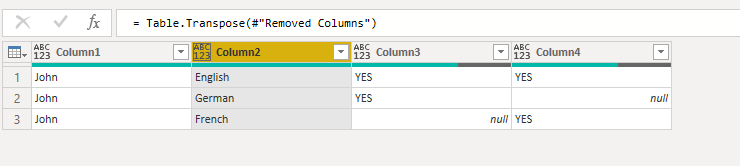
Here is your table. Will attach the PBIX in a couple.
Let me know if you have any questions.

If this solves your issues, please mark it as the solution, so that others can find it easily. Kudos are nice too.
Nathaniel


merge.PNG


let
    Source = Table.FromRows(Json.Document(Binary.Decompress(Binary.FromText("i45WUorViVbyS8xNVVBQcK1IzFVAAP+kksTMvNQUIBOsCkx45WfkgZTmpedkFmfAlEa6BiugAgwd7qlFuYl5Ckg6lGJjAQ==", BinaryEncoding.Base64), Compression.Deflate)), let _t = ((type text) meta [Serialized.Text = true]) in type table [#"Table 2 - Obtained:" = _t]),
    #"Changed Type" = Table.TransformColumnTypes(Source,{{"Table 2 - Obtained:", type text}}),
    #"Removed Blank Rows" = Table.SelectRows(#"Changed Type", each not List.IsEmpty(List.RemoveMatchingItems(Record.FieldValues(_), {"", null}))),
    #"Promoted Headers" = Table.PromoteHeaders(#"Removed Blank Rows", [PromoteAllScalars=true]),
    #"Changed Type1" = Table.TransformColumnTypes(#"Promoted Headers",{{"Name   Exam           Obtained   ", type text}}),
    #"Split Column by Positions" = Table.SplitColumn(#"Changed Type1", "Name   Exam           Obtained   ", Splitter.SplitTextByPositions({0, 7, 22}), {"Name   Exam           Obtained   .1", "Name   Exam           Obtained   .2", "Name   Exam           Obtained   .3"}),
    #"Changed Type2" = Table.TransformColumnTypes(#"Split Column by Positions",{{"Name   Exam           Obtained   .1", type text}, {"Name   Exam           Obtained   .2", type text}, {"Name   Exam           Obtained   .3", type text}}),
    #"Renamed Columns" = Table.RenameColumns(#"Changed Type2",{{"Name   Exam           Obtained   .1", "Name"}, {"Name   Exam           Obtained   .2", "Exam"}, {"Name   Exam           Obtained   .3", "Obtained"}}),
    #"Appended Query" = Table.Combine({#"Renamed Columns", Required}),
    #"Transposed Table" = Table.Transpose(#"Appended Query"),
    #"Reordered Columns" = Table.ReorderColumns(#"Transposed Table",{"Column1", "Column3", "Column2", "Column4"}),
    #"Merged Columns" = Table.CombineColumns(#"Reordered Columns",{"Column1", "Column3"},Combiner.CombineTextByDelimiter("", QuoteStyle.None),"Merged"),
    #"Split Column by Positions1" = Table.SplitColumn(#"Merged Columns", "Merged", Splitter.SplitTextByPositions({0, 7, 11}), {"Merged.1", "Merged.2", "Merged.3"}),
    #"Changed Type3" = Table.TransformColumnTypes(#"Split Column by Positions1",{{"Merged.1", type text}, {"Merged.2", type text}, {"Merged.3", type text}}),
    #"Removed Columns" = Table.RemoveColumns(#"Changed Type3",{"Merged.2", "Merged.3"}),
    #"Transposed Table1" = Table.Transpose(#"Removed Columns")
in
    #"Transposed Table1"


Did I answer your question? Mark my post as a solution!

Proud to be a Super User!


Helpful resources

Announcements
Fabric Community Sticker Design Challenge Barcelona Carousel

Fabric Community Sticker Challenge - Barcelona 2026

If you love stickers, then you will definitely want to check out our community sticker challenge, Barcelona edition!

July Power BI Update Carousel

Power BI Monthly Update - July 2026

Check out the July 2026 Power BI update to learn about new features.

Power BI DataViz World Championships carousel

Power BI DataViz World Championships - June 2026

A new Power BI DataViz World Championship is coming this June! Don't miss out on submitting your entry.