Get certified for free when you join Fabric Data Days 2026 and dive into Fabric, Power BI, SQL, AI, and other essential data skills.
Join nowTry your skills in the Power BI Dataviz World Championship! Round one ends June 26. Join now
I am not so familiar with M lang, and am straggling to solve the following problem in Power Query:
I have the table
TABLE1
| Date | Attribute | Value |
| 2023-02-01 | AA | A1 |
| 2023-02-01 | AA | A2 |
| 2023-02-01 | BB | B1 |
| 2023-02-02 | AA | A3 |
| 2023-02-03 | BB | B2 |
| 2023-02-03 | BB | B3 |
| 2023-02-04 | CC | C1 |
| 2023-02-06 | AA | A4 |
I need to combine (with ";" as separator) values in cells indicated above in italic so the only one row exist for every Date/Attribute combination.
In other words, the desired table should looks like this:
| Date | Attribute | Value |
| 2023-02-01 | AA | A1; A2 |
| 2023-02-01 | BB | B1 |
| 2023-02-02 | AA | A3 |
| 2023-02-03 | BB | B2; B3 |
| 2023-02-04 | CC | C1 |
| 2023-02-06 | AA | A4 |
Please help!
Solved! Go to Solution.
Hi,
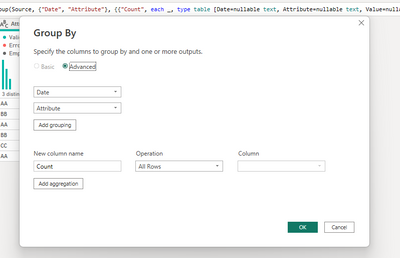
You have to group by
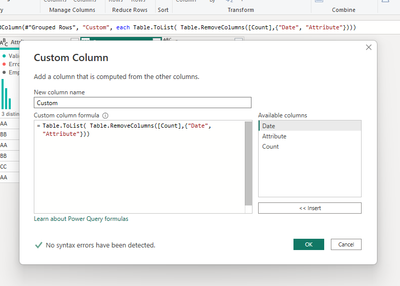
then add a custom column
Table.ToList( Table.RemoveColumns([Count],{"Date", "Attribute"}))
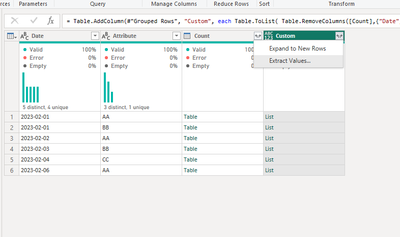
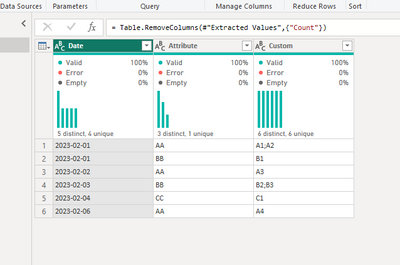
then extract values
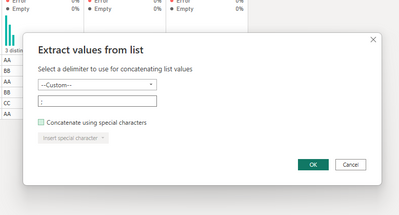
select your delimiter
and remove column count
If this post is useful to help you to solve your issue, consider giving the post a thumbs up and accepting it as a solution!
Thank you very much, @serpiva64 !!!
It turns much easier then I've tried to code with nested M functions.
Thanks once again for very helpful reply.
Hi,
You have to group by
then add a custom column
Table.ToList( Table.RemoveColumns([Count],{"Date", "Attribute"}))
then extract values
select your delimiter
and remove column count
If this post is useful to help you to solve your issue, consider giving the post a thumbs up and accepting it as a solution!
| User | Count |
|---|---|
| 4 | |
| 3 | |
| 2 | |
| 2 | |
| 1 |