cancel
Showing results for 
Search instead for 
Did you mean: 

The FabCon + SQLCon recap series starts April 14th at 8am Pacific. If you’re tracking where AI is going inside Fabric, this first session is a can't miss. Register now

Reply
JP8991
Kudo Collector
Kudo Collector

Column that Calculates Previous Step

Hello All,


I would like to create a calculated column in Power Query that calculates the previous step based on an ID.

Below is an example of what I am after with the "Previous Step" column being the end result.

IDRankStepPrevious Step
123451Step 1null
123452Step 2Step 1
123453Step 3Step 2
123454Step 4Step 3
123455Step 5Step 4
123456Step 6Step 5
123457Step 7Step 6
123458Step 8Step 7
123459Step 9Step 8


Any help would be greatly appreciated.

1 ACCEPTED SOLUTION

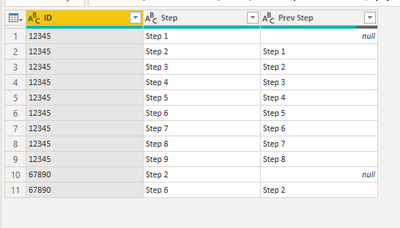
If that's what you want, which seems different from your initial example, just Group by ID and then add the shifted column as a custom aggregation within the Table.Group function:


let
    Source = Table.FromRows(Json.Document(Binary.Decompress(Binary.FromText("i45WMjQyNjFV0lEKLkktUDBUitVBEzLCFDLGFDLBFDLFFDLDFDLHFLLAFLIEC5mZW1gaoLoLRQhofCwA", BinaryEncoding.Base64), Compression.Deflate)), let _t = ((type nullable text) meta [Serialized.Text = true]) in type table [ID = _t, Step = _t]),
    #"Grouped Rows" = Table.Group(Source, {"ID"}, {
        {"Previous Step", each Table.FromColumns(
            Table.ToColumns(_) & {{null} & List.RemoveLastN([Step],1)},
            type table[ID=Int64.Type,Step=text, Prev Step=text]
        ),type table[ID=Int64.Type,Step=text, Prev Step=text]}
        }),
    #"Expanded Previous Step" = Table.ExpandTableColumn(#"Grouped Rows", "Previous Step", {"Step", "Prev Step"}, {"Step", "Prev Step"})
in
    #"Expanded Previous Step"


Before

ronrsnfld_0-1643766517302.png

After

ronrsnfld_1-1643766555341.png


View solution in original post

5 REPLIES 5
CNENFRNL
Community Champion
Community Champion

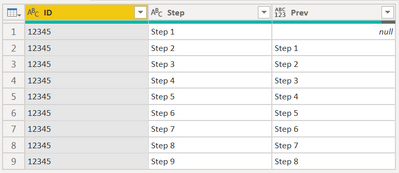
Column Rank is redundant. Mount a slighted-tweaked column to the original table, that's enough,

let
    Source = Table.FromRows(Json.Document(Binary.Decompress(Binary.FromText("i45WMjQyNjFV0lEKLkktUDBUitVBEzLCFDLGFDLBFDLFFDLDFDLHFLLAFLJUio0FAA==", BinaryEncoding.Base64), Compression.Deflate)), let _t = ((type nullable text) meta [Serialized.Text = true]) in type table [ID = _t, Step = _t]),
    Cols = Table.ToColumns(Source),
    #"Added Column" = Table.FromColumns(Cols & {{null} & List.RemoveLastN(List.Last(Cols),1)}, Table.ColumnNames(Source) & {"Prev"})
in
    #"Added Column"

CNENFRNL_0-1643727768203.png


Thanks to the great efforts by MS engineers to simplify syntax of DAX! Most beginners are SUCCESSFULLY MISLED to think that they could easily master DAX; but it turns out that the intricacy of the most frequently used RANKX() is still way beyond their comprehension!

DAX is simple, but NOT EASY!

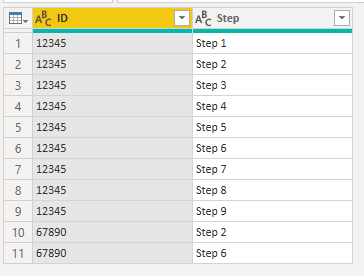
Close but I need it by ID.

Please see the below code, you will notice I added a new ID, which should show null for Step 2 and Step 2 for Step 6 in the Prev column.

let
    Source = Table.FromRows(Json.Document(Binary.Decompress(Binary.FromText("i45WMjQyNjFV0lEKLkktUDBUitVBEzLCFDLGFDLBFDLFFDLDFDLHFLLAFLIEC5mZW1gaoLoLRQhofCwA", BinaryEncoding.Base64), Compression.Deflate)), let _t = ((type nullable text) meta [Serialized.Text = true]) in type table [ID = _t, Step = _t]),
    Cols = Table.ToColumns(Source),
    #"Added Column" = Table.FromColumns(Cols & {{null} & List.RemoveLastN(List.Last(Cols),1)}, Table.ColumnNames(Source) & {"Prev"})
in
    #"Added Column"


If that's what you want, which seems different from your initial example, just Group by ID and then add the shifted column as a custom aggregation within the Table.Group function:


let
    Source = Table.FromRows(Json.Document(Binary.Decompress(Binary.FromText("i45WMjQyNjFV0lEKLkktUDBUitVBEzLCFDLGFDLBFDLFFDLDFDLHFLLAFLIEC5mZW1gaoLoLRQhofCwA", BinaryEncoding.Base64), Compression.Deflate)), let _t = ((type nullable text) meta [Serialized.Text = true]) in type table [ID = _t, Step = _t]),
    #"Grouped Rows" = Table.Group(Source, {"ID"}, {
        {"Previous Step", each Table.FromColumns(
            Table.ToColumns(_) & {{null} & List.RemoveLastN([Step],1)},
            type table[ID=Int64.Type,Step=text, Prev Step=text]
        ),type table[ID=Int64.Type,Step=text, Prev Step=text]}
        }),
    #"Expanded Previous Step" = Table.ExpandTableColumn(#"Grouped Rows", "Previous Step", {"Step", "Prev Step"}, {"Step", "Prev Step"})
in
    #"Expanded Previous Step"


Before

ronrsnfld_0-1643766517302.png

After

ronrsnfld_1-1643766555341.png


BA_Pete
Super User
Super User

Hi @JP8991 ,

Paste this over the default code in a new blank query to follow the steps I took:


let
    Source = Table.FromRows(Json.Document(Binary.Decompress(Binary.FromText("TYo7DoAwFMOugt7cpf/2HIxVR7YKMcD9gSFKhkiR7THMh5iyOfPf9vu4tv+cz1o2HW2ADczUR+DIUH0CTgzVZ+DMUH0BLgzVV+DKUH0DbgzVd+DOcM4X", BinaryEncoding.Base64), Compression.Deflate)), let _t = ((type nullable text) meta [Serialized.Text = true]) in type table [ID = _t, Rank = _t, Step = _t, #"Previous Step" = _t]),
    chgTypes = Table.TransformColumnTypes(Source,{{"ID", Int64.Type}, {"Rank", Int64.Type}, {"Step", type text}, {"Previous Step", type text}}),
    #"addRank-1" = Table.AddColumn(chgTypes, "rank-1", each [Rank] - 1),
    mergeOnSelf = Table.NestedJoin(#"addRank-1", {"rank-1"}, #"addRank-1", {"Rank"}, "Added Custom", JoinKind.LeftOuter),
    expandStepCol = Table.ExpandTableColumn(mergeOnSelf, "Added Custom", {"Step"}, {"Step.1"}),
    sortRank = Table.Sort(expandStepCol,{{"Rank", Order.Ascending}})
in
    sortRank


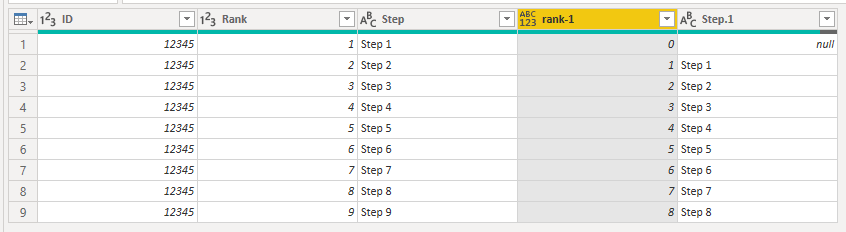
Summary:

1) Create [rank-1] column just subtracting 1 from the [Rank] column (assuming this order is what you are basing the 'previous step' evaluation on).

2) Merge table on itself - LEFT OUTER on [rank-1] = [Rank]

3) Expand the [Step] column from the nested tables.


This gives me the following output:
BA_Pete_0-1643706961326.png


Pete


Now accepting Kudos! If my post helped you, why not give it a thumbs-up?

Proud to be a Datanaut!


serpiva64
Solution Sage
Solution Sage

Hi,

this are the passages you can apply to obtain your result:


let
Source = Table.FromRows(Json.Document(Binary.Decompress(Binary.FromText("TYo7DoAwFMOugt7cpf/2HIxVR7YKMcD9gSFKhkiR7THMh5iyOfPf9vu4tv+cz1o2HW2ADczUR+DIUH0CTgzVZ+DMUH0BLgzVV+DKUH0DbgzVd+DOcM4X", BinaryEncoding.Base64), Compression.Deflate)), let _t = ((type nullable text) meta [Serialized.Text = true]) in type table [ID = _t, Rank = _t, Step = _t, #"Previous Step" = _t]),
#"Changed Type" = Table.TransformColumnTypes(Source,{{"ID", Int64.Type}, {"Rank", Int64.Type}, {"Step", type text}, {"Previous Step", type text}}),
#"Added Custom" = Table.AddColumn(#"Changed Type", "Custom", each [Rank]-1),
#"Changed Type1" = Table.TransformColumnTypes(#"Added Custom",{{"Custom", type text}}),
#"Added Conditional Column" = Table.AddColumn(#"Changed Type1", "Custom.1", each if [Custom] = "0" then null else "Step "& [Custom]),
#"Changed Type2" = Table.TransformColumnTypes(#"Added Conditional Column",{{"Custom.1", type text}})
in
#"Changed Type2"

Helpful resources

Announcements
New to Fabric survey Carousel

New to Fabric Survey

If you have recently started exploring Fabric, we'd love to hear how it's going. Your feedback can help with product improvements.

Power BI DataViz World Championships carousel

Power BI DataViz World Championships - June 2026

A new Power BI DataViz World Championship is coming this June! Don't miss out on submitting your entry.

Join our Fabric User Panel

Join our Fabric User Panel

Share feedback directly with Fabric product managers, participate in targeted research studies and influence the Fabric roadmap.

March Power BI Update Carousel

Power BI Community Update - March 2026

Check out the March 2026 Power BI update to learn about new features.