cancel
Showing results for 
Search instead for 
Did you mean: 

The Power BI Data Visualization World Championships is back! Get ahead of the game and start preparing now! Learn more

Reply
LyndonTomas
Frequent Visitor

Column Sequence

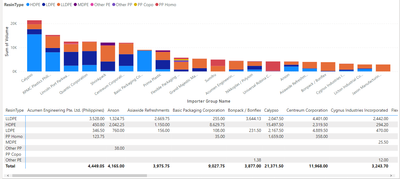
Hi! Is there are way for the columns to be the same as the sequence of the stacked columns above?

LyndonTomas_0-1689929014366.png

Column Name(s):

Volume - Y axis

Importer Group -  X axis

Resin Type - Legend


I've just duiplicated the column chart and the just converted it into a matrix below, but is there a way for the column for the stacked column chart would be the same of the columns in the matrix?

1 ACCEPTED SOLUTION
rubayatyasmin
Super User
Super User

Hi, @LyndonTomas 


The question is not clear to me. but I think you are asking for same serial in the matrix as X axis (importer group). You need to adjust your column names as like the Stack chart. meaning you need to put calypso column as the first column instead of Acumen eng. and so so. 


rubayatyasmin_0-1689517080227.png


Did I answer your question? Mark my post as a solution!super-user-logo

Proud to be a Super User!


View solution in original post

2 REPLIES 2
BA_Pete
Super User
Super User

Hi @LyndonTomas 


The simplest way of ordering dimensions is to add a fixed Sort Key column to your dimension table, then, in the Data view, select your dimension column, select Sort By, then select your Sort Key column. However, this will always fix the dimension values in the same order, regardless of dynamic performance.


In order to get them to order by dynamic performance, you'll need to add a calculated rank column in your dimension table based on your required sort value (Sum of Volume here, I think) to act as a Sort Key.

Here's a thread that has a number of techniques to add a calculated rank column:

https://community.fabric.microsoft.com/t5/Desktop/Create-calculated-Rank-column-in-Powerbi/td-p/3022... 


In addtion to any of the techniques above, I would also advise adding a very small random number to your value totals that will be used to calculate the rank. This will ensure that there are no ties as neither Dense nor Skip tie resolution will work correctly for a Sort Key rank column.


Pete


Now accepting Kudos! If my post helped you, why not give it a thumbs-up?

Proud to be a Datanaut!


rubayatyasmin
Super User
Super User

Hi, @LyndonTomas 


The question is not clear to me. but I think you are asking for same serial in the matrix as X axis (importer group). You need to adjust your column names as like the Stack chart. meaning you need to put calypso column as the first column instead of Acumen eng. and so so. 


rubayatyasmin_0-1689517080227.png


Did I answer your question? Mark my post as a solution!super-user-logo

Proud to be a Super User!


Helpful resources

Announcements
Power BI DataViz World Championships

Power BI Dataviz World Championships

The Power BI Data Visualization World Championships is back! Get ahead of the game and start preparing now!

December 2025 Power BI Update Carousel

Power BI Monthly Update - December 2025

Check out the December 2025 Power BI Holiday Recap!

FabCon Atlanta 2026 carousel

FabCon Atlanta 2026

Join us at FabCon Atlanta, March 16-20, for the ultimate Fabric, Power BI, AI and SQL community-led event. Save $200 with code FABCOMM.