Join us at FabCon Atlanta from March 16 - 20, 2026, for the ultimate Fabric, Power BI, AI and SQL community-led event. Save $200 with code FABCOMM.
Register now!The Power BI Data Visualization World Championships is back! Get ahead of the game and start preparing now! Learn more
Hello,
Hello,
I'm trying to add a column "MaxPerMonth" where i have the value max of the numberAlarms per month.
I've tried to use the function MAXX but i didn't get the required result, can you please help me?
| Date | NumberAlarms | MaxPerMonth |
| 01-01-2016 | 20 | 30 |
| 02-01-2016 | 21 | 30 |
| 03-01-2016 | 20 | 30 |
| 04-01-2016 | 30 | 30 |
| 05-01-2016 | 15 | 30 |
| 06-01-2016 | 1 | 30 |
| 07-01-2016 | 2 | 30 |
| 08-01-2016 | 3 | 30 |
| 09-01-2016 | 5 | 30 |
| 10-01-2016 | 6 | 30 |
| 20-02-2016 | 58 | 60 |
| 21-02-2016 | 60 | 60 |
| 22-02-2016 | 2 | 60 |
| 23-02-2016 | 3 | 60 |
| 24-02-2016 | 1 | 60 |
| 25-02-2016 | 5 | 60 |
| 15-03-2016 | 1 | 5 |
| 16-03-2016 | 5 | 5 |
| 17-03-2016 | 1 | 5 |
| 18-03-2016 | 2 | 5
|
Thanks in advance for your help.
Mariana
Solved! Go to Solution.
Hi @Sea_and_Anne,
Firstly, create a new column named yearmonth using the following formula.
yearmonth = FORMAT(Table[Date],"yyyy/mm")
Secondly, create a new column named Maxpermonth using the following formula.
Maxpermonth = CALCULATE(MAX(Table[NumberAlarms]),FILTER(Table,Table[yearmonth]=EARLIER(Table[yearmonth])))
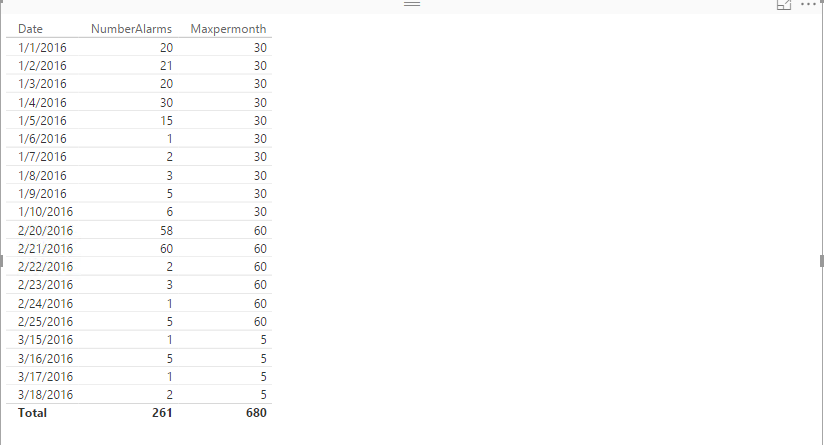
You will get your desired result as shown in the following screenshot. For more details, please review the example in the attached PBIX file.
Thanks,
Lydia Zhang
Hi @Sea_and_Anne,
Firstly, create a new column named yearmonth using the following formula.
yearmonth = FORMAT(Table[Date],"yyyy/mm")
Secondly, create a new column named Maxpermonth using the following formula.
Maxpermonth = CALCULATE(MAX(Table[NumberAlarms]),FILTER(Table,Table[yearmonth]=EARLIER(Table[yearmonth])))
You will get your desired result as shown in the following screenshot. For more details, please review the example in the attached PBIX file.
Thanks,
Lydia Zhang
The Power BI Data Visualization World Championships is back! Get ahead of the game and start preparing now!
| User | Count |
|---|---|
| 17 | |
| 9 | |
| 8 | |
| 7 | |
| 6 |