This time we’re going bigger than ever. Fabric, Power BI, SQL, AI and more. We're covering it all. You won't want to miss it.
Learn moreJoin the FabCon + SQLCon recap series. Up next: Power BI, Real-Time Intelligence, IQ and AI, and Data Factory take center stage. All sessions are available on-demand after the live show. Register now
Hi,
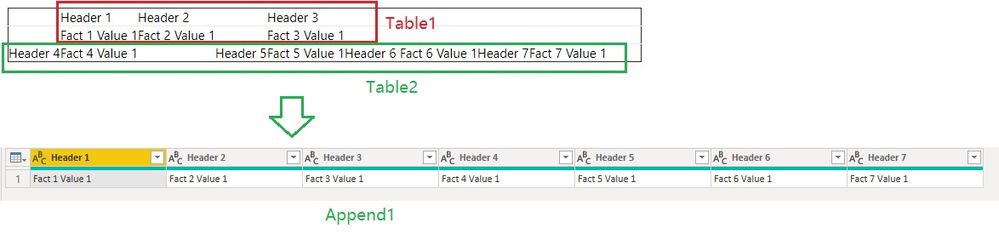
I am looking to reshape some messy data from a PDF table as in the example below, to create the table below that.
I can perform this transition (i think) with many, many, many applied steps. Though if there are specific techniques that produce a more efficient solution I would be keen to see them, or if anyone knows of any resources online that I can research into this I would be keen to upskill.
| Header 1 | Header 2 | Header 3 | |||||||
| Fact 1 Value 1 | Fact 2 Value 1 | Fact 3 Value 1 | |||||||
| Header 4 | Fact 4 Value 1 | Header 5 | Fact 5 Value 1 | Header 6 | Fact 6 Value 1 | Header 7 | Fact 7 Value 1 |
| Header 1 | Header 2 | Header 3 | Header 4 | Header 5 | Header 6 | Header 7 |
| Fact 1 Value | Fact 2 Value | Fact 3 Value | Fact 4 Value | Fact 5 Value | Fact 6 Value | Fact 7 Value |
Thank you
Tom
Solved! Go to Solution.
Hi @tomshaw83
I'm not sure if my solution is more efficient than yours. But my solution is all processed with the user interface without needing to modify the M codes in Advanced editor. You can download the attached pbix file to check specific steps.
To make it clearer, I deal with the data in separate queries and combine them at the end.
Hope this helps.
Community Support Team _ Jing
If this post helps, please Accept it as the solution to help other members find it.
Thank you, some useful techniques in your solution
Hi @tomshaw83
I'm not sure if my solution is more efficient than yours. But my solution is all processed with the user interface without needing to modify the M codes in Advanced editor. You can download the attached pbix file to check specific steps.
To make it clearer, I deal with the data in separate queries and combine them at the end.
Hope this helps.
Community Support Team _ Jing
If this post helps, please Accept it as the solution to help other members find it.
Check out the April 2026 Power BI update to learn about new features.
If you have recently started exploring Fabric, we'd love to hear how it's going. Your feedback can help with product improvements.
A new Power BI DataViz World Championship is coming this June! Don't miss out on submitting your entry.
| User | Count |
|---|---|
| 3 | |
| 3 | |
| 3 | |
| 2 | |
| 2 |