Get Fabric or SQL Certified for Free.
Get certified for free when you join Fabric Data Days 2026 and dive into Fabric, Power BI, SQL, AI, and other essential data skills.
Join now- Power BI forums
- Get Help with Power BI
- Desktop
- Service
- Report Server
- Power Query
- Mobile Apps
- Developer
- DAX Commands and Tips
- Custom Visuals Development Discussion
- Health and Life Sciences
- Power BI Spanish forums
- Translated Spanish Desktop
- Training and Consulting
- Instructor Led Training
- Dashboard in a Day for Women, by Women
- Galleries
- Data Stories Gallery
- Themes Gallery
- Contests Gallery
- QuickViz Gallery
- Quick Measures Gallery
- Visual Calculations Gallery
- Fabric Apps Gallery
- Notebook Gallery
- Translytical Task Flow Gallery
- TMDL Gallery
- R Script Showcase
- Webinars and Video Gallery
- Ideas
- Custom Visuals Ideas (read-only)
- Issues
- Issues
- Events
- Upcoming Events
July 28 - August 9 | Final Round of the Power BI Dataviz World Championships. This is your chance. Learn more
- Power BI forums
- Forums
- Get Help with Power BI
- Power Query
- Re: Channel Advisor API Connection with auth key c...
- Subscribe to RSS Feed
- Mark Topic as New
- Mark Topic as Read
- Float this Topic for Current User
- Bookmark
- Subscribe
- Printer Friendly Page

- Mark as New
- Bookmark
- Subscribe
- Mute
- Subscribe to RSS Feed
- Permalink
- Report Inappropriate Content
Channel Advisor API Connection with auth key creation
Afternoon All!
Gonna be honest i'm racking my **bleep** brains out with this one but i'm getting no where.
I tested a rest function in Postman and all works brilliant returning the data i need. unfortunately i want to build this into a power query now.
to generate a Oauth2 key i need to send a refresh key with username and password in order to get a return , then use the vaule it returns to request a report.
I'm hoping some wise individual will have at least some idea how to pull this off as i cannot i've tried using the web API fuction built into PQ but its just doesn't allow me to do anything. any ideas?
Thanks in advance 🙂
Solved! Go to Solution.


- Mark as New
- Bookmark
- Subscribe
- Mute
- Subscribe to RSS Feed
- Permalink
- Report Inappropriate Content
Great! Cheers!
The response is in Json format, so you just need to add a step at the end of the custom function to extract access_token value. Don't forget to add a comma at the end of previous response step.
.....................
 response = Json.Document(Web.Contents(.......................)),
 access_token = response[access_token]
in
access_token
Jing

- Mark as New
- Bookmark
- Subscribe
- Mute
- Subscribe to RSS Feed
- Permalink
- Report Inappropriate Content
I am trying to use everybody's code snippets to connect to Channel Advisor's API. This part works:
() =>
let
    url = "https://api.channeladvisor.com/oauth2/token",
    headers = [#"Authorization"="Basic xxxxxxx="],
    postBody = [
        grant_type = "refresh_token",
        refresh_token = "xxxxxxxx"
        ],
    response = Json.Document(Web.Contents(url,
        [
            Headers = headers,
            Content = Text.ToBinary(Uri.BuildQueryString(postBody))
        ])),
    access_token = response[access_token]
in
    access_token
What doesn't work is this part:
let
    Source = Json.Document(Web.Contents("https://api.channeladvisor.com/oauth2/token",
                       [Headers=[#"Authorization"="bearer " & GetAccessToken(),
                                 #"accept" = "text/plain",
                                 #"Content-Type"="application/json"],

                        ManualStatusHandling = {404, 400}]))

in
    Source
I have tried it with "Bearer" vs. "bearer" and a few other things, but either I get a 400 error OR the Power Query output simply gives me a small table that says "error | invalid client".
What am I doing wrong?


- Mark as New
- Bookmark
- Subscribe
- Mute
- Subscribe to RSS Feed
- Permalink
- Report Inappropriate Content
hi @Anonymous ,
Could you try to replace your last query with:
let
    Source = Json.Document(Web.Contents("search_url",
                       [Headers=[#"Authorization"= GetAccessToken(),
                                 #"accept" = "text/plain",
                                 #"Content-Type"="application/json"],

                        ManualStatusHandling = {404, 400}]))

in
Source- Mark as New
- Bookmark
- Subscribe
- Mute
- Subscribe to RSS Feed
- Permalink
- Report Inappropriate Content
Thank you for responding. If I make that change, I get this error:
DataSource.Error: The remote name could not be resolved: 'search_url'
Details:
search_url- Mark as New
- Bookmark
- Subscribe
- Mute
- Subscribe to RSS Feed
- Permalink
- Report Inappropriate Content
Replace search_url in the query with your url: https://api.channeladvisor.com/oauth2/token
- Mark as New
- Bookmark
- Subscribe
- Mute
- Subscribe to RSS Feed
- Permalink
- Report Inappropriate Content
That produces the "error | invalid client" response.

- Mark as New
- Bookmark
- Subscribe
- Mute
- Subscribe to RSS Feed
- Permalink
- Report Inappropriate Content
I really only want order information at this point. When I tried it with https://api.channeladvisor.com/v1/orders as the URL, I got a different error:
Expression.Error: The 'Authorization' header is only supported when connecting anonymously. These headers can be used with all authentication types: Accept, Accept-Charset, Accept-Encoding, Accept-Language, Cache-Control, Content-Type, If-Modified-Since, Prefer, Range, Referer- Mark as New
- Bookmark
- Subscribe
- Mute
- Subscribe to RSS Feed
- Permalink
- Report Inappropriate Content
What is in the documentation from the API? Did you try to connect with for example Postman (https://www.postman.com/)? Did you get a succesvol connection?
If your not familiar with Postman:
Postman is an API platform for building and using APIs. Postman simplifies each step of the API lifecycle and streamlines collaboration so you can create better APIs—faster.- Mark as New
- Bookmark
- Subscribe
- Mute
- Subscribe to RSS Feed
- Permalink
- Report Inappropriate Content
I'll try that. Thanks!
- Mark as New
- Bookmark
- Subscribe
- Mute
- Subscribe to RSS Feed
- Permalink
- Report Inappropriate Content
@SomeDataDude I set up Postman and was able to connect as follows:
GET https://api.channeladvisor.com/v1/ordersAuthorization: Bearer token (using the initial access token from Channel Advisor)
Body: none
When I try to enter a refresh token, the whole thing errors out.
How do I now take what is working in Postman and alter the initial code for the function and query? What I have tried is to enter that information into my initial code, but it doesn't work. It comes back and says something about connecting anonymously.
- Mark as New
- Bookmark
- Subscribe
- Mute
- Subscribe to RSS Feed
- Permalink
- Report Inappropriate Content
OK, so for future reference, in case there is somebody else searching for the complete answer, here is what I did after @SomeDataDude put me on the right track. My goal was to connect to Channel Advisor orders.
STEP 1: CREATE CUSTOM FUNCTION
Prerequisite: create an application in Channel Advisor's developer console and record the access token and refresh token.
Recommended: test code first before creating the function as described elsewhere in this post.
() =>
let
    url = "https://api.channeladvisor.com/oauth2/token",
    headers = [#"Authorization"="Basic XXXXX"],
    postBody = [
        grant_type = "refresh_token",
        refresh_token = "XXXXX"
        ],
    response = Json.Document(Web.Contents(url,
        [
            Headers = headers,
            Content = Text.ToBinary(Uri.BuildQueryString(postBody))
        ])),
    access_token = response[access_token]
in
    access_token
This gets the current access token (= bearer token in Channel Advisor "speak") based on the refresh token.
STEP 2: CREATE THE CONNECTION QUERY
This is the initial query:
let
    Source = Json.Document(Web.Contents("https://api.channeladvisor.com/v1/orders",
                       [Headers=[#"Authorization"="bearer " & GetAccessToken(),
                                 #"accept" = "text/plain",
                                 #"Content-Type"="application/json"],

                        ManualStatusHandling = {404, 400}]))
in
    Source
And this is the output from that query:

Click on the word "List" in the table, next to the word "value". This inserts a step "Navigation" into the query. It also opens up the list an a tab called "List Tools" at the top. Click on "Convert | To Table" on the ribbon in the "List Tools" tab:

It will present you with a dialog box. I simply clicked "OK":
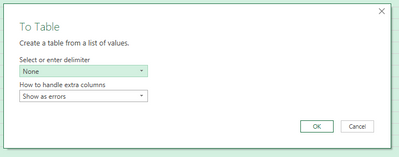
The last step is to expand the resulting column:

Uncheck "Use original column name as prefix" and click "OK". Voila, here is your data.
OF NOTE:
Make sure that both data sources are set to connect anonymously. Otherwise, you will get an error. Also, try things in Postman first if you run into trouble.
- Mark as New
- Bookmark
- Subscribe
- Mute
- Subscribe to RSS Feed
- Permalink
- Report Inappropriate Content
Hi @TrysHisBest
Do you send a Post request to get the key? If so, you need to put request body in Content parameter of Web.Contents function.
Here is an example for Post request. Create a blank query, open its Advanced Editor, remove the code there and paste below code to it.
let
    url = "https://xxxxxxxxxxxxxxxxxxxxxxxx",
    headers = [#"Content-Type" = "application/x-www-form-urlencoded", #"Accept" = "*/*"],
    postBody = [
        grant_type = "xxxxxxxxxx",
        username = "xxxxxxxxxxxxxxxx",
        password = "xxxxxxxxxxx"
        ],
    response = Json.Document(Web.Contents(url,
        [
            Headers = headers,
            Content = Text.ToBinary(Uri.BuildQueryString(postBody))
        ]))
in
    response
Once you get the key, you can then use it in another Web.Contents statement to get data for your report.
Best Regards,
Community Support Team _ Jing
If this post helps, please Accept it as Solution to help other members find it.
- Mark as New
- Bookmark
- Subscribe
- Mute
- Subscribe to RSS Feed
- Permalink
- Report Inappropriate Content
Hi Jing,
I've tried this and had this come back as the first response?
DataSource.Error: Web.Contents failed to get contents from 'https://api.channeladvisor.com/oauth2/token' (400): Bad Request
Details:
DataSourceKind=Web
DataSourcePath=https://api.channeladvisor.com/oauth2/token
Url=https://api.channeladvisor.com/oauth2/token
After that i tried ammending to add in the refresh token but met with the same response above?
let
    url = "https://api.channeladvisor.com/oauth2/token",
    headers = [#"Content-Type" = "application/x-www-form-urlencoded", #"Accept" = "*/*"],
    postBody = [
        grant_type = refresh_token,
        refresh_token ="xxxxx"
        username = "xxxxxxxxxxxxxxxx",
        password = "xxxxxxxxxxx"
        ],
    response = Json.Document(Web.Contents(url,
        [
            Headers = headers,
            Content = Text.ToBinary(Uri.BuildQueryString(postBody))
        ]))
in
response- Mark as New
- Bookmark
- Subscribe
- Mute
- Subscribe to RSS Feed
- Permalink
- Report Inappropriate Content
Hi @TrysHisBest
You need to modify the headers and body content according to your POST request. Can you provide a screenshot of the correct request in Postman (remove sensitive info)?
I think grant_type value should also be wrapped by double quotes.
grant_type = "refresh_token",
Jing
- Mark as New
- Bookmark
- Subscribe
- Mute
- Subscribe to RSS Feed
- Permalink
- Report Inappropriate Content
Hi @v-jingzhang ,
Really do apprecaite the help.


This is what i made in postman and getting the auth key from. works no problem
Then have a seperate tab to use a GET request to get the data i need from a different url with the Auth02 key.

Again thanks very much 🙂
- Mark as New
- Bookmark
- Subscribe
- Mute
- Subscribe to RSS Feed
- Permalink
- Report Inappropriate Content
Hi @TrysHisBest
Your username and password are passed in Authorization Header with Basic Auth type, not in Body, so they should be in Headers parameter rather than Content parameter of Web.Contents().
I did some google searching for passing basic Authorization username and password, and found a blog and a thread:
Using Power Query to get data from an API that uses a Username and Password combination
Passing username and password in Basic authentication (microsoft.com)
Both suggest to put username and password in username:pasword format, then encode the string with base64 encoding. Then put the encoded string into Headers. For encoding use the link https://www.base64encode.org/
Based on above, you could try below code
let
    url = "https://api.channeladvisor.com/oauth2/token",
    headers = [#"Authorization"="Basic xxxxxxxxxxxxx"],
    postBody = [
        grant_type = "refresh_token",
        refresh_token = "xxxxxxxxxxxxxxxx"
        ],
    response = Json.Document(Web.Contents(url,
        [
            Headers = headers,
            Content = Text.ToBinary(Uri.BuildQueryString(postBody))
        ]))
in
    response
If you can get correct token by using above code, then you can transform the query to a custom function so that it can be called by other queries. Just add () => before let:
() =>
let
    url = "https://api.channeladvisor.com/oauth2/token",
    headers = [#"Authorization"="Basic xxxxxxxxxxxxx"],
    postBody = [
        grant_type = "refresh_token",
        refresh_token = "xxxxxxxxxxxxxxxx"
        ],
    response = Json.Document(Web.Contents(url,
        [
            Headers = headers,
            Content = Text.ToBinary(Uri.BuildQueryString(postBody))
        ]))
in
    response
Then create another query for the GET request which calls the function. Assume the earlier custom function query is called GetAccessToken.
let
    Source = Json.Document(Web.Contents("https://xxxxxxxxxxxxxxxxxxxx", [Headers=[#"Authorization"="Bearer "&GetAccessToken()]]))
in
    Source
Hope this helps.
Jing
- Mark as New
- Bookmark
- Subscribe
- Mute
- Subscribe to RSS Feed
- Permalink
- Report Inappropriate Content
Hi Jing,
Thank you for providing the solution. After trying your code, I got following error "DataSource.Error: Web.Contents with the Content option is only supported when connecting anonymously.
Details:
DataSourceKind=Web
DataSourcePath=https://api-eu.ariba.com/v2/oauth/token"
Could you please help us out here?
- Mark as New
- Bookmark
- Subscribe
- Mute
- Subscribe to RSS Feed
- Permalink
- Report Inappropriate Content
Hi @v-jingzhang,
Thanks for sharing the solution. Could you help me with the following problem?
I created the function, that is working fine. But if I put the function in the second query, it doesn’t work. When I put the token directly in the query it works fine. I use the following M code:
let
    Source = Json.Document(Web.Contents("URL",
                       [Headers=[#"Authorization"="Bearer  "&GetAccessToken(),
                                 #"accept" = "text/plain",
                                 #"Content-Type"="application/json"],

                        ManualStatusHandling = {404, 400}]))

in
    Source
My custom query is called GetAccessToken.
What am I doing wrong?
This is the error I get: Formula.Firewall: Query 'Query5' (step 'Source') is accessing data sources that have privacy levels which cannot be used together. Please rebuild this data combination.


- Mark as New
- Bookmark
- Subscribe
- Mute
- Subscribe to RSS Feed
- Permalink
- Report Inappropriate Content
As it says. Modify the query privacy settings so that they match. Or Inline the token query.
- Mark as New
- Bookmark
- Subscribe
- Mute
- Subscribe to RSS Feed
- Permalink
- Report Inappropriate Content
Hi @lbendlin ,
Thanks for your reply. Which options do I have to modify te query privacy settings? Inline the token is not an option, because it is a refresh token. I don’t want to replace the token every time I refresh the data.
- Mark as New
- Bookmark
- Subscribe
- Mute
- Subscribe to RSS Feed
- Permalink
- Report Inappropriate Content

Helpful resources

Fabric Community Sticker Challenge - Barcelona 2026
If you love stickers, then you will definitely want to check out our community sticker challenge, Barcelona edition!

Power BI Monthly Update - July 2026
Check out the July 2026 Power BI update to learn about new features.

Power BI DataViz World Championships - June 2026
A new Power BI DataViz World Championship is coming this June! Don't miss out on submitting your entry.

| User | Count |
|---|---|
| 4 | |
| 2 | |
| 2 | |
| 2 | |
| 1 |


