cancel
Showing results for 
Search instead for 
Did you mean: 

Learn from the best! Meet the four finalists headed to the FINALS of the Power BI Dataviz World Championships! Register now

Reply
jaryszek
Resident Rockstar
Resident Rockstar

Changing defaults table based on customizations table and composite keys

Hi Guys,


I am using PQ in Excel.

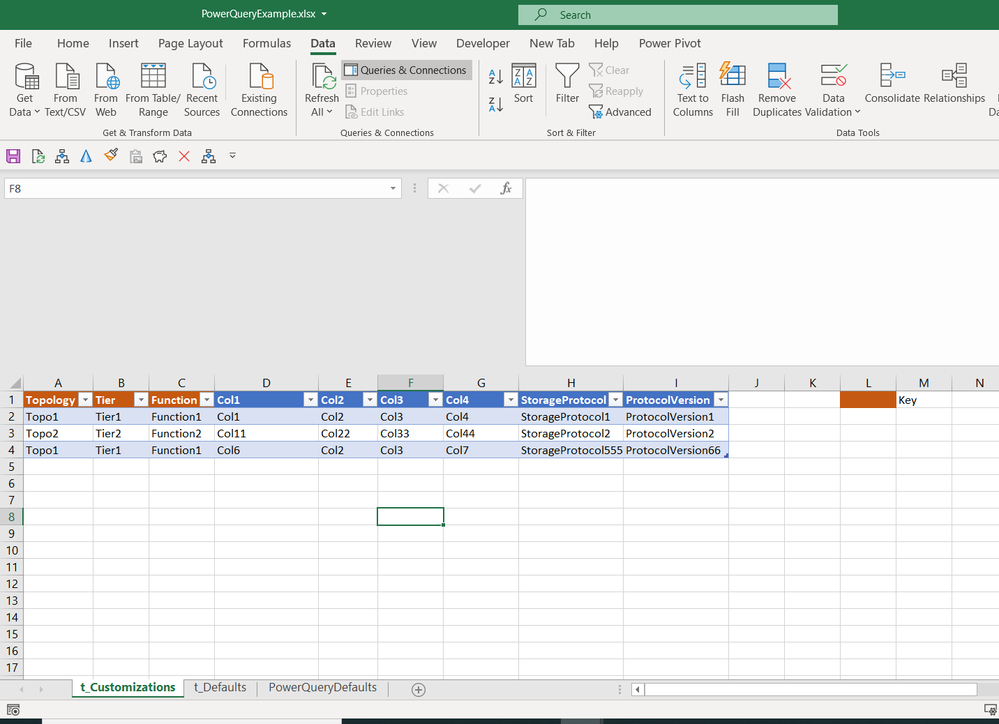
i have 2 sources: t_Defaults and t_Customizations with composite Key: Topology&Tier&Function


Screenshot_56.png


Screenshot_54.png


As a base i am using t_Defaults but what i want to do this is:

1) If any row in t_Customizations is fullfilled (all columns, if one is empty - skip this row !) replace corresponding row (composite key) with corresponding composite key from t_Defaults. 

2) If table t_Customizations is empty - just use t_Defaults. 


Expected result:
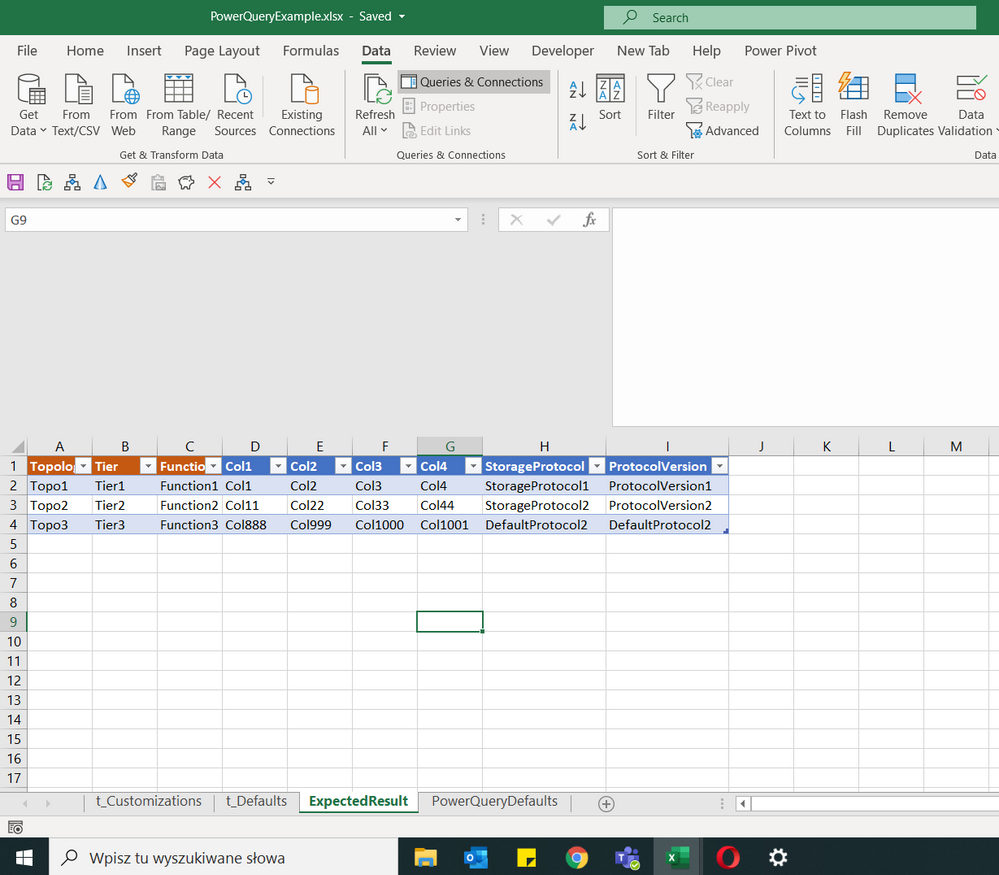
Screenshot_55.png


So as you can see:

1) First row has been replaced from (Topo1&Tier1&Function1 key) t_Defaults with corresponding values from t_Customizations

2) Second row   has been replaced from (Topo2&Tier2&Function2 key) t_Defaults with corresponding values from t_Customizations

3) third row from t_defaults was not replaced because key Topo3&Tier3&Function3 do not exists in t_Customizations table. 


I am adding also my example Excel into google drive:

https://drive.google.com/file/d/1XhjPvYp8QANPFb1n-KJG5aMSnPz4SiZC/view?usp=sharing


Please help how to do this. I am starting my adventure with PQ currently.


Best Wishes,

Jacek


1 ACCEPTED SOLUTION
ziying35
Impactful Individual

@jaryszek 

// t_Customizations
let
    Source = Excel.CurrentWorkbook(){[Name="t_Customizations"]}[Content]
in
    Source

// output
let
    keys = List.FirstN(Table.ColumnNames(t_Customizations), 3),
    acc = List.Accumulate(
              Table.ToRecords(t_Customizations),
              t_Defaults, 
              (s,c)=>let pos = Table.PositionOf(s, Record.SelectFields(c, keys), 0, keys) 
                     in Table.ReplaceRows(s, pos, 1, {c})
          )
in
    acc

// t_Defaults
let
    Source = Excel.CurrentWorkbook(){[Name="t_Defaults"]}[Content]
in
    Source

View solution in original post

2 REPLIES 2
ziying35
Impactful Individual

@jaryszek 

// t_Customizations
let
    Source = Excel.CurrentWorkbook(){[Name="t_Customizations"]}[Content]
in
    Source

// output
let
    keys = List.FirstN(Table.ColumnNames(t_Customizations), 3),
    acc = List.Accumulate(
              Table.ToRecords(t_Customizations),
              t_Defaults, 
              (s,c)=>let pos = Table.PositionOf(s, Record.SelectFields(c, keys), 0, keys) 
                     in Table.ReplaceRows(s, pos, 1, {c})
          )
in
    acc

// t_Defaults
let
    Source = Excel.CurrentWorkbook(){[Name="t_Defaults"]}[Content]
in
    Source
v-juanli-msft
Community Support
Community Support

Hi @jaryszek 

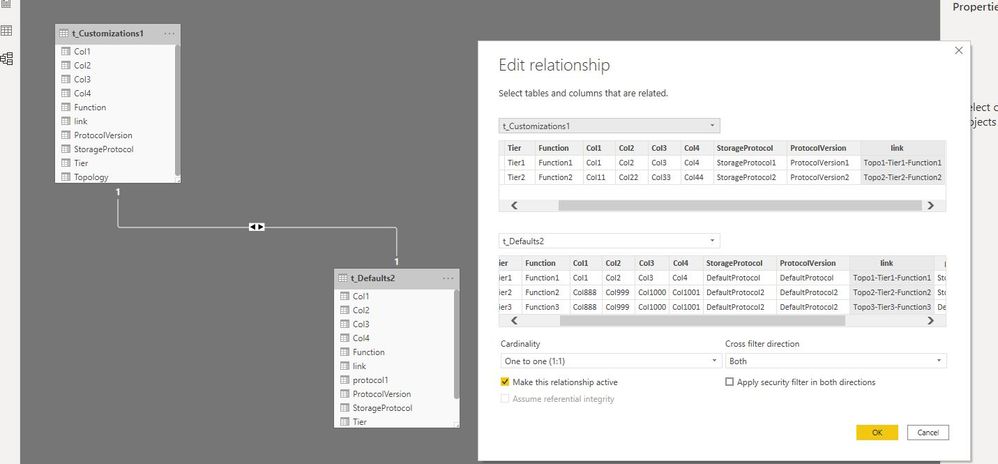
Capture7.JPGCapture8.JPG

protocol1 =
IF (
    RELATED ( t_Customizations1[StorageProtocol] ) <> BLANK (),
    RELATED ( t_Customizations1[StorageProtocol] ),
    t_Defaults2[StorageProtocol]
)


version1 =
IF (
    RELATED ( t_Customizations1[ProtocolVersion] ) <> BLANK (),
    RELATED ( t_Customizations1[ProtocolVersion] ),
    t_Defaults2[ProtocolVersion]
)


Best Regards
Maggie
Community Support Team _ Maggie Li
If this post helps, then please consider Accept it as the solution to help the other members find it more quickly.

Helpful resources

Announcements
New to Fabric survey Carousel

New to Fabric Survey

If you have recently started exploring Fabric, we'd love to hear how it's going. Your feedback can help with product improvements.

Power BI DataViz World Championships carousel

Power BI DataViz World Championships - June 2026

A new Power BI DataViz World Championship is coming this June! Don't miss out on submitting your entry.

Join our Fabric User Panel

Join our Fabric User Panel

Share feedback directly with Fabric product managers, participate in targeted research studies and influence the Fabric roadmap.

March Power BI Update Carousel

Power BI Community Update - March 2026

Check out the March 2026 Power BI update to learn about new features.