cancel
Showing results for 
Search instead for 
Did you mean: 

July 7 - July 17 | Round 2 of the Power BI Dataviz World Championships. Don't miss your chance! Learn more

Reply
Anonymous
Not applicable

Changing data type duplicate some values

i have a table that have around 10k rows, with a column that have unique values, i import these from MySQL with a ODBC connector, and the first 2 columns are like it follow:
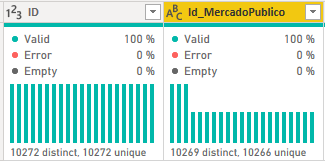
Damianrojas_0-1612800195604.png

I sorted A-Z and have the same order as the MySQL data and all unique values, but when i change the type of data in several columns, i get some data replaced and duplicated, and the column distribution accuses like it follow:
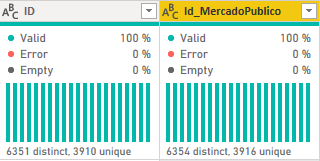
Damianrojas_1-1612800937571.png

So when i sort that result, i see duplicated values out of nowhere and some data get replaced, but i thought it was visual, because in the dashboards all seems right, no inconsistent data... untill i added another table that i tried to make a relationship one-many, choosing the ID to another one that has multiple rows from same ID, getting an error that its invalid, and searched why, and came to the conclution that this was the problem, duplicated rows out of nowhere only changing data type negates me the chance to make a one-many relationship because there are duplicates in the first one.


1 ACCEPTED SOLUTION
Anonymous
Not applicable

@Anonymous 

Would it work if you just right click the column with duplicated rows =>add as new query =>remove duplicates in the list tool => convert to table. After done, you can create a many to one relationship with the new distinct table.


Paul Zheng _ Community Support Team
If this post helps, please Accept it as the solution to help the other members find it more quickly.

View solution in original post

2 REPLIES 2
Anonymous
Not applicable

@Anonymous 

Would it work if you just right click the column with duplicated rows =>add as new query =>remove duplicates in the list tool => convert to table. After done, you can create a many to one relationship with the new distinct table.


Paul Zheng _ Community Support Team
If this post helps, please Accept it as the solution to help the other members find it more quickly.

Greg_Deckler
Community Champion
Community Champion

@Anonymous Sorry, having trouble following, can you post sample data as text and expected output?
Not really enough information to go on, please first check if your issue is a common issue listed here: https://community.powerbi.com/t5/Community-Blog/Before-You-Post-Read-This/ba-p/1116882

Also, please see this post regarding How to Get Your Question Answered Quickly: https://community.powerbi.com/t5/Community-Blog/How-to-Get-Your-Question-Answered-Quickly/ba-p/38490

The most important parts are:
1. Sample data as text, use the table tool in the editing bar
2. Expected output from sample data
3. Explanation in words of how to get from 1. to 2.


Follow on LinkedIn
@ me in replies or I'll lose your thread!!!
Instead of a Kudo, please vote for this idea
Become an expert!: Enterprise DNA
External Tools: MSHGQM
YouTube Channel!: Microsoft Hates Greg
Latest book!:
DAX For Humans

DAX is easy, CALCULATE makes DAX hard...

Helpful resources

Announcements
FabCon and SQLCon Barcelona 2026

FabCon & SQLCon – Barcelona 2026

Join us in Barcelona for FabCon and SQLCon, the Fabric, Power BI, SQL, and AI community event. Save €200 with code FABCMTY200.

60 days of Data Days Carousel

Data Days 2026

Join Fabric Data Days 2026: 60 days of free live/on-demand sessions, challenges, study groups, and certification opportunities.

Power BI DataViz World Championships carousel

Power BI DataViz World Championships - June 2026

A new Power BI DataViz World Championship is coming this June! Don't miss out on submitting your entry.