Don't miss your chance to take the Fabric Data Engineer (DP-600) exam for FREE! Find out how by attending the DP-600 session on April 23rd (pacific time), live or on-demand.
Learn moreNext up in the FabCon + SQLCon recap series: The roadmap for Microsoft SQL and Maximizing Developer experiences in Fabric. All sessions are available on-demand after the live show. Register now
Hello,
I have developed Power BI reports using Local SQL Server and now the client wants to move the database to SQL Azure.
Can someone please guide what care should be taken for this move and what will be the impact on my existing visuals from this?
Thanks,
Vinay
Solved! Go to Solution.
Hi @vinaypugalia,
Sorry for the late response.
1.The generally followed way to change the datasource from on-premise SQL to SQL Azure in Power BI.
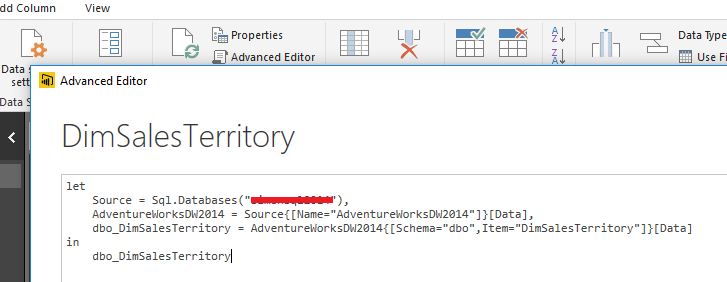
The way suggested in my original post is general method to change data source. We need to change it in Power BI Desktop. We can open Advanced Editor in Query Editor, you will see the connection information like below:
You can replace this with Azure SQL connection information. You can create a new report, get data from the Azure SQL database, copy this information from Advanced Editor then replace the original report connection information.
2.What will be the impact of this change on my measures & visuals?
If the Azure database content is the same as original database, the difference is just the move to Azure. It will not affect measures and visuals as data are not changed.
Best Regards,
Qiuyun Yu
Hi @vinaypugalia,
As we are not able to change the data source in service directly, if you already publish the report to Power BI service before move the database to Azure, we need to change the data source in Power BI desktop then republish the report. Also we can no longer connect to Azure SQL Database directly from the Power BI service.
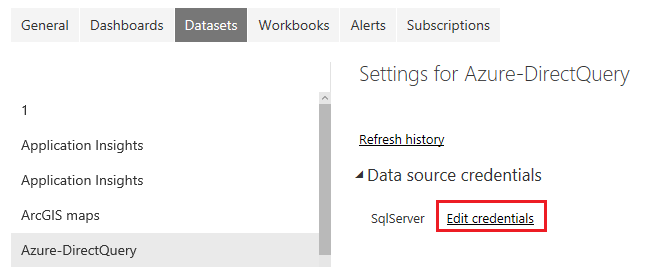
After republish, we need to go to the dataset settings, set the credential for the dataset connect to the Azure database. My test scenario is connect to Azure SQL database in DirectQuery mode.
Reference:
Azure SQL Database with DirectQuery
Best Regards,
Qiuyun Yu
Thanks for sharing this information.
Also, can you please let me know the following -
Thanks!
Hi @vinaypugalia,
Sorry for the late response.
1.The generally followed way to change the datasource from on-premise SQL to SQL Azure in Power BI.
The way suggested in my original post is general method to change data source. We need to change it in Power BI Desktop. We can open Advanced Editor in Query Editor, you will see the connection information like below:
You can replace this with Azure SQL connection information. You can create a new report, get data from the Azure SQL database, copy this information from Advanced Editor then replace the original report connection information.
2.What will be the impact of this change on my measures & visuals?
If the Azure database content is the same as original database, the difference is just the move to Azure. It will not affect measures and visuals as data are not changed.
Best Regards,
Qiuyun Yu
If you have recently started exploring Fabric, we'd love to hear how it's going. Your feedback can help with product improvements.
A new Power BI DataViz World Championship is coming this June! Don't miss out on submitting your entry.
Experience the highlights from FabCon & SQLCon, available live and on-demand starting April 14th.
| User | Count |
|---|---|
| 5 | |
| 3 | |
| 3 | |
| 3 | |
| 2 |
| User | Count |
|---|---|
| 7 | |
| 5 | |
| 5 | |
| 5 | |
| 4 |