cancel
Showing results for 
Search instead for 
Did you mean: 

July 7 - July 17 | Round 2 of the Power BI Dataviz World Championships. Don't miss your chance! Learn more

Reply
lucasib
New Member

Change rows

Hello.

I only need to put row 2 of the "NSU" table in row 1. I know this might be an easy question to solve, but I started learning recently.

I don't need the lines with the code starting at 013... I just need the date, NSU, value and operation to be on the same line.


asasdds.png

1 ACCEPTED SOLUTION
rohit_singh
Solution Sage
Solution Sage

Hi @lucasib ,


Please follow the steps below in Power Query :


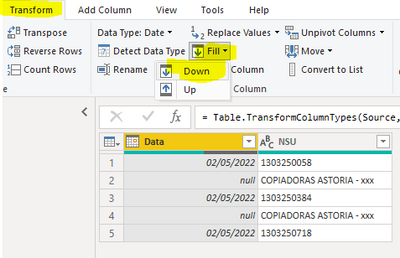
1) Select the "Date" column and go to "Transform" --> "Fill" --> "Down"

Repeat this for the "Valor" and "Opercao" columns


rohit_singh_1-1652975755892.png

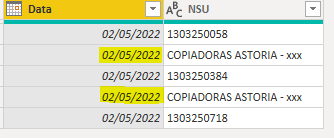
This will replace the null values with the last non-null value in the rows above.

rohit_singh_2-1652975779167.png


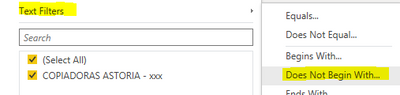
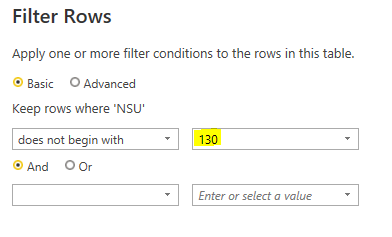
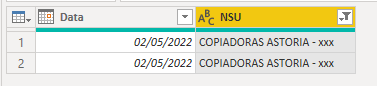
2) Select the "NSU" column and click on the filter button. Select "Text Filters" --> "Does not begin with" and add 130 as the value as shown below.

rohit_singh_5-1652975963924.png


rohit_singh_3-1652975816364.png

3) All rows starting with 130 will be filtered out and you will get the desired output.

rohit_singh_4-1652975834908.png


Kind regards,

Rohit


Please mark this answer as the solution if it resolves your issue.
Appreciate your kudos! 😊


View solution in original post

4 REPLIES 4
Anonymous
Not applicable

Lots of ways to do it, like Table.Split(TableName, 2) to make a list of two-row tables that you can select fields from, but the dead simple way is to use the Table.FillDown function, then just use Table.Alternate to keep just the alternate rows.


-Nate

Table.FillDown is great here but I'd be worried about inconsistent parity causing issues with Table.Alternate (e.g. if there were an extra or missing row somewhere).


This can be fixed by adding a custom column that tags which rows to keep based on Data and Valor being null. For example,

let
    Source = Table.FromRows(Json.Document(Binary.Decompress(Binary.FromText("i45WMtI31TcyMDJS0lEyMDQ2MDYyNTAwtQDyjIyMjfQsTYCskMyS0px8pVidaCUgz9k/wNPRxT/IMRjIASGQOI1NMbMwN9MzI9IUKJOQmUAjDY30TCyIMDQWAA==", BinaryEncoding.Base64), Compression.Deflate)), let _t = ((type nullable text) meta [Serialized.Text = true]) in type table [Data = _t, NSU = _t, Valor = _t, Operacao = _t]),
    #"Changed Type" = Table.TransformColumnTypes(Source,{{"Data", type date}, {"NSU", type text}, {"Valor", type number}, {"Operacao", type text}}),
    #"Replaced Value" = Table.ReplaceValue(#"Changed Type","",null,Replacer.ReplaceValue,{"Operacao"}),
    #"Added Custom" = Table.AddColumn(#"Replaced Value", "Custom", each if [Data] = null and [Valor] = null then "Keep" else "Remove", type text),
    #"Filled Down" = Table.FillDown(#"Added Custom",{"Data", "Valor", "Operacao"}),
    #"Filtered Rows" = Table.SelectRows(#"Filled Down", each [Custom] = "Keep" and [NSU] <> ""),
    #"Removed Columns" = Table.RemoveColumns(#"Filtered Rows",{"Custom"})
in
    #"Removed Columns"


 

Vijay_A_Verma
Most Valuable Professional

See the working here - Open a blank query - Home - Advanced Editor - Remove everything from there and paste the below code to test

let
    Source = Table.FromRows(Json.Document(Binary.Decompress(Binary.FromText("i45WMtI31TcyMDJSMDSyMjAAIgVHXyUdJUMjIGECxK5KsTrRSnmlOTlATmJSMpCEcsASOLUbA0kLIHZC1p+ckkqc/tTUotQiIG0JxFHIJhiaGBubGpsimxILAA==", BinaryEncoding.Base64), Compression.Deflate)), let _t = ((type nullable text) meta [Serialized.Text = true]) in type table [Data = _t, NSU = _t, Valor = _t, Operacao = _t]),
    #"Changed Type" = Table.TransformColumnTypes(Source,{{"Data", type datetime}, {"NSU", type text}, {"Valor", Currency.Type}, {"Operacao", type text}}),
    #"Added Index" = Table.AddIndexColumn(#"Changed Type", "Index", 0, 1, Int64.Type),
    BuffList = List.Buffer(#"Added Index"[NSU]),
    Custom = Table.ReplaceValue(#"Added Index",each [NSU],each if Number.Mod([Index],2)=0 then BuffList{[Index]+1} else [NSU],Replacer.ReplaceValue,{"NSU"}),
    #"Removed Columns" = Table.RemoveColumns(Custom,{"Index"})
in
    #"Removed Columns"


rohit_singh
Solution Sage
Solution Sage

Hi @lucasib ,


Please follow the steps below in Power Query :


1) Select the "Date" column and go to "Transform" --> "Fill" --> "Down"

Repeat this for the "Valor" and "Opercao" columns


rohit_singh_1-1652975755892.png

This will replace the null values with the last non-null value in the rows above.

rohit_singh_2-1652975779167.png


2) Select the "NSU" column and click on the filter button. Select "Text Filters" --> "Does not begin with" and add 130 as the value as shown below.

rohit_singh_5-1652975963924.png


rohit_singh_3-1652975816364.png

3) All rows starting with 130 will be filtered out and you will get the desired output.

rohit_singh_4-1652975834908.png


Kind regards,

Rohit


Please mark this answer as the solution if it resolves your issue.
Appreciate your kudos! 😊


Helpful resources

Announcements
FabCon and SQLCon Barcelona 2026

FabCon & SQLCon – Barcelona 2026

Join us in Barcelona for FabCon and SQLCon, the Fabric, Power BI, SQL, and AI community event. Save €200 with code FABCMTY200.

60 days of Data Days Carousel

Data Days 2026

Join Fabric Data Days 2026: 60 days of free live/on-demand sessions, challenges, study groups, and certification opportunities.

Power BI DataViz World Championships carousel

Power BI DataViz World Championships - June 2026

A new Power BI DataViz World Championship is coming this June! Don't miss out on submitting your entry.