
This time we’re going bigger than ever. Fabric, Power BI, SQL, AI and more. We're covering it all. You won't want to miss it.
Learn moreLevel up your Power BI skills this month - build one visual each week and tell better stories with data! Get started
Hi there,
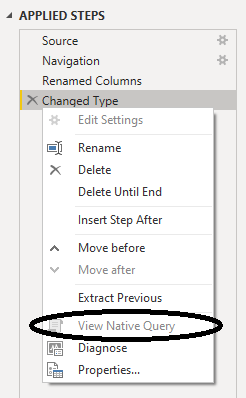
I have a table with two columns: item and date. There are four applied steps in the Power Query: Source, Navigation, Renamed Columns and Changed Type.
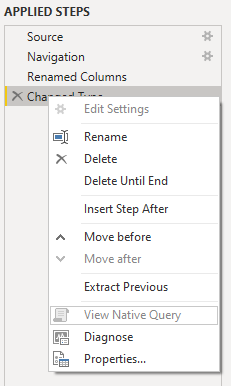
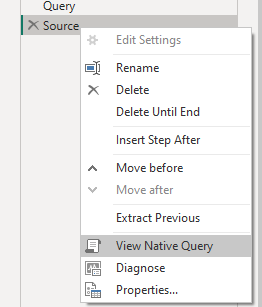
Date is initially formatted as text, but I want it to be a date, so that's what the Changed Type step is all about. However, I lose native query after adding this step. Is there a way to avoid this, so that it will still be possible to view native query?
I don't want to change the date type already in the SQL database (because of multiple databases with several languages).
Any kind of help is appreciated. Thanks!
Hi @Gertjan ,
In Power Query, Text -> all transformations would break query-folding.
Changing data types that do not break query-folding in Power Query / Power BI
Please try using sql statement in query.
let
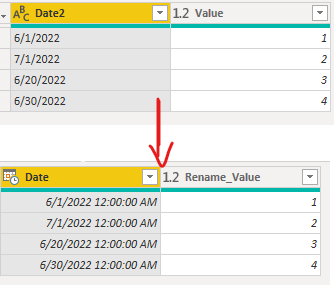
Source = Sql.Database(".", "CaseTest", [Query="select #(lf) CAST( [Date2] AS date) [Date],#(lf) [Value] as [Rename_Value]#(lf)from [dbo].[Test1$]"])
in
Source
If the problem is still not resolved, please provide detailed error information or the expected result you expect. Let me know immediately, looking forward to your reply.
Best Regards,
Winniz
If this post helps, then please consider Accept it as the solution to help the other members find it more quickly.
Thanks for your suggestion. However, it still doesn't allow me to view native query.
Maybe it's just not possible?
That is surprising, my friend. Did you happen to re-click the steps from beginning to end, to make sure that the View Native Query doesn't light up? Or perhaps clear the cache?
Oh yeah, you could try Date.FromText, or even just the Parse Date GUI function.
--Nate
I re-clicked the steps, cleared the cache and tried the other functions. However, View Native Query still doesn't light up. Any other ideas?
Instead of Table.TransformColumnTypes, go back and make it Table.TransformColumns, and replace "type date" with "Date.From". Basically using Date.From to transform instead of changing types.
--Nate
Thanks @Anonymous, the query itself works, however it still doesn't allow to view native query. Any other solution?
Not sure if you still searching for a fix, however this is how i did it.
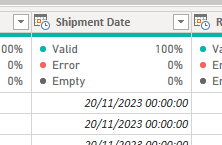
Use this in the SQL statement " CONVERT(DATE, t.[SHIPDATE], 103) AS 'Shipment Date' " (use your column names )
It will automatically recognise the column as Date/Time
And you do not need the "Changed Type" step that blocks the Native Query:
And after that, just change the format to "Short Date" from the "Table View"
And you can use the column in a relashionship with another table.
And because you are not breaking the Native Query, you can use the "Incremental Refresh" as well without the warning of not being able to fold.
Check out the April 2026 Power BI update to learn about new features.
Sign up to receive a private message when registration opens and key events begin.
If you have recently started exploring Fabric, we'd love to hear how it's going. Your feedback can help with product improvements.
| User | Count |
|---|---|
| 3 | |
| 3 | |
| 2 | |
| 2 | |
| 2 |
| User | Count |
|---|---|
| 7 | |
| 5 | |
| 5 | |
| 4 | |
| 3 |