cancel
Showing results for 
Search instead for 
Did you mean: 

Vote for your favorite vizzies from the Power BI Dataviz World Championship submissions. Vote now!

Reply
martbov
Frequent Visitor

Change Redshift database in report

Hello everyone,


I've built a report in Power BI desktop with Amazon Redshift as its datasource. The report was built using a test database/cluster in Redshift and now that the report is complete, I would like to switch to the 'live' database/cluster. However, I could not find the option to configure that in Power BI desktop.

Could someone explain to me if it is possible to switch between Redshift datasources and if so, how?

Thanks in advance.


Kind regards,


Mart

1 ACCEPTED SOLUTION
Anonymous
Not applicable

@martbov,

There are two methods for you to change the data source.

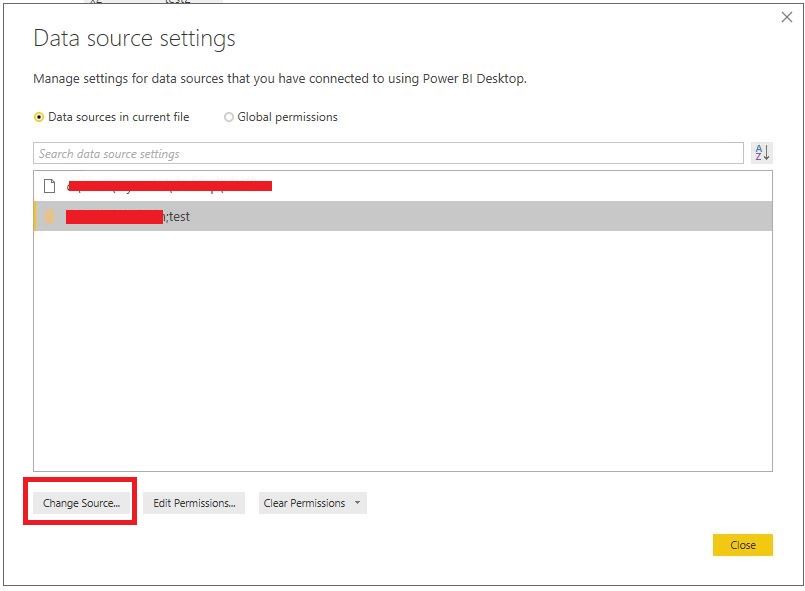
1. Go to File->Options and Settings->Data Source settings, then find your data source and click change data source.
1.JPG

2. Right click your table, select "Edit query", then click Advanced Editor in the Query Editor of Power BI Desktop, change server and database in the source code in the Advanced Editor .

Regards,
Lydia

View solution in original post

3 REPLIES 3
Anonymous
Not applicable

@martbov,

There are two methods for you to change the data source.

1. Go to File->Options and Settings->Data Source settings, then find your data source and click change data source.
1.JPG

2. Right click your table, select "Edit query", then click Advanced Editor in the Query Editor of Power BI Desktop, change server and database in the source code in the Advanced Editor .

Regards,
Lydia

kevhav
Continued Contributor

I also had this use case. And I discovered that the "Change Source..." button is not enabled, for my Redshift data source.


I just created this idea; please vote...

"Change Source..." for Redshift data sources

Thank you, Lydia. Your second method solves my problem.
In the datasource settings the "Change Source..." button is greyed out for me, but manually entering the correct data source in the Advanced Editor did work.

Helpful resources

Announcements
Power BI DataViz World Championships

Power BI Dataviz World Championships

Vote for your favorite vizzies from the Power BI World Championship submissions!

Sticker Challenge 2026 Carousel

Join our Community Sticker Challenge 2026

If you love stickers, then you will definitely want to check out our Community Sticker Challenge!

January Power BI Update Carousel

Power BI Monthly Update - January 2026

Check out the January 2026 Power BI update to learn about new features.

FabCon Atlanta 2026 carousel

FabCon Atlanta 2026

Join us at FabCon Atlanta, March 16-20, for the ultimate Fabric, Power BI, AI and SQL community-led event. Save $200 with code FABCOMM.